 Rock 5T Talos Linux Kubernetes Dev Cluster
After running a production Kubernetes cluster on Hetzner Cloud for a while, I wanted a local twin — same GitOps, same stack, same APIs — but sitting on my desk. Something I could break, rewire, reflash, and rebuild without touching the cloud bill.
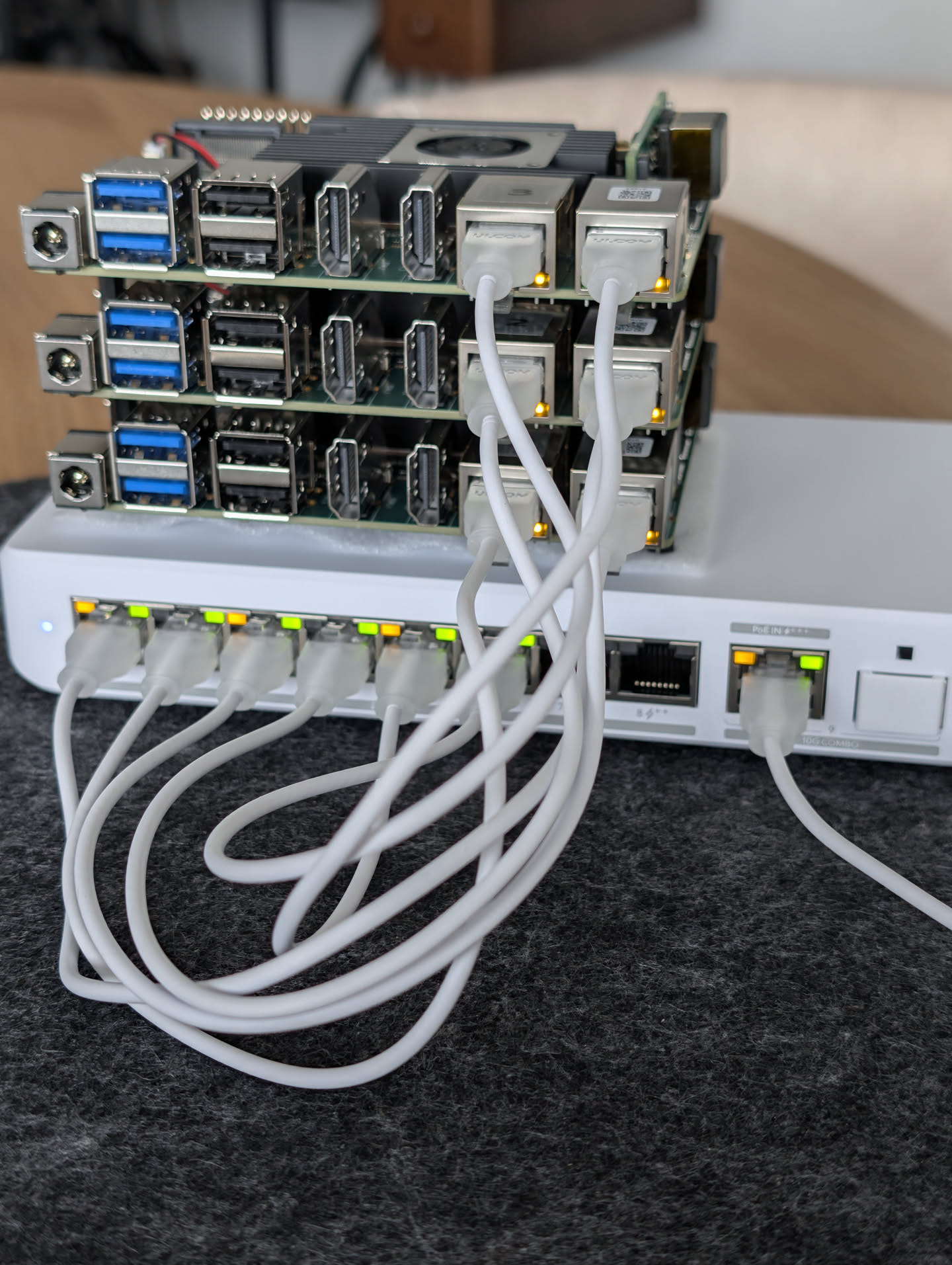
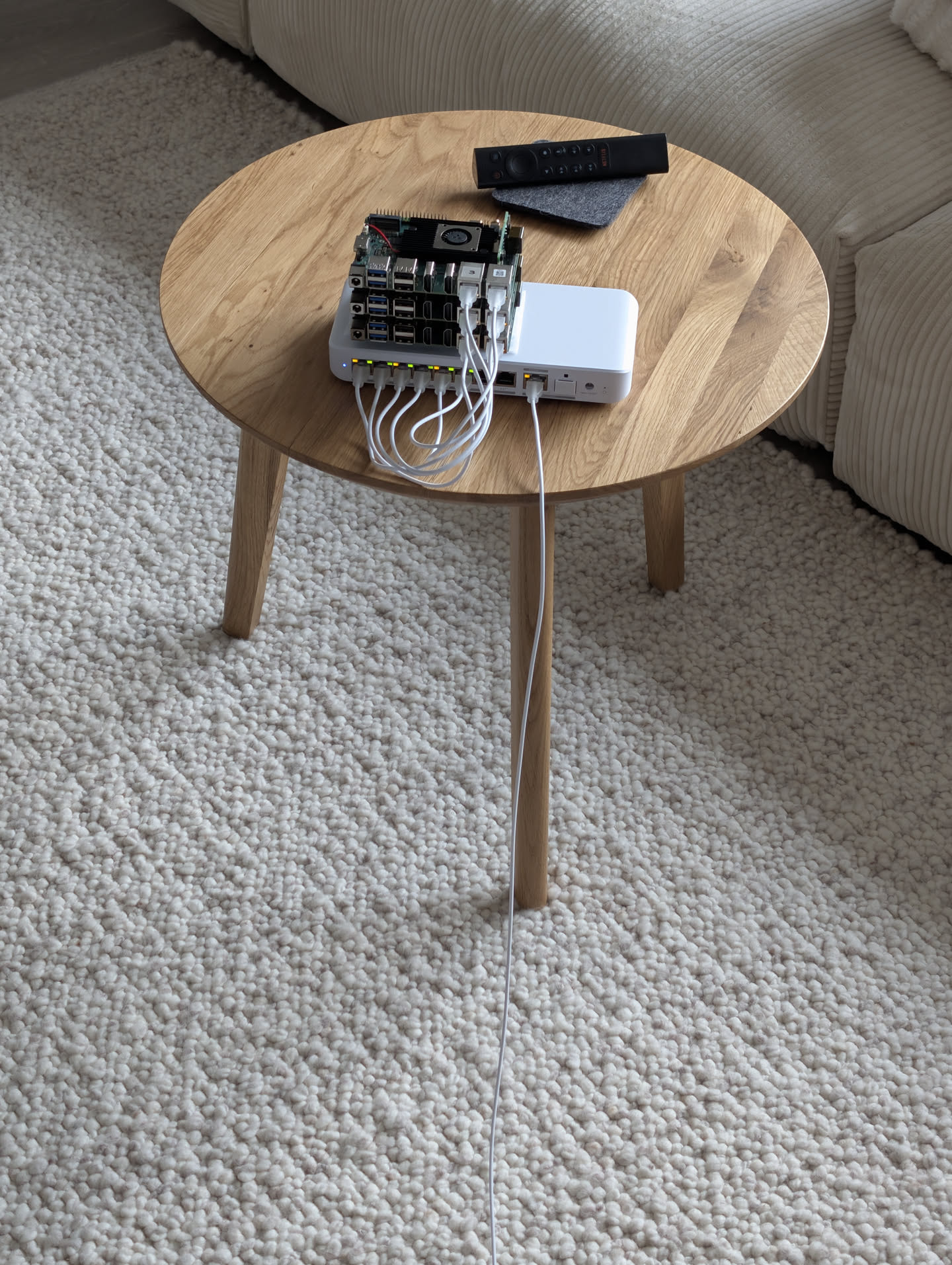
The result is this little beast: three Radxa Rock 5T boards, a Ubiquiti Flex 2.5G PoE with a single PoE++ cable and a properly grown‑up Kubernetes setup (Talos, Cilium BGP, Longhorn, Gateway API, Flux).
 Why Rock 5T — and why is this more than “just another SBC cluster”?
Let me be honest: We see a lot of Pi clusters, most of them are cute but slow, plugged into a USB‑C octopus, running k3s on SD/eMMC with low I/O and a single GbE NIC for CNI data plane and management plane. In my opinion this ends up compromising the stack to fit the hardware.
This build doesn’t have those problems. Here’s why the Rock 5T specifically changes the equation:
Details
 24 GB LPDDR5 RAM per node
The Raspberry Pi 5 tops out at 16 GB. Most other SBCs in the same price bracket offer 4–8 GB. The Rock 5T ships in the last spring deals came up with 24 GB LPDDR5 — that’s 1,5× the best Pi 5 you can buy. Across three nodes that’s 72 GB of cluster RAM total.
What does that mean in practice? You can run a genuinely full stack per node, in my case:
-
Cilium + Hubble agent
-
Cilium Gateway API
-
Longhorn engine + replica
-
Cert-Manager,
-
CloudNative-PG PostgreSQL cluster
-
Step-CA internal PKI
-
A dozen real applications
…and still have headroom. On an 8 GB node you’re constantly tuning memory limits and watching nodes go MemoryPressure. Here you mostly just deploy things.
 TWO native 2.5 GbE NICs
Almost every SBC cluster you’ve seen has one network interface. Raspberry Pi 5 without HATs has one GbE. Most Rock 4/5 variants have one.
The Rock 5T has two independent, native 2.5 GbE NICs (both RTL8125BG on PCIe). This is a big deal for Kubernetes because it lets physically separate your data planes.
In this cluster:
-
NIC 1 carries the home LAN, Kubernetes API traffic, Gateway API/ingress, BGP sessions and LoadBalancer VIPs.
-
NIC 2 carries exclusively pod-to-pod traffic — isolated VLAN, no default route, the kernel literally cannot send pod packets out the wrong NIC.
You get the full bandwidth of both NICs simultaneously. With three nodes that’s up to 7.5 Gb/s of aggregate pod-to-pod capacity that never contends with external traffic. On a single-NIC SBC cluster everything fights for the same wire.
 Real PCIe NVMe
SD card / eMMC Kubernetes clusters are notorious in the homelab world. Those storages have terrible random IOPS (Longhorn will eat them alive), they wear out, and they’re slow enough that etcd becomes a bottleneck.
The Rock 5T has a real M.2 2280 slot running PCIe 3.0. I’m running a Crucial P510 1 TB in each node. That’s real NVMe performance: random 4K reads that Longhorn, etcd and databases actually care about. The difference vs. eMMC in a distributed storage context is night and day.
 RK3588: A76 cores that genuinely perform
Not all ARM cores are equal. The older SBC ecosystem was mostly Cortex-A53/A55 — efficient, but weak single-threaded performance. The RK3588 uses 4× Cortex-A76 (up to 2.4 GHz) big cores + 4× Cortex-A55 little cores. For me the A76 generation was a significant generational jump for Kubernetes workloads.
 PoE+ that actually works
Most SBC needs a HAT for PoE. The Radxa 25W PoE+ Module 5514 is a different story — it’s a proper 25W IEEE 802.3at module that can be soldered cleanly onto the board and reliably delivers the power budget the Rock 5T needs under load.
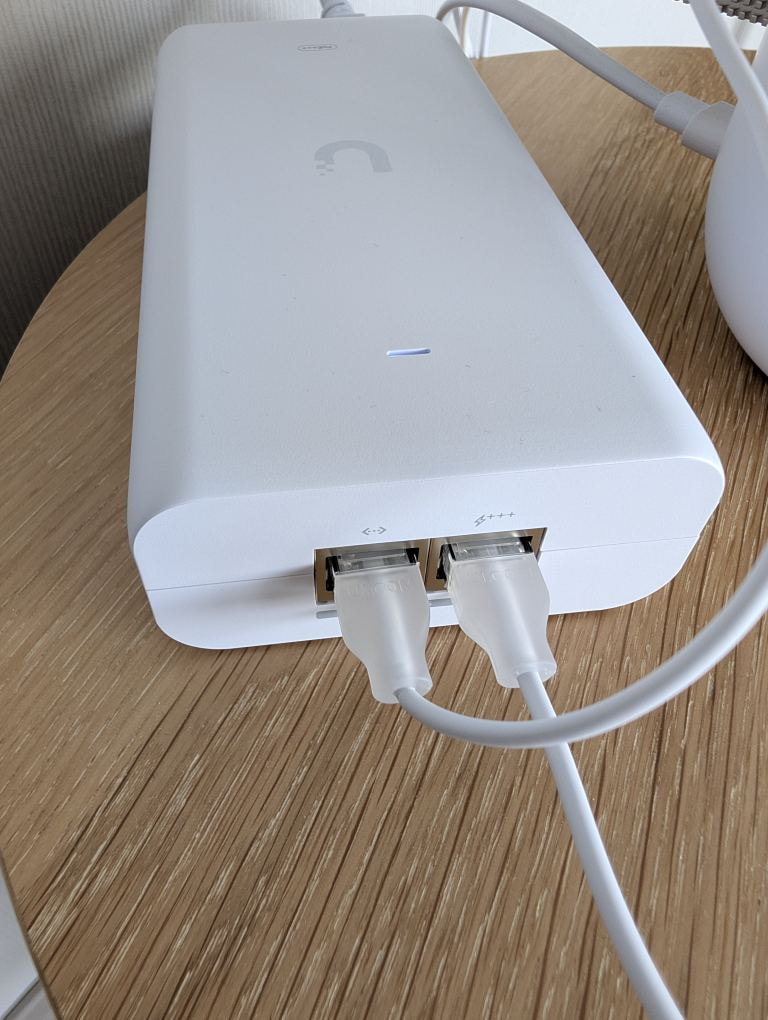
Combined with a Ubiquiti 10G PoE+++ Adapter (90W) injector feeding a Ubiquiti Flex 2.5G PoE, the entire cluster runs off one cable from my router. No wall warts, no USB-C bricks, no power strip gymnastics. One cable to rule them all. 
 Talos Linux
Talos Linux has an official Rock 5T overlay in ghcr.io/siderolabs/sbc-rockchip, maintained alongside Talos releases. It means U-Boot is already compiled and tested, the kernel config is tuned and upgrades work through the standard talosctl upgrade path. First-class SBC support in the Talos ecosystem is still rare — the Rock 5T has it. 
The comparison in one table
| Raspberry Pi 5 cluster | Typical SBC | Rock 5T (this build) | |
|---|---|---|---|
| RAM per node | 4–16 GB | 8–16 GB | 24 GB |
| NVMe | USB-bridged or none | Often none | PCIe 3.0 M.2 2280 |
| NICs | 1× GbE | 1× GbE | 2× 2.5 GbE (native) |
| CPU big cores | 4× A76 (Pi 5) | A55 only | 4× A76 + 4× A55 |
| PoE HAT quality | Flakey / underpowered | Good | 25W (5514), solid |
The Rock 5T is the first SBC I’ve used where I stopped making compromises to fit the hardware and just… ran the same stack I run in the cloud.
 Bill of Materials
| Component | Qty | notes |
|---|---|---|
| Radxa Rock 5T (RK3588, 24 GB) | 3 | |
| Radxa 25W PoE+ Module 5514 | 3 | Per-node PoE+ power |
| Crucial P510 1 TB NVMe (PCIe 3.0) | 3 | Talos system disk + Longhorn replicated storage |
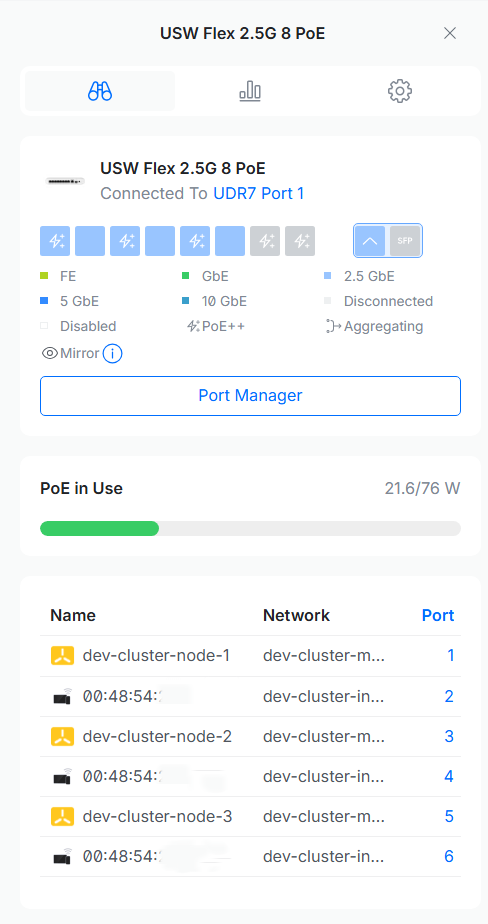
| Ubiquiti Flex 2.5G PoE | 1 | 8× 2.5 GbE PoE, 1× 10G SFP+, PoE-in |
| Ubiquiti UACC 10G PoE+++ Adapter (90W) | 1 | Powers switch + entire downstream cluster |
| Ubiquiti Dream Router | 1 | BGP peer (AS 64512) ↔ Cilium (AS 64513) |
| patch cables | 7 | 1× PoE+++ uplink + 3× PoE++ node-to-switch + 3x node-to-switch |
Power budget
| Item | Idle | Peak |
|---|---|---|
| 3× Rock 5T + NVMe (incl. PoE+ overhead) | ~20 W | ~45 W |
| Flex 2.5G PoE (system) | ~7 W | ~9 W |
| Total at the wall | ~27 W | ~54 W |
Comfortably inside the PoE availability of 76 W with PoE+++ input
 The Plan
There’s one catch with the Rock 5T: the BootROM boot order is SPI → eMMC → SD → USB — it cannot boot directly from NVMe. So the build looks like this:
-
Pre-flash NVMe with the Talos image on your workstation.
-
Temporarily boot Armbian from SD to gain access to the SPI NOR flash (
/dev/mtdblock0). -
Flash U-Boot into SPI, then remove the SD card.
-
On next boot: SPI U-Boot → NVMe → Talos.

-
talosctlapply + bootstrap → Kubernetes is up. -
Cilium + BGP + Gateway API + Longhorn + Flux → it’s a real cluster.
Below is the full sequence. Everything should be reproducible.
Reproducible plan
 Phase 1 — Bake a Talos image for the Rock 5T
Stock Talos doesn’t include everything we need. We need kernel modules for Longhorn, the Realtek 2.5 GbE firmware, and LLDP so UniFi can see the nodes in its topology view.
Open factory.talos.dev, pick Talos v1.12.8, “Single Board Computers”, “Radxa Rock 5T”, and add these extensions:
# rock5t-schematic.yaml
customization:
  systemExtensions:
    officialExtensions:
      - siderolabs/iscsi-tools         # Longhorn v1 iSCSI initiator
      - siderolabs/util-linux-tools    # Longhorn helpers
      - siderolabs/realtek-firmware    # RTL8125BG 2.5G NICs
      - siderolabs/lldpd               # nodes show up in UniFi topology
overlay:
  name: rock5t
  image: ghcr.io/siderolabs/sbc-rockchip
Download metal-arm64.raw.xz. Note your schematic ID — you’ll plug it into the Talos install.image later.
Phase 2 — Extract U-Boot for SPI
The SPI NOR on the Rock 5T was shipped empty from the factory. We need a U-Boot that knows how to chain-load Talos from NVMe. The correct binary is bundled inside the sbc-rockchip overlay container.
crane --platform=linux/arm64 export ghcr.io/siderolabs/sbc-rockchip:v0.2.0 \
  | tar x --wildcards '*/rock5t/u-boot-rockchip-spi.bin'
You should now have a ~1.9 MB u-boot-rockchip-spi.bin. Keep it — you’ll copy it to each node in Phase 4.
Phase 3 — Pre-flash the NVMes
It is much faster to flash three drives on your workstation with a USB→NVMe adapter than to do it in-place on the boards.
- Pop each Crucial P510 into a USB→NVMe enclosure.
- Flash the Talos image via balenaEtcher
- Install each NVMe into its Rock 5T board.
Phase 4 — Flash SPI from Armbian (one-time, per node)
Talos is intentionally minimal — it does not expose /dev/mtd* and cannot flash the SPI NOR from within itself. Armbian’s vendor kernel does expose it, so we use it as a one-time stepping stone.
-
Download Armbian Debian Trixie Minimal (vendor kernel) for Rock 5T and flash it to a microSD card.
-
Insert the SD card into the first node (the pre-flashed NVMe is already installed — it will be ignored during this boot since SD wins the boot order). Power on, SSH in as
root/1234. -
Verify MTD is available:
ls /dev/mtd* # expect /dev/mtdblock0 -
From your workstation, copy the SPI U-Boot over:
scp u-boot-rockchip-spi.bin root@<armbian-ip>:/tmp/ -
Flash and verify on the board:
dd if=/tmp/u-boot-rockchip-spi.bin of=/dev/mtdblock0 bs=4096 sync md5sum /tmp/u-boot-rockchip-spi.bin dd if=/dev/mtdblock0 bs=1 count=$(stat -c%s /tmp/u-boot-rockchip-spi.bin) | md5sum # MD5s must match -
Note both NIC MAC addresses (
ip link show) — you’ll need them to pin interfaces deterministically in Talos. -
Power off. Remove the SD card. Repeat for nodes 2 and 3.
Future boots: SPI U-Boot → NVMe → Talos. The SD card is never needed again.
Phase 5 — Network design
Each Rock 5T has two 2.5 GbE NICs and I use both, with completely separated roles:
| NIC | VLAN | Subnet | Purpose |
|---|---|---|---|
enP4p65s0 (NIC 1) |
10 — management |
10.10.1.0/24 |
Home LAN, Kube API, Gateway API, BGP sessions, VIPs |
enP3p49s0 (NIC 2) |
11 — internal |
10.10.2.0/24 |
Pod-to-pod traffic only — isolated |
| Talos VIP | — | 10.10.1.100 |
Shared control-plane endpoint |
NIC separation is enforced three ways — belt, braces and suspenders:
- Kubelet
nodeIP.validSubnets: ["10.10.2.0/24"]→ forces Cilium’sautoDirectNodeRoutesto install pod-CIDR routes via10.10.2.x. East-west pod traffic exits NIC 2. - No gateway, no default route on NIC 2. The kernel physically cannot route external traffic via the cluster NIC. This is enforced at the network layer, not just by policy.
- UniFi VLAN 11 (
dev-cluster-internal) hasIsolate Network: trueandAllow Internet Access: false. Even if something misconfigured in software tried to send external traffic out NIC 2, the switch/router drops it before it gets anywhere. This layer is completely independent of the OS config — it holds even if you wipe and reinstall a node.
The result: you get full 2.5 Gb/s between pods and a separate 2.5 Gb/s for ingress, Gateway API, BGP and the Kube API, simultaneously, on the same hardware.
UniFi network + switch port setup
Before plugging in the nodes, create both networks in UniFi → Networks and assign the switch ports.
Network 1 — dev-cluster-management
| Setting | Value |
|---|---|
| VLAN ID | 10 |
| IPv4 Gateway | 10.10.1.1/24 |
| DHCP | DHCP Server (range 10.10.1.6 – 10.10.1.254) |
| Isolate Network |  |
| Allow Internet Access |  |
Set DHCP reservations for each node’s NIC 1 MAC address here — BGP sessions from the Dream Router side target fixed IPs, so reservations prevent sessions dropping on DHCP renewal.
Network 2 — dev-cluster-internal
| Setting | Value |
|---|---|
| VLAN ID | 11 |
| IPv4 Gateway | 10.10.2.1/24 |
| DHCP | None — Talos assigns static IPs |
| Isolate Network | |
| Allow Internet Access | |
Nodes configure their own static IPs on this NIC via the Talos machine config — no DHCP needed or wanted.
Switch port profile — per node, per NIC
Each Rock 5T has two cables going into the Flex 2.5G PoE. Configure each port in UniFi → Devices → Switch → Ports:
| Port | Native VLAN | Tagged VLANs | Auto PoE |
|---|---|---|---|
NIC 1 (enP4p65s0) |
dev-cluster-management (10) |
Block All | (powers the board via PoE+ module) |
NIC 2 (enP3p49s0) |
dev-cluster-internal (11) |
Block All | |
Both ports use Uplink mode, not Edge. “Block All” on tagged VLAN management means no VLAN trunk — each port carries exactly one untagged network. NIC 1 and NIC 2 are physically on different VLANs at the switch level, which reinforces the isolation even before Talos/Cilium enforce it in software.
Phase 6 — Talos config
Machine config is split into small patches by concern so it stays readable and reviewable. Here are the important ones:
install.yaml — disk + factory image
machine:
  install:
    disk: /dev/nvme0n1
    image: factory.talos.dev/installer/<your-schematic-id>:<version>
cluster.yaml — disable Flannel + kube-proxy, allow scheduling on all CP nodes
cluster:
  allowSchedulingOnControlPlanes: true
  network:
    cni:
      name: none        # Cilium takes over
    podSubnets:
      - 10.244.0.0/16
    serviceSubnets:
      - 10.96.0.0/12
  proxy:
    disabled: true      # Cilium handles kube-proxy replacement
kubelet.yaml — pin nodeIP to the cluster NIC
machine:
  kubelet:
    nodeIP:
      validSubnets:
        - "10.10.2.0/24"
This single line is what makes Cilium’s direct node routes go out NIC 2 and not NIC 1. It’s the cornerstone of the NIC separation.
longhorn.yaml — pre-load kernel modules
machine:
  kernel:
    modules:
      - name: iscsi_tcp       # Longhorn v1 iSCSI initiator
      - name: dm_crypt        # Longhorn volume encryption
      - name: nvme_tcp        # Longhorn v2 NVMe-oF TCP (pre-loaded, not active)
      - name: nvme_fabrics    # Longhorn v2 NVMe-oF base (pre-loaded, not active)
  sysctls:
    # vm.nr_hugepages: "1024"   # SPDK: 1024 × 2MiB = 2GiB per node
    #                           # Uncomment only when v2DataEngine: true in Longhorn HelmRelease
ccm.yaml — Cloud Controller Manager & Bootstrap CRDs (optional)
cluster:
  externalCloudProvider:
    enabled: true
    manifests:
      - https://raw.githubusercontent.com/siderolabs/talos-cloud-controller-manager/v1.12.0/docs/deploy/cloud-controller-manager-daemonset.yml
      - https://github.com/prometheus-operator/prometheus-operator/releases/download/v0.90.1/stripped-down-crds.yaml
      - https://github.com/kubernetes-sigs/gateway-api/releases/download/v1.4.1/standard-install.yaml
machine:
  features:
    kubernetesTalosAPIAccess:
      enabled: true
      allowedRoles:
        - os:reader
        - os:etcd:backup
      allowedKubernetesNamespaces:
        - kube-system
I my case the Talos CCM handles node lifecycle in the Kubernetes API (node taints, addresses). Prometheus Operator CRDs and Gateway API CRDs are bootstrapped here — before Flux runs — so that Cilium, cert-manager and kube-prometheus-stack can reference them immediately on first reconcile without ordering issues. Talos API access is scoped to kube-system for the CCM and etcd backup operator.
nodes/node-1.yaml — MAC-pinned interfaces + VIP
machine:
  network:
    hostname: "dev-cluster-node-1"
    interfaces:
      - deviceSelector:
          hardwareAddr: "00:48:54:xx:xx:xx"   # enP4p65s0 – home network
        dhcp: true
        vip:
          ip: 10.10.1.100
      - deviceSelector:
          hardwareAddr: "00:48:54:xx:xx:xx"   # enP3p49s0 – in-cluster
        addresses:
          - 10.10.2.1/24
        # No routes/gateway – intentional: isolates pod-to-pod traffic to this subnet
hardwareAddrand notinterface: eth0? On the Rock 5T, kernel interface names can renumber. MAC-based binding is the way to ensure your network config is deterministic.
Generate, apply, bootstrap
talosctl gen config dev-cluster https://10.10.1.100:6443 \
  --kubernetes-version v1.33.10 \
  --install-disk /dev/nvme0n1

# Apply common patches + node-specific patch to each node
talosctl apply-config --insecure --nodes 10.10.1.101 \
  --file controlplane.yaml \
  --config-patch @install.yaml \
  --config-patch @cluster.yaml \
  --config-patch @kubelet.yaml \
  --config-patch @longhorn.yaml \
  --config-patch @ccm.yaml \
  --config-patch @nodes/node-1.yaml

# Repeat for 10.10.1.102 / node-2 and 10.10.1.103 / node-3

# Bootstrap on node 1 only — once
talosctl -n 10.10.1.101 --talosconfig ./talosconfig bootstrap

# Grab kubeconfig
talosctl -n 10.10.1.101 --talosconfig ./talosconfig kubeconfig ~/.kube/config

kubectl get nodes
# NAME                   STATUS   ROLES           AGE   VERSION
# dev-cluster-node-1     Ready    control-plane   2m    v1.33.12
# dev-cluster-node-2     Ready    control-plane   2m    v1.33.12
# dev-cluster-node-3     Ready    control-plane   2m    v1.33.12
My dev cluster intentionally runs the same Kubernetes version as the production Hetzner cluster — not the Talos default (which would be v1.35.2 for Talos v1.12.8).
Phase 7 — Cilium with kube-proxy replacement + BGP + Gateway API
Why kube-proxy replacement? eBPF in the kernel is faster, lower overhead, and unlocks BGP and Gateway API as first-class citizens with no additional components.
Why BGP instead of L2 ARP for LoadBalancer IPs? Because all three nodes advertise the same IP simultaneously, and the Ubiquiti Dream Router installs three equal-cost routes. Incoming traffic is distributed 3-way across nodes — true ECMP (Equal Cost Multiple Path). No active/standby, no MAC flapping, no “whoever wins the ARP race gets all the traffic”. See the Cilium BGP Control Plane docs for full configuration reference.
My Cilium Helm values (managed via Flux HelmRelease):
apiVersion: helm.toolkit.fluxcd.io/v2
kind: HelmRelease
metadata:
  name: cilium
  namespace: kube-system
spec:
  interval: 1h
  chart:
    spec:
      chart: cilium
      version: "1.18.7"
      sourceRef:
        kind: HelmRepository
        name: cilium
        namespace: flux-system
      interval: 1h
  releaseName: cilium
  install:
    crds: CreateReplace
  upgrade:
    crds: CreateReplace
  values:
    kubeProxyReplacement: true
    k8sServiceHost: "10.10.1.100"
    k8sServicePort: 6443
    kubeProxyReplacementHealthzBindAddr: "0.0.0.0:10256"
    # native routing + kube-proxy replacement → skip conntrack iptables rules
    installNoConntrackIptablesRules: true

    socketLB:
      hostNamespaceOnly: true  # Talos: restrict socket LB to host netns

    # IPAM / routing
    ipam:
      mode: kubernetes

    k8s:
      requireIPv4PodCIDR: true

    routingMode: native
    ipv4NativeRoutingCIDR: "10.244.0.0/16"
    autoDirectNodeRoutes: true
    policyCIDRMatchMode: nodes

    # BPF
    bpf:
      masquerade: true
      datapathMode: veth
      hostLegacyRouting: false

    # Encryption
    encryption:
      enabled: false

    # Network devices
    devices:
      - enP4p65s0   # home network NIC
      - enP3p49s0   # in-cluster NIC

    # DNS proxy
    dnsProxy:
      enableTransparentMode: true

    # Egress gateway
    egressGateway:
      enabled: false

    # Load balancer
    loadBalancer:
      acceleration: disabled

    # BGP Control Plane – replaces L2 announcements
    bgpControlPlane:
      enabled: true

    # Gateway API
    gatewayAPI:
      enabled: true
      enableProxyProtocol: false    # no proxy protocol – BGP L3 LB
      enableAppProtocol: true
      enableAlpn: true
      externalTrafficPolicy: Cluster  # Cluster = all 3 nodes advertise VIP → true ECMP
      gatewayClass:
        create: "true"

    # Hubble observability
    hubble:
      enabled: true
      relay:
        enabled: true
      ui:
        enabled: true

    # Prometheus metrics
    prometheus:
      enabled: true
      serviceMonitor:
        enabled: false

    # Talos-specific: cgroup & capabilities
    cgroup:
      autoMount:
        enabled: false  # Talos manages cgroup mounts
      hostRoot: /sys/fs/cgroup

    securityContext:
      capabilities:
        ciliumAgent:
          - CHOWN
          - KILL
          - NET_ADMIN
          - NET_RAW
          - IPC_LOCK
          - SYS_ADMIN
          - SYS_RESOURCE
          - DAC_OVERRIDE
          - FOWNER
          - SETGID
          - SETUID
        cleanCiliumState:
          - NET_ADMIN
          - SYS_ADMIN
          - SYS_RESOURCE

    # Operator
    operator:
      replicas: 2
      nodeSelector:
        node-role.kubernetes.io/control-plane: ""
      podDisruptionBudget:
        enabled: true
        minAvailable: ~   # null → switches PDB to maxUnavailable mode
        maxUnavailable: 1
      topologySpreadConstraints:
        - maxSkew: 1
          topologyKey: kubernetes.io/hostname
          whenUnsatisfiable: DoNotSchedule
          labelSelector:
            matchLabels:
              app.kubernetes.io/name: cilium-operator
          matchLabelKeys:
            - pod-template-hash
      prometheus:
        enabled: true
        serviceMonitor:
          enabled: false
BGP peering with the Ubiquiti Dream Router
# CiliumBGPClusterConfig — all three nodes peer with the Ubiquiti Dream Router
apiVersion: cilium.io/v2alpha1
kind: CiliumBGPClusterConfig
metadata:
  name: cilium-bgp
spec:
  nodeSelector:
    matchLabels: {}  # all nodes
  bgpInstances:
    - name: cluster
      localASN: 64513
      peers:
        - name: udr7
          peerASN: 64512
          peerAddress: "192.168.0.1"  # Dream Router LAN IP
          peerConfigRef:
            name: cilium-peer-udr7
apiVersion: cilium.io/v2alpha1
kind: CiliumBGPAdvertisement
metadata:
  name: bgp-lb-advertisement
  labels:
    advertise: bgp-lb   # matched by bgp-peer-config families[].advertisements
spec:
  advertisements:
    - advertisementType: Service
      service:
        addresses:
          - LoadBalancerIP
      selector:
        matchLabels: {}   # advertise all LoadBalancer services
# CiliumBGPPeerConfig — hold 9s / keepalive 3s → ~9s failover on node loss
apiVersion: cilium.io/v2alpha1
kind: CiliumBGPPeerConfig
metadata:
  name: cilium-peer-udr7
spec:
  gracefulRestart:
    enabled: true
    restartTimeSeconds: 120
  timers:
    holdTimeSeconds: 9
    keepAliveTimeSeconds: 3
  transport:
    peerPort: 179
  families:
    - afi: ipv4
      safi: unicast
      advertisements:
        matchLabels:
          advertise: bgp-lb
# CiliumLoadBalancerIPPool — the IP range BGP will advertise
apiVersion: cilium.io/v2alpha1
kind: CiliumLoadBalancerIPPool
metadata:
  name: dev-pool
spec:
  blocks:
    - start: "10.10.1.200"
      stop:  "10.10.1.249"
Configuring BGP on the Ubiquiti Dream Router
UniFi manages FRR via a config file upload — no SSH required.
- Go to UniFi Network → Settings → Routing
- Click Add BGP and fill in:
- Name:
Kubernetes DEV - Device:
<Dream Router> - Configuration File: upload the
frr.confbelow asunify-frr.conf
- Name:
- Click ApplyConfiguring BGP on the Ubiquiti Dream Router
frr version 8.1
frr defaults traditional
hostname UDR7
!
! ============================================================
! BGP – Kubernetes dev cluster (AS 64513)
! Nodes peer via enP4p65s0 (DHCP from 10.10.1.0/24)
! ⚠ Set DHCP reservations in UniFi for each node MAC before
!   enabling – BGP sessions drop if node IPs change
! ============================================================
router bgp 64512
 bgp router-id 10.10.1.1
 bgp log-neighbor-changes
 !
 ! ECMP: accept equal-cost paths from same remote AS
 bgp bestpath as-path multipath-relax
 maximum-paths 3
 !
 ! Peer group – shared config for all 3 nodes
 neighbor K8S-NODES peer-group
 neighbor K8S-NODES remote-as 64513
 neighbor K8S-NODES description dev-cluster
 neighbor K8S-NODES timers 3 9
 neighbor K8S-NODES timers connect 5
 !
 ! ⚠ Replace with actual DHCP-assigned node IPs
 ! Check UniFi → Clients, or: talosctl get addresses -n <node>
 neighbor 10.10.1.101 peer-group K8S-NODES
 neighbor 10.10.1.102 peer-group K8S-NODES
 neighbor 10.10.1.103 peer-group K8S-NODES
 !
 address-family ipv4 unicast
  ! Activate all peers in the group
  neighbor K8S-NODES activate
  neighbor K8S-NODES soft-reconfiguration inbound
  !
  ! Only accept LB pool prefixes from nodes – safety filter
  ! Prevents accidentally learning pod CIDRs or node routes
  neighbor K8S-NODES prefix-list cluster-lb-only in
  !
  ! Never advertise UDR7 routes back to cluster nodes
  neighbor K8S-NODES prefix-list DENY-ALL out
 exit-address-family
!
! Accept only prefixes within the LB pool range
ip prefix-list cluster-lb-only seq 10 permit 10.10.1.200/24 le 32
ip prefix-list cluster-lb-only seq 20 deny any
!
! Outbound: advertise nothing to cluster nodes
ip prefix-list DENY-ALL seq 10 deny any
!
line vty
!
Apply the FRR config on the Ubiquiti Dream Router first, then enable BGP in Cilium. Otherwise BGP neighbors sit in
Activestate during rollout and your LB IPs are unreachable while you wait. With this order, sessions establish in ~5 seconds.
Verify BGP is working
$ cilium bgp peers
# Node: dev-cluster-node-1   Peer: 10.10.1.1   Session: established
# Node: dev-cluster-node-2   Peer: 10.10.1.1   Session: established
# Node: dev-cluster-node-3   Peer: 10.10.1.1   Session: established
10.10.1.100(VIP) vs.10.10.1.200–249(LB pool) — two completely different mechanisms:
10.10.1.100is a Talos-native L2 floating IP. Talos runs internal leader election backed by etcd — the winning node assigns the IP directly to its NIC 1 interface. If that node goes down, another node wins and the IP moves. The router never sees a BGP route for it, just an ARP from whichever node currently holds it. Used exclusively forkube-apiserver+talosctlaccess.
10.10.1.200–249are BGP-advertised LoadBalancer IPs. All three nodes advertise each IP simultaneously. The router installs 3 ECMP routes per IP — true layer 3 load balancing, no ARP involved.This is also why the BGP inbound prefix-filter below only permits
10.10.1.200/24 le 32—10.10.1.100never appears in BGP at all, so no rule for it is needed or wanted.
Phase 8 — Storage and GitOps
Flux + SOPS-age
My GitOps repo mirrors the same infrastructure/ / operators/ / applications/ layout I run in production. Same stack, same structure.
export GITEA_TOKEN=<your-token>
flux bootstrap gitea \
  --components-extra=image-reflector-controller,image-automation-controller \
  --hostname=git.my.domain \
  --token-auth=true \
  --owner=user \
  --repository=Kubernetes-Dev \
  --branch=main \
  --path=./flux-system \
  --personal --private

# Inject SOPS age key so Flux can decrypt secrets
kubectl create secret generic sops-age \
  --namespace=flux-system \
  --from-file=age.agekey=/path/to/age.agekey

# Force first reconcile
flux reconcile kustomization flux-system --with-source
The rest installs itself from Git. Cilium, Longhorn, Gateway API — Flux pulls them in order.
Longhorn
Longhorn uses all three Crucial P510s as its data plane. Three nodes = three replicas = you can lose any single node and lose zero data. Because we’re on real PCIe 3.0 NVMe, Longhorn’s random IOPS are actually usable for databases.
The kernel modules from longhorn.yaml (Phase 6) are already loaded by the time Longhorn installs — it just works.
apiVersion: helm.toolkit.fluxcd.io/v2
kind: HelmRelease
metadata:
  name: longhorn
  namespace: longhorn-system
spec:
  interval: 1h
  chart:
    spec:
      chart: longhorn
      version: "1.11.1"
      sourceRef:
        kind: HelmRepository
        name: longhorn
        namespace: flux-system
      interval: 1h
  releaseName: longhorn
  install:
    crds: CreateReplace
    remediation:
      retries: 5
  upgrade:
    crds: CreateReplace
    remediation:
      retries: 3
  dependsOn:
    - name: cilium
      namespace: kube-system   # wait until nodes are Ready before scheduling Longhorn
  values:
    defaultSettings:
      defaultDataLocality: best-effort
      replicaSoftAntiAffinity: "true"
      replicaAutoBalance: best-effort
      # Keep 20% free on each disk minimum
      storageMinimalAvailablePercentage: 20
      allowCollectingLonghornUsageMetrics: false
      upgradeChecker: false
      # V2 Data Engine — requires hugepages + kernel modules + sperate block disks on each node
      # Do NOT enable until Talos machine config patch has been applied and nodes rebooted
      v2DataEngine: false
      networkPolicies:
        enabled: true
        type: "k3s"  # k3s = grant kube-system namespace access future Longhorn UI
    persistence:
      defaultClass: true
      dataEngine: v1
      defaultClassReplicaCount: 3
      defaultDataLocality: best-effort
      reclaimPolicy: Retain
 The full stack at a glance
| Layer | Component |
|---|---|
| OS | Talos Linux v1.12.8 (immutable, API-only, no SSH) |
| Kubernetes | v1.33.12 - all 3 nodes are control-plane + worker |
| CNI | Cilium 1.17+ - eBPF, kube-proxy replacement |
| LoadBalancer | Cilium BGP Control Plane → ECMP 3-way on Ubiquiti Dream Router |
| Ingress | Gateway API (Cilium native) — no deprecated ingress-nginx |
| Storage | Longhorn — replicated NVMe, 3 replicas |
| Secrets | SOPS + age, encrypted in Git |
| GitOps | Flux + image automation |
 Gallery
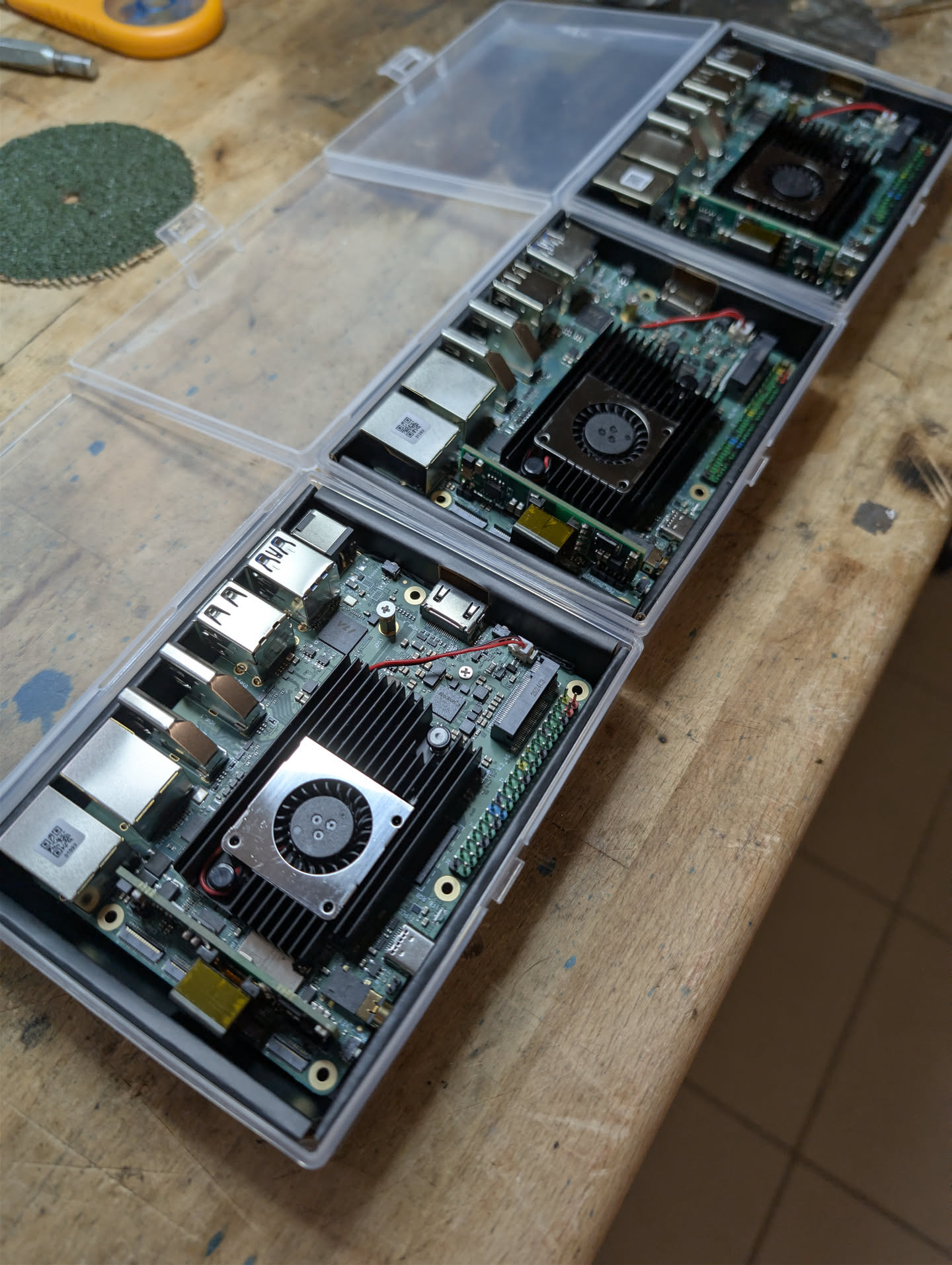
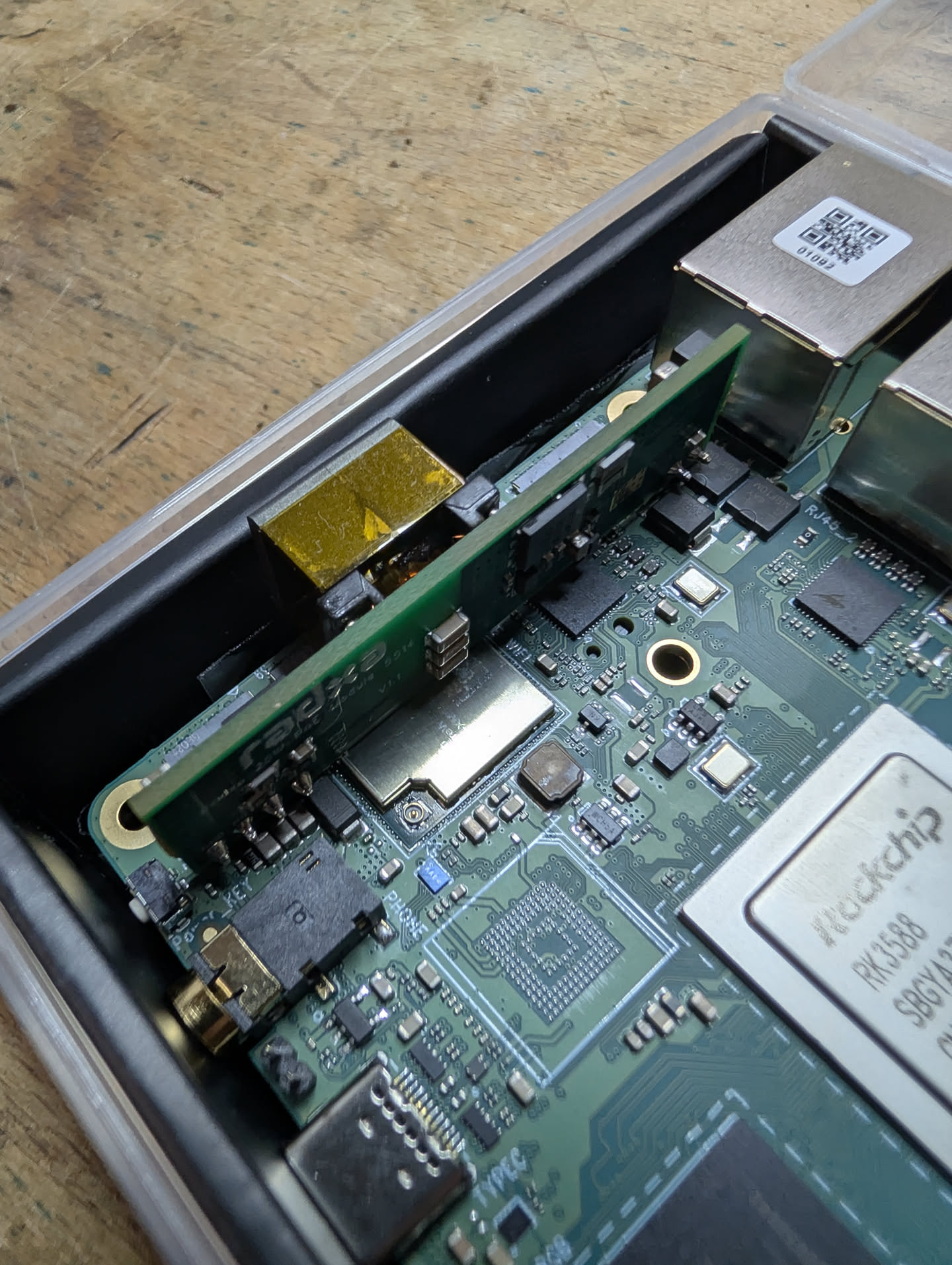
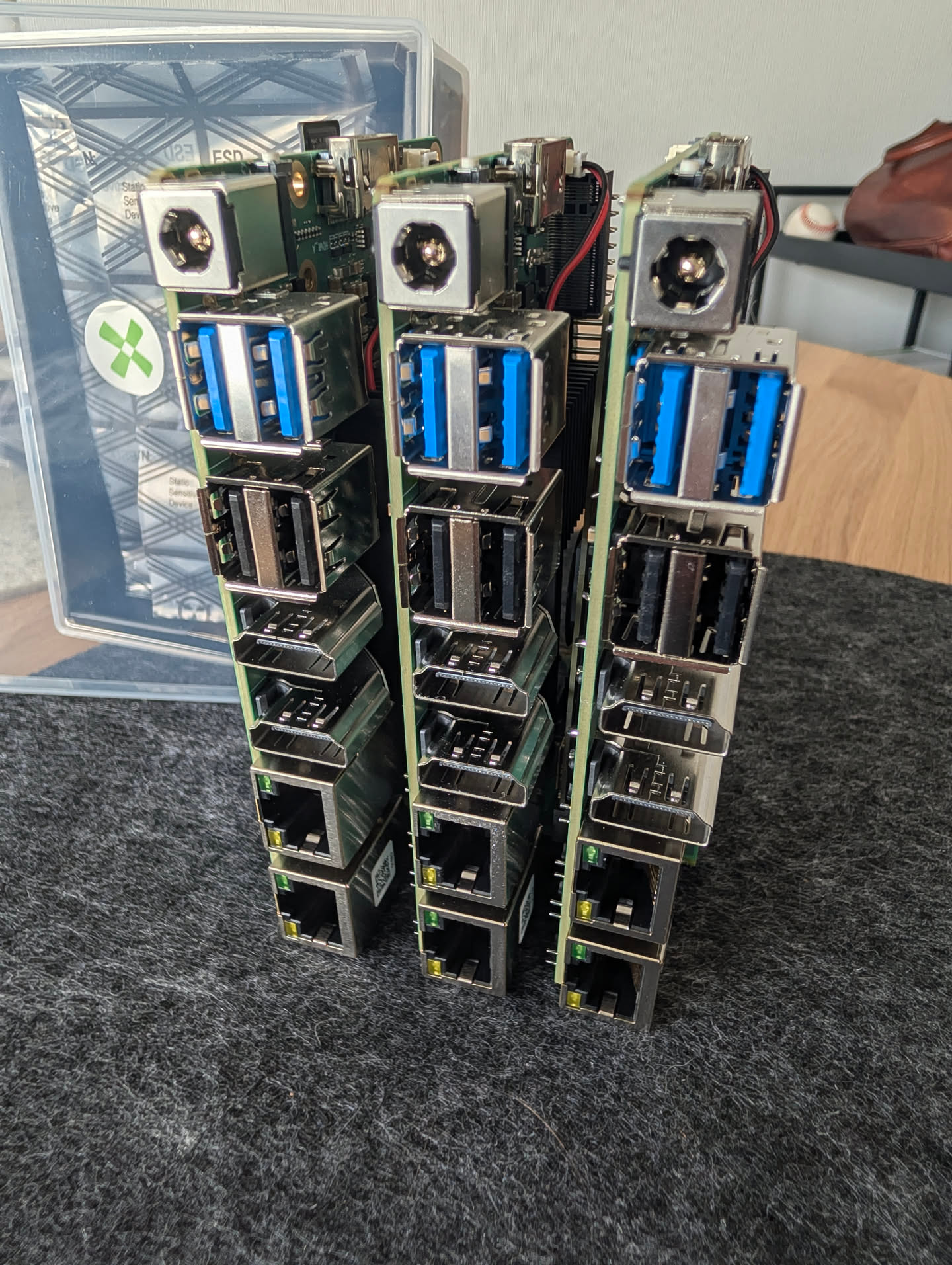
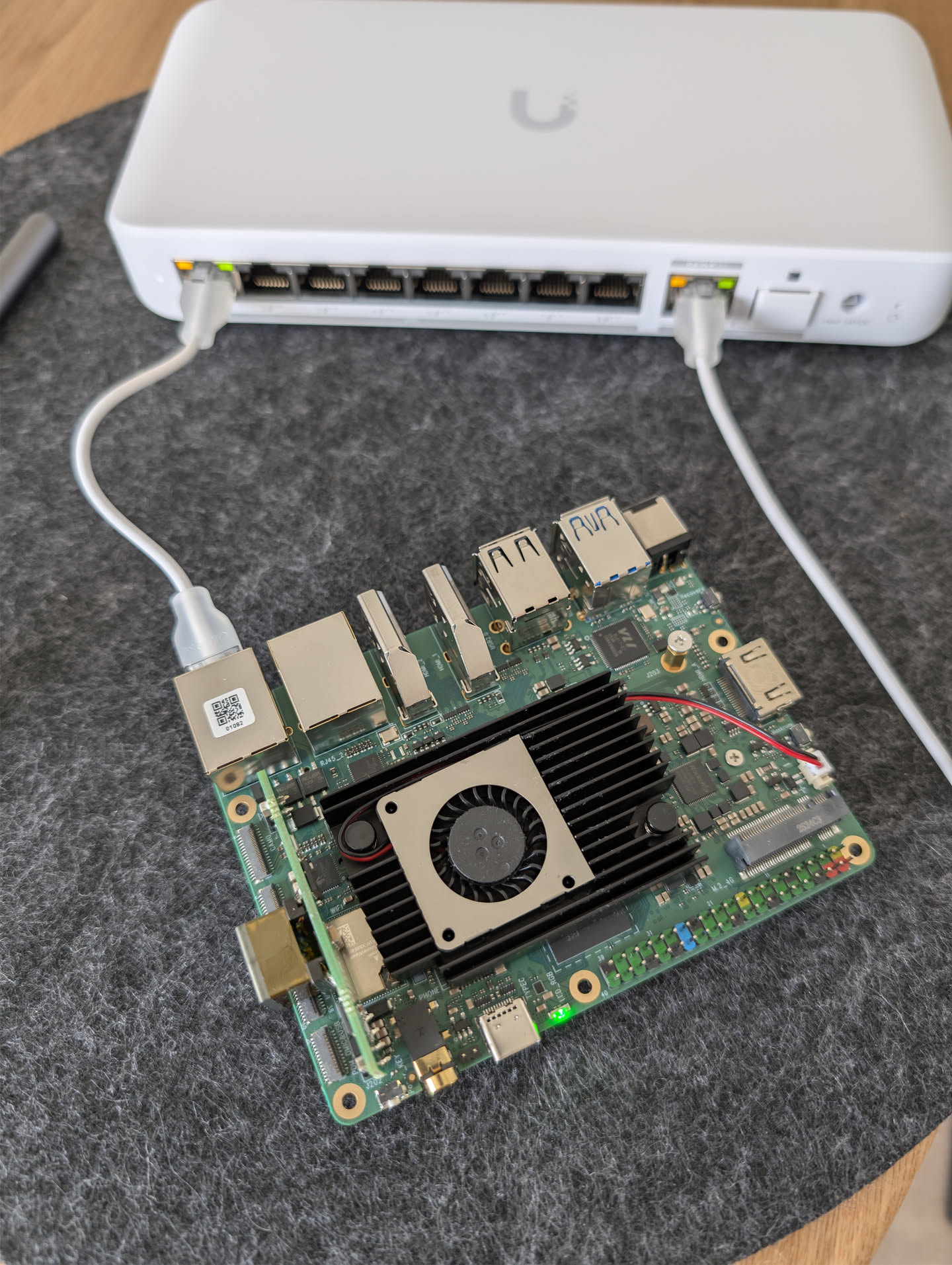
 Thank you, @radxa
None of this would be remotely possible without the Rock 5T being what it is. The combination of dual native 2.5 GbE, a real PCIe 3.0 M.2 2280 slot, 24 GB LPDDR5, a working PoE+ module and — critically — a first-class Talos Linux overlay maintained alongside upstream releases makes this board genuinely special in the SBC ecosystem, in my point of view.
I’m happy to answer questions about reproducing any part of this and hoping for feedback and suggestions for v2 
 Temperature & noise solved in Kubernetes
 Note on graphs: I’ll add proper performance, utilization and temperature graphs in a follow-up. Right now the cluster is running fewer applications than it eventually will — it’s a dev cluster and I’m actively testing and reconfiguring things, so the current numbers wouldn’t be representative of a steady-state workload. Once it’s settled I’ll share real data.
 I’ll give it a try for sure in future, but for now I can make better strategy for my purpose.