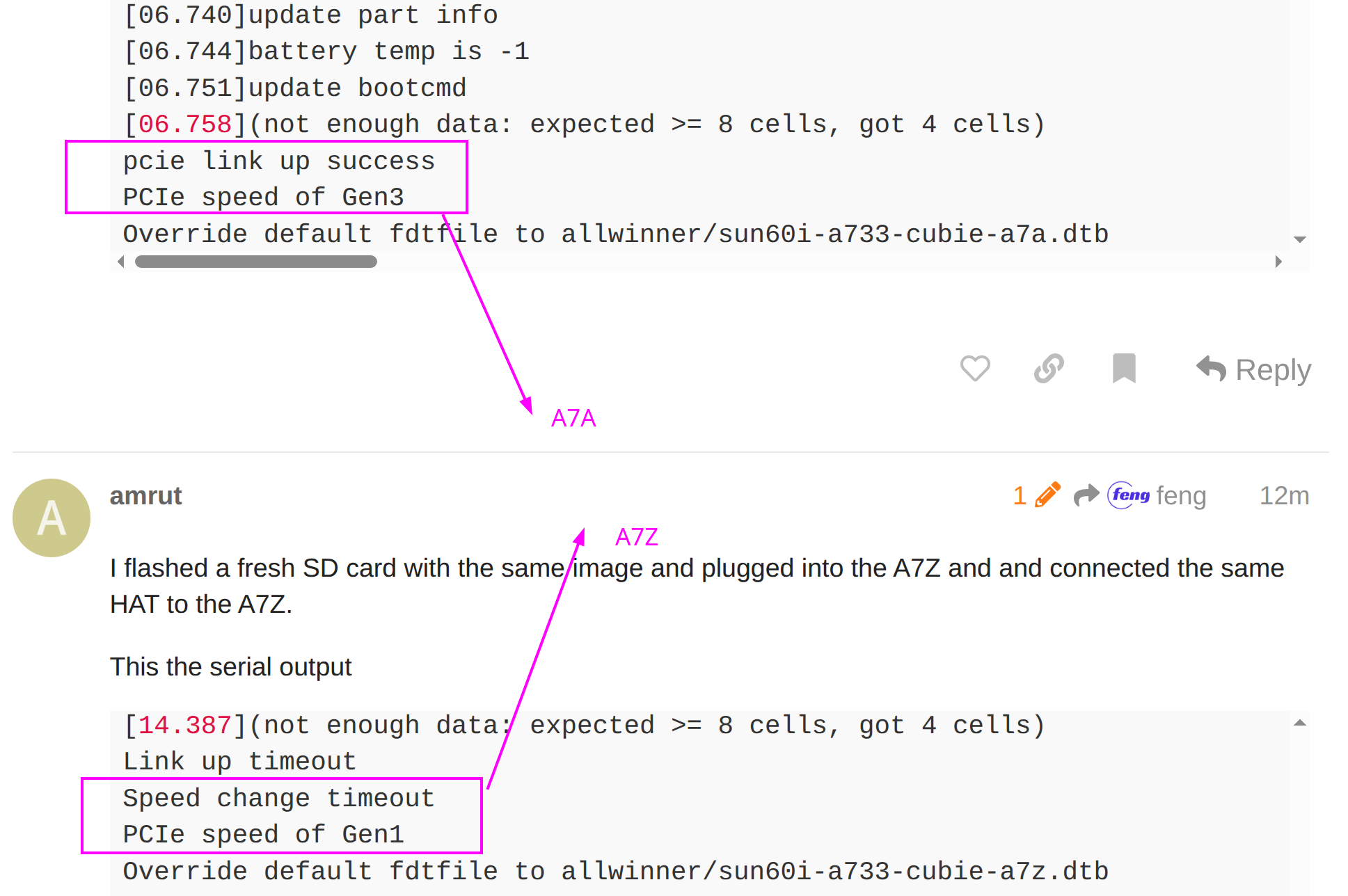
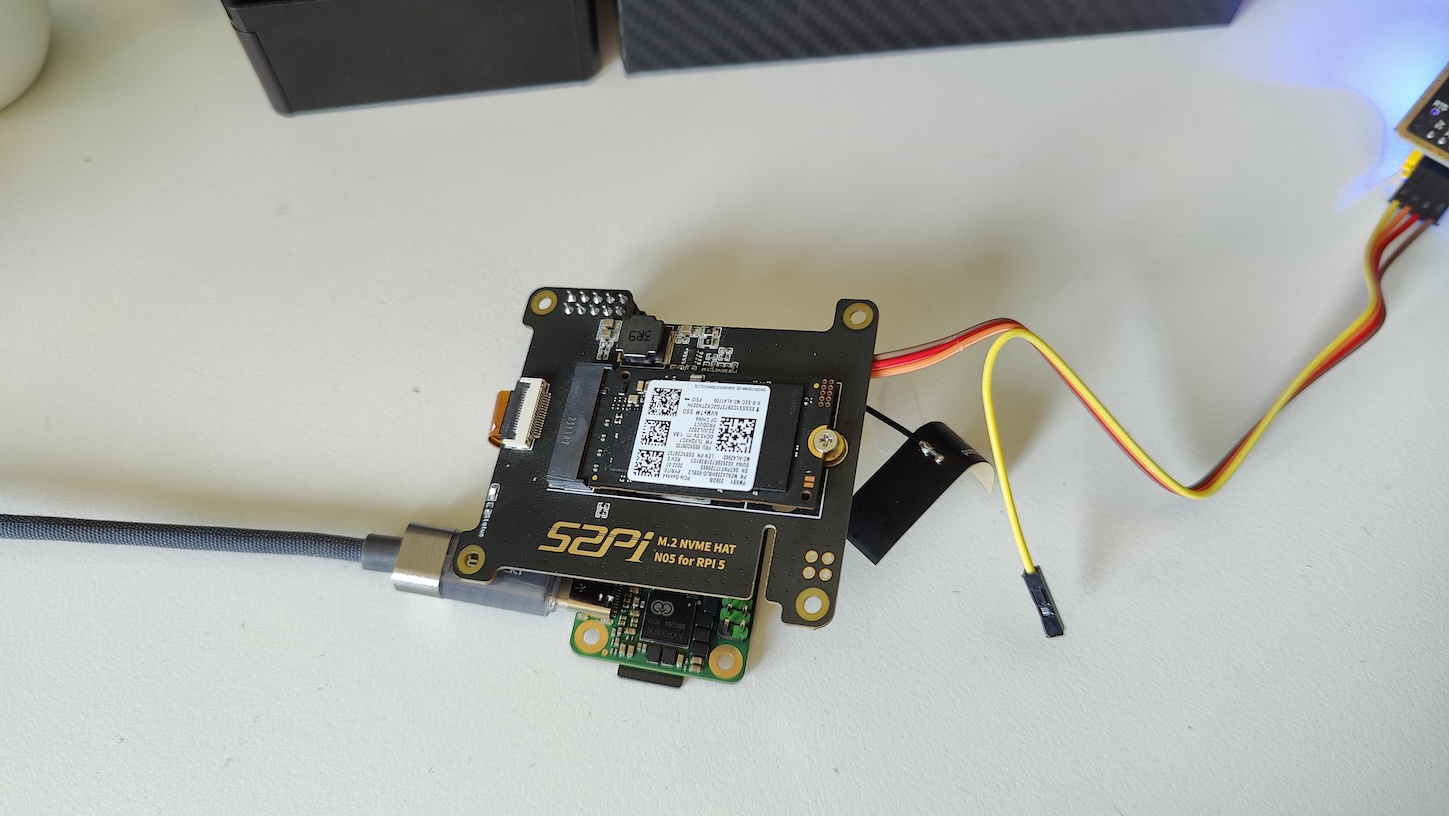
Radxa Cubie A7Z - NVMe Hat not detected

Hey Folks,

I am trying to use an NVMe HAT via the PCIe slot on the Cubie A7Z but It does not even power the hat.
I have used the hat on a raspberry pi and a cubie A7A, and it does get detected there.

I am using this B2 image from here: Release b2 (rsdk) · radxa-build/radxa-cubie-a7z · GitHub

Any pointers to what I am missing or what can be done?

I would say double check how you have the cable seated because it looks like it might not be straight on the 52pi adapter, but I also see that ssd is a pcie gen 4x4. Do you have any 2 lane cards to test? Maybe the ssd cant downgrade to pcie 3x1?

I have attached the cable many times. It might not look straight but its connected properly.
I have also tried with Samsung PM9B1 which is a Gen 3 Nvme, but it still does not work.

I used this same gen4 NVMe with Cubie A7A, where its the only one working on it ( even the gen3 dint work on it), So I assume it should work here also. :slight_smile:

Hey @feng,
can you also help me with the A7Z?

You can download the T8 image from the Cubie-A7A GitHub page at https://github.com/radxa-build/radxa-cubie-a7a/releases/tag/rsdk-t8. (Don’t be confused; the T8 image for Cubie-A7A is already compatible with Cubie-A7Z, but the name still shows as Cubie-A7A.) Then, try installing the kernel package I sent you in another post.

Hey @feng,

Thank you for your reply.

I tried this, but it did not work.
I also see that the hat does not get power to it. Its the same HAT I used on the A7A and it works there.

Any leads you can give me?

You can take the SD card that A7A can recognize the HAT from, directly plug it into A7Z, and use the same HAT. (First confirm that the SSD is recognized on A7A, then directly use the SD card with image on A7Z. The premise is that it must be the T8 version image.)

Hey @feng,

I plugged the SD card I used on the A7A that recognised the SSD, on the A7Z, but the A7z did not boot up. Here is the serial output.

[156]dram para10 invalid use default para
[160]vaild para:5  select dram para0
[164][mmc]: mmc driver ver 2024-03-20 10:36
[173][mmc]: Wrong media type 0x0
[177][mmc]: ***Try SD card 0***
[186][mmc]: HSSDR52/SDR25 4 bit
[189][mmc]: 50000000 Hz
[191][mmc]: 30250 MB
[193][mmc]: ***SD/MMC 0 init OK!!!***
[199]boot param - chipid not match
[202]boot param - chipid error
[205]DRAM BOOT DRIVE INFO: V0.601
[210]DRAM_VCC set to 560 mv
[213]DRAM CLK =1800 MHZ
[215]DRAM Type =9 (8:LPDDR4,9:LPDDR5)
[274]Training result is = ff
[277]DRAM Pstate 1 training, frequency is 1200 Mhz
[282]DRAM Pstate 1 training fail, fail result is 0xff!
[287]DRAM initial error : 1 !
[290]init dram fail
[292]Failed preparing the second boot

But the image used for the A7A was the B2 version from here: https://github.com/radxa-build/radxa-cubie-a7a/releases/tag/rsdk-b2 and the linux headers and images installed from the other topic.

Now, as per your previous message, I used the T8 version from the A7A as you mentioned above, on the A7Z, it boots up properly I installed the linux headers and images as you mentioned, but the SSD hat does not get power.

I then also tried the T8 version ( with the linux headers and image) you mentioned on the A7A, it did recognise the HAT and the SSD… lspci command shows gen 3 speeds. But when I run hdparm test, it gives me a transfer rate of 1.5 MB/s.

So right now the A7Z does not recognise the HAT with the T8 image from A7A. I also dont see the power led on the hat glowing up on the A7Z.

Hey @feng,

Can you help me with this?

Hey @feng,

I tried the build you mentioned in the A7A post on the A7Z, ie.
https://github.com/radxa-build/radxa-a733/releases/download/rsdk-t1/radxa-a733_bullseye_kde_t1.output_512.img.xz

But the NVMe HAT’s power LED does not turn on when connected to the A7Z. On the A7A it does turn on.
So what could be the problem?

Could you export the boot logs from both the A7A and A7Z using the latest images? This will allow us to compare the differences. We will also conduct some testing on this recently.

So here is the log from the A7A

[163]HELLO! BOOT0 is starting!
[166]BOOT0 commit : {9f6fab4f-dirty}

[180]dram_para_total:0xf
[183]vaild para:6  select dram para2
[187][mmc]: mmc driver ver 2024-03-20 10:36
[196][mmc]: Wrong media type 0x0
[200][mmc]: ***Try SD card 0***
[209][mmc]: HSSDR52/SDR25 4 bit
[212][mmc]: 50000000 Hz
[214][mmc]: 60650 MB
[216][mmc]: ***SD/MMC 0 init OK!!!***
[222]boot param - magic error 
[225]DRAM BOOT DRIVE INFO: V0.601
[230]DRAM_VCC set to 560 mv
[233]DRAM CLK =1800 MHZ
[235]DRAM Type =9 (8:LPDDR4,9:LPDDR5)
[392]Training result is = 7
[395]DRAM Pstate 1 training, frequency is 1200 Mhz
[583]Training result is = 7
[586]DRAM Pstate 2 training, frequency is 800 Mhz
[947]Training result is = 7
[950]DRAM Pstate 3 training, frequency is 400 Mhz
[5929]Training result is = 7
[5931]DRAM Pstate 0 training, frequency is 1800 Mhz
[5940]Actual DRAM SIZE =8192 M
[5943]DRAM SIZE =8192 MBytes, para1 = a10a, para2 = 20001001, dram_tpr13 = 65
[5958]DRAM simple test OK.
[5964]error:bad magic.
[6028]error: dtb not found for scp
[6031]mmc not para
[6033]Jump to ATF: monitor_base = 0x48000000, uboot_base = 0x4a000000, optee_base = 0x0
NOTICE:  BL31: OP-TEE 32bit detected
NOTICE:  BL31: U-BOOT 32bit detected
NOTICE:  BL31: v2.5(debug):5fc237a6a
NOTICE:  BL31: Built : 09:05:28, Feb 26 2025
NOTICE:  BL31: No DTB found.
ERROR:   Error initializing runtime service opteed_fast


U-Boot 2018.07-10-boot-aw2501-g56bb8c6a2ea-dirty (Sep 16 2025 - 08:32:16 +0000) Allwinner Technology

[06.085]CPU:   Allwinner Family
[06.088]Model: Radxa Cubie A7A
I2C:   ready
[06.155]DRAM:  8 GiB
[06.164]Relocation Offset is: 75d89000
[06.222]secure enable bit: 0
[06.225]PMU: AXP8191
[06.227]PMU: AXP8191 VER_A
FDT ERROR:fdt_get_regulator_name:get property handle twi-supply error:FDT_ERR_INTERNAL
[06.239]bmu_axp515_probe pmic_bus_read fail
[06.243][AXP8191] onoff status: 0x50 = 0x1, 0x51 = 0x0
[06.248][AXP8191] charge status: 0x4 = 0x0
[06.251]CPU=1014 MHz,PLL6=1200 Mhz,AHB=200 Mhz, APB1=24Mhz  MBus=600Mhz
[06.258]gic: sec monitor mode
SPI ALL:   ready
[06.302]flash init start
[06.304]workmode = 0,storage type = 1
[06.308][mmc]: mmc driver ver uboot2018:2024-10-18 9:01:00 -- uboot2018:2025-03-28 10:03:00
[06.316][mmc]: get sdc_type fail and use default host:tm1.
[06.324][mmc]: can't find node "mmc0",will add new node
[06.329][mmc]: fdt err returned <no error>
[06.332][mmc]: Using default timing para
[06.336][mmc]: SUNXI SDMMC Controller Version:0x50530
[06.353][mmc]: card_caps:0x3000000a
[06.356][mmc]: host_caps:0x3000003f
[06.360]sunxi flash init ok
get value error
[06.370]Loading Environment from SUNXI_FLASH... OK
No ethernet found.
[06.379]Failed to found available display route
[06.383]Get sunxi drm device fail!
[06.393]the secure storage item0 copy0 magic is bad
[06.404]the secure storage item0 copy1 magic is bad
[06.409]usb burn from boot
delay time 0
[06.415]usb prepare ok
[06.718]overtime
[06.722]do_burn_from_boot usb : no usb exist
cann't get the boot_base from the env
[06.740]update part info
[06.744]battery temp is -1
[06.751]update bootcmd
[06.758](not enough data: expected >= 8 cells, got 4 cells)
pcie link up success
PCIe speed of Gen3
Override default fdtfile to allwinner/sun60i-a733-cubie-a7a.dtb
[07.103]libfdt fdt_check_header(): FDT_ERR_BADMAGIC
[07.109]libfdt fdt_path_offset() returned FDT_ERR_BADMAGIC
[07.114][mmc]: get sunxi-mmc0 string failed
[07.119]The storage not support sample function
[07.125]## error: update_fdt_dram_para_from_bootpara : FDT_ERR_NOTFOUND
[07.131]Invalid phandle:0
[07.134]only find 1073741818 phandle, format:endpoints=<&disp0_out_tcon0 &tcon0_out_rgb0>;
[07.142]Failed to found available display route
[07.147]chip id : 0x00005100 0x00004900 0x00004810 0x00001de2
[07.152]mac addr => 08:51:49:58:ff:f1
[07.156]chip id : 0x00005100 0x00004900 0x00004810 0x00001de2
[07.161]mac addr => 08:51:49:58:ff:f0
[07.165]/chosen/rng-seed node not exit
[07.169]no battery, disabled battery functons
[07.173]Could not find nodeoffset for bat_supply
[07.177]update dts
curr_device:0
Device: SUNXI SD/MMC
Manufacturer ID: ad
OEM: 4c53
Name: LX64G 
Bus Speed: 50000000
Mode : SD High Speed (50MHz)
Rd Block Len: 512
SD version 3.0
High Capacity: Yes
Capacity: 59.2 GiB
Bus Width: 4-bit
Erase Group Size: 512 Bytes
[ufs]info:Driver version 0.0.24 2024.12.30 16:00
[ufs]info:Cal words 0x60:val 0x908e0000, 0x64:val 0x4d1f9c58
[ufs]err:uic c 16,uic a 0,1,0
[ufs]err:e 80000010,0,0,0,0
[ufs]err:int s 0,400
[ufs]err:Device not present
[ufs]err:wait device link startup failed
[ufs]info:peer link startup timeout
[ufs]info:Cal words 0x60:val 0x908e0000, 0x64:val 0x4d1f9c58
[ufs]err:uic c 16,uic a 0,1,0
[ufs]err:e 80000010,0,0,0,0
[ufs]err:int s 0,400
[ufs]err:Device not present
[ufs]err:wait device link startup failed
[ufs]info:peer link startup timeout
[ufs]info:Cal words 0x60:val 0x908e0000, 0x64:val 0x4d1f9c58
[ufs]err:uic c 16,uic a 0,1,0
[ufs]err:e 80000010,0,0,0,0
[ufs]err:int s 0,400
[ufs]err:Device not present
[ufs]err:wait device link startup failed
[ufs]info:peer link startup timeout
[ufs]info:Cal words 0x60:val 0x908e0000, 0x64:val 0x4d1f9c58
[ufs]err:uic c 16,uic a 0,1,0
[ufs]err:e 80000010,0,0,0,0
[ufs]err:int s 0,400
[ufs]err:Device not present
[ufs]err:wait device link startup failed
[ufs]info:peer link startup timeout
[ufs]err:link startup failed -6
[ufs]err:ufshcd_probe() failed -6
fail to init ufs
sunxi_flash - sunxi_flash sub-system

Usage:
sunxi_flash sunxi_flash init storage_type
sunxi_flash read mem_addr part_name [size]
sunxi_flash read_mtd mem_addr part_name [size]
sunxi_flash write <mem_addr> <part_name> [size]
sunxi_flash write <mem_addr> <part_name> [offset] [size]
sunxi_flash write_mtd <mem_addr> <part_name>
sunxi_flash boot0 force_dram_update_size <new_val> 
sunxi_flash boot0 force_dram_update_flag <new_val> 

Hit any key to stop autoboot:  0 
starting USB...
USB0:   start sunxi  USB-DRD...
config usb clk ok
sunxi USB-DRD init ok...
USB EHCI 1.00
scanning bus 0 for devices... 1 USB Device(s) found
USB1:   start sunxi  USB1-Host...
config usb clk ok
sunxi USB1-Host init ok...
USB EHCI 1.00
scanning bus 1 for devices... 1 USB Device(s) found
       scanning usb for storage devices... 0 Storage Device(s) found

Device 0: device type unknown
... is now current device
** Bad device usb 0 **
mmc0 is current device
Scanning mmc 0:2...
Scanning mmc 0:3...
Found /boot/extlinux/extlinux.conf
Retrieving file: /boot/extlinux/extlinux.conf
1307 bytes read in 19 ms (66.4 KiB/s)
U-Boot menu
1:      Debian GNU/Linux 11 (bullseye) 5.15.147-11-a733
2:      Debian GNU/Linux 11 (bullseye) 5.15.147-11-a733 (rescue target)
Enter choice: 1:        Debian GNU/Linux 11 (bullseye) 5.15.147-11-a733
Retrieving file: /boot/initrd.img-5.15.147-11-a733
13546417 bytes read in 575 ms (22.5 MiB/s)
Retrieving file: /boot/vmlinuz-5.15.147-11-a733
19030528 bytes read in 802 ms (22.6 MiB/s)
append: root=UUID=a8f02731-860a-4d1c-abb7-fbd744b11bbe console=ttyAS0,115200n8 rootwait clk_ignore_unused mac_addr=08:51:49:58:ff:f1 mac1_addr=08:51:49:58:ff:f0 quiet splash loglevel=4 rw earlycon consoleblank=0 console=tty1 coherent_pool=2M irqchip.gicv3_pseudo_nmi=0 cgroup_enable=cpuset cgroup_memory=1 cgroup_enable=memory swapaccount=1 kasan=off
Retrieving file: /usr/lib/linux-image-5.15.147-11-a733/allwinner/sun60i-a733-cubie-a7a.dtb
196537 bytes read in 142 ms (1.3 MiB/s)
[15.050]libfdt fdt_path_offset() returned FDT_ERR_BADMAGIC
[15.059]The storage not support sample function
[15.145]Invalid phandle:0
[15.147]only find 1073741818 phandle, format:endpoints=<&disp0_out_tcon0 &tcon0_out_rgb0>;
[15.155]Failed to found available display route
[15.162]mac addr => 08:51:49:58:ff:f1
[15.166]mac addr => 08:51:49:58:ff:f0
[15.170]no battery, disabled battery functons
[15.178]update dts
stop sunxi USB-DRD ok...
stop sunxi USB1-Host ok...
   Loading Ramdisk to 49314000, end 49fff3b1 ... OK
[15.228]Starting kernel ...

[15.231]total: 15231 ms

[15.233][mmc]: MMC Device 2 not found
[15.237][mmc]: mmc 2 not find, so not exit
NOTICE:  [SCP] :wait arisc ready....
NOTICE:  [SCP] :arisc version: [d463b9da43dc50320f21ba51c6c51afe2db20d83]
NOTICE:  [SCP] :arisc startup ready
NOTICE:  [SCP] :arisc startup notify message feedback
NOTICE:  [SCP] :sunxi-arisc driver is starting
NOTICE:  BL3-1: Next image address = 0x40200000
NOTICE:  BL3-1: Next image spsr = 0x3c5
[    0.000000][    T0] AW BSP version: 2b77705786, 2025-10-27 03:01:52, RadxaOS SDK
[    0.081567][    T1] iommu_master csi_iommu: attach fail:-517
[    0.081612][    T1] sunxi-iommu-v2 3900000.iommu: master probe failed with -517
[    0.219800][    T1] sunxi:ccu_ddr:[ERR]: dram_clk:1800
[    0.219815][    T1] sunxi:ccu_ddr:[ERR]: dram_div:0x11080503
[    0.220060][    T1] sunxi:pin-2000000.pinctrl:[ERR]: unknown pin 
[    0.220064][    T1] sunxi:pin-2000000.pinctrl:[ERR]: unknown pin 
[    0.220111][    T1] sunxi:pin-2000000.pinctrl:[ERR]: unknown pin 
[    0.220114][    T1] sunxi:pin-2000000.pinctrl:[ERR]: unknown pin 
[    0.285656][    T1] sunxi:sunxi_mmc_host-4022000.sdmmc:[ERR]: manual set ocr
[    0.325288][    C0] sunxi:sunxi_mmc_host-4022000.sdmmc:[ERR]: smc 1 p2 err, cmd 1, RTO !!
[    0.335369][    C0] sunxi:sunxi_mmc_host-4022000.sdmmc:[ERR]: smc 1 p2 err, cmd 1, RTO !!
[    0.345444][    C0] sunxi:sunxi_mmc_host-4022000.sdmmc:[ERR]: smc 1 p2 err, cmd 1, RTO !!
[    0.355512][    C0] sunxi:sunxi_mmc_host-4022000.sdmmc:[ERR]: smc 1 p2 err, cmd 1, RTO !!
[    0.365585][    C0] sunxi:sunxi_mmc_host-4022000.sdmmc:[ERR]: smc 1 p2 err, cmd 1, RTO !!
[    0.375652][    C0] sunxi:sunxi_mmc_host-4022000.sdmmc:[ERR]: smc 1 p2 err, cmd 1, RTO !!
[    0.385749][    C0] sunxi:sunxi_mmc_host-4022000.sdmmc:[ERR]: smc 1 p2 err, cmd 1, RTO !!
[    0.395839][    C0] sunxi:sunxi_mmc_host-4022000.sdmmc:[ERR]: smc 1 p2 err, cmd 1, RTO !!
[    0.405942][    C0] sunxi:sunxi_mmc_host-4022000.sdmmc:[ERR]: smc 1 p2 err, cmd 1, RTO !!
[    0.414562][    T1] sunxi:sunxi_sidefuse init success!
[    0.414571][    T1] sunxi:sunxi_smcdrm config service not available: FFFFFFFF
[    0.429817][    C0] sunxi:sunxi_mmc_host-4022000.sdmmc:[ERR]: smc 1 p2 err, cmd 1, RTO !!
[    0.439920][    C0] sunxi:sunxi_mmc_host-4022000.sdmmc:[ERR]: smc 1 p2 err, cmd 1, RTO !!
[    0.449975][    C0] sunxi:sunxi_mmc_host-4022000.sdmmc:[ERR]: smc 1 p2 err, cmd 1, RTO !!
[    0.460023][    C0] sunxi:sunxi_mmc_host-4022000.sdmmc:[ERR]: smc 1 p2 err, cmd 1, RTO !!
[    0.470084][    C0] sunxi:sunxi_mmc_host-4022000.sdmmc:[ERR]: smc 1 p2 err, cmd 1, RTO !!
[    0.480155][    C0] sunxi:sunxi_mmc_host-4022000.sdmmc:[ERR]: smc 1 p2 err, cmd 1, RTO !!
[    0.490242][    C0] sunxi:sunxi_mmc_host-4022000.sdmmc:[ERR]: smc 1 p2 err, cmd 1, RTO !!
[    0.500335][    C0] sunxi:sunxi_mmc_host-4022000.sdmmc:[ERR]: smc 1 p2 err, cmd 1, RTO !!
[    0.510432][    C0] sunxi:sunxi_mmc_host-4022000.sdmmc:[ERR]: smc 1 p2 err, cmd 1, RTO !!
[    0.520525][    C0] sunxi:sunxi_mmc_host-4022000.sdmmc:[ERR]: smc 1 p2 err, cmd 1, RTO !!
[    0.530650][    C0] sunxi:sunxi_mmc_host-4022000.sdmmc:[ERR]: smc 1 p2 err, cmd 1, RTO !!
[    0.540794][    C0] sunxi:sunxi_mmc_host-4022000.sdmmc:[ERR]: smc 1 p2 err, cmd 1, RTO !!
[    0.550946][    C0] sunxi:sunxi_mmc_host-4022000.sdmmc:[ERR]: smc 1 p2 err, cmd 1, RTO !!
[    0.561066][    C0] sunxi:sunxi_mmc_host-4022000.sdmmc:[ERR]: smc 1 p2 err, cmd 1, RTO !!
[    0.562134][    T1] sunxi:axp8191_temp_ctrl:[ERR]: axp8191-temp-ctrl device is not configed
[    0.580549][    C0] sunxi:sunxi_mmc_host-4022000.sdmmc:[ERR]: smc 1 p2 err, cmd 1, RTO !!
[    0.590661][    C0] sunxi:sunxi_mmc_host-4022000.sdmmc:[ERR]: smc 1 p2 err, cmd 1, RTO !!
[    0.600755][    C0] sunxi:sunxi_mmc_host-4022000.sdmmc:[ERR]: smc 1 p2 err, cmd 1, RTO !!
[    0.610859][    C0] sunxi:sunxi_mmc_host-4022000.sdmmc:[ERR]: smc 1 p2 err, cmd 1, RTO !!
[    0.620959][    C0] sunxi:sunxi_mmc_host-4022000.sdmmc:[ERR]: smc 1 p2 err, cmd 1, RTO !!
[    0.631044][    C0] sunxi:sunxi_mmc_host-4022000.sdmmc:[ERR]: smc 1 p2 err, cmd 1, RTO !!
[    0.641137][    C0] sunxi:sunxi_mmc_host-4022000.sdmmc:[ERR]: smc 1 p2 err, cmd 1, RTO !!
[    0.651228][    C0] sunxi:sunxi_mmc_host-4022000.sdmmc:[ERR]: smc 1 p2 err, cmd 1, RTO !!
[    0.661324][    C0] sunxi:sunxi_mmc_host-4022000.sdmmc:[ERR]: smc 1 p2 err, cmd 1, RTO !!
[    0.671417][    C0] sunxi:sunxi_mmc_host-4022000.sdmmc:[ERR]: smc 1 p2 err, cmd 1, RTO !!
[    0.680698][  T108] sunxi:sunxi_mmc_host-4022000.sdmmc:[ERR]: retry:set phase failed or over retry times
[    0.691421][  T108] sunxi:sunxi_mmc_host-4022000.sdmmc:[ERR]: retry:give up
[    0.720803][    T9] [drm:sunxi_drm_bind] *ERROR* none mode found init_connecting
[    0.729075][    T9] [drm:sunxi_drm_get_logo_info] *ERROR* init connecting not found sunxi_drm_get_logo_info
[    0.905584][  T104] sunxi-ufs-pltfm 4520000.ufs: link startup failed 1
[    0.913168][  T104] sunxi-ufs-pltfm 4520000.ufs: UFS Host state=0
[    0.920110][  T104] sunxi-ufs-pltfm 4520000.ufs: outstanding reqs=0x0 tasks=0x0
[    0.928525][  T104] sunxi-ufs-pltfm 4520000.ufs: saved_err=0x0, saved_uic_err=0x0
[    0.937035][  T104] sunxi-ufs-pltfm 4520000.ufs: Device power mode=1, UIC link state=0
[    0.946001][  T104] sunxi-ufs-pltfm 4520000.ufs: PM in progress=0, sys. suspended=0
[    0.946018][  T104] sunxi-ufs-pltfm 4520000.ufs: Auto BKOPS=0, Host self-block=0
[    0.963180][  T104] sunxi-ufs-pltfm 4520000.ufs: Clk gate=1
[    0.969617][  T104] sunxi-ufs-pltfm 4520000.ufs: last_hibern8_exit_tstamp at 0 us, hibern8_exit_cnt=0
[    0.980119][  T104] sunxi-ufs-pltfm 4520000.ufs: last intr at 901865 us, last intr status=0x404
[    0.990070][  T104] sunxi-ufs-pltfm 4520000.ufs: error handling flags=0x0, req. abort count=0
[    0.999864][  T104] sunxi-ufs-pltfm 4520000.ufs: hba->ufs_version=0x300, Host capabilities=0x11870f1f, caps=0x0
[    1.011527][  T104] sunxi-ufs-pltfm 4520000.ufs: quirks=0x0, dev. quirks=0x0
[    1.019490][  T104] host_regs: 00000000: 11870f1f 00000000 00000300 00000000
[    1.027424][  T104] host_regs: 00000010: 00000000 00000926 00000000 00000000
[    1.035346][  T104] host_regs: 00000020: 00000000 e0000470 00000000 00000000
[    1.043289][  T104] host_regs: 00000030: 00000008 00000001 00000000 00000000
[    1.051351][  T104] host_regs: 00000040: 00000000 00000000 00000000 00000000
[    1.059322][  T104] host_regs: 00000050: 00000000 00000000 00000000 00000000
[    1.067277][  T104] host_regs: 00000060: 00000000 00000000 00000000 00000000
[    1.067284][  T104] host_regs: 00000070: 00000000 00000000 00000000 00000000
[    1.083150][  T104] host_regs: 00000080: 00000000 00000000 00000000 00000000
[    1.092100][  T104] host_regs: 00000090: 00000000 00000000 00000000 00000000
[    1.100019][  T104] sunxi-ufs-pltfm 4520000.ufs: No record of pa_err
[    1.107169][  T104] sunxi-ufs-pltfm 4520000.ufs: No record of dl_err
[    1.114307][  T104] sunxi-ufs-pltfm 4520000.ufs: No record of nl_err
[    1.121444][  T104] sunxi-ufs-pltfm 4520000.ufs: No record of tl_err
[    1.128580][  T104] sunxi-ufs-pltfm 4520000.ufs: No record of dme_err
[    1.135823][  T104] sunxi-ufs-pltfm 4520000.ufs: No record of auto_hibern8_err
[    1.145069][  T104] sunxi-ufs-pltfm 4520000.ufs: No record of fatal_err
[    1.152487][  T104] sunxi-ufs-pltfm 4520000.ufs: link_startup_fail[0] = 0x1 at 903136 us
[    1.161565][  T104] sunxi-ufs-pltfm 4520000.ufs: link_startup_fail: total cnt=1
[    1.169758][  T104] sunxi-ufs-pltfm 4520000.ufs: No record of resume_fail
[    1.177364][  T104] sunxi-ufs-pltfm 4520000.ufs: No record of suspend_fail
[    1.185070][  T104] sunxi-ufs-pltfm 4520000.ufs: dev_reset[0] = 0x0 at 398489 us
[    1.193360][  T104] sunxi-ufs-pltfm 4520000.ufs: dev_reset: total cnt=1
[    1.193362][  T104] sunxi-ufs-pltfm 4520000.ufs: No record of host_reset
[    1.193364][  T104] sunxi-ufs-pltfm 4520000.ufs: No record of task_abort
[    1.463911][  T173] rtc-hym8563 14-0051: hctosys: unable to read the hardware clock
GROWROOT: CHANGED: partition=3 start=679936 old: size=12884417 end=13564353 new: size=123531231 end=124211167
[  OK  ] Finished Tell Plymouth To Write Out Runtime Data.
[  OK  ] Finished Create Volatile Files and Directories.
[  OK  ] Started Entropy Daemon based on the HAVEGE algorithm.
         Starting Network Time Synchronization...
         Starting Update UTMP about System Boot/Shutdown...
[  OK  ] Finished Commit a transient machine-id on disk.
[  OK  ] Finished Update UTMP about System Boot/Shutdown.
[  OK  ] Started Network Time Synchronization.
[  OK  ] Reached target System Time Set.
[  OK  ] Reached target System Time Synchronized.
[  OK  ] Started Rule-based Manager for Device Events and Files.
         Starting Show Plymouth Boot Screen...
         Starting Network Service...
[  OK  ] Started Show Plymouth Boot Screen.
[  OK  ] Started Forward Password R…s to Plymouth Directory Watch.
[  OK  ] Reached target Local Encrypted Volumes.
[  OK  ] Reached target System Initialization.
[  OK  ] Started CUPS Scheduler.
[  OK  ] Started local-apt-repository.path.
[  OK  ] Started Daily apt download activities.
[  OK  ] Started Daily apt upgrade and clean activities.
[  OK  ] Started Periodic ext4 Onli…ata Check for All Filesystems.
[  OK  ] Started Discard unused blocks once a week.
[  OK  ] Started Refresh fwupd metadata regularly.
[  OK  ] Started Daily man-db regeneration.
[  OK  ] Started Daily Cleanup of Temporary Directories.
[  OK  ] Reached target Paths.
[  OK  ] Reached target Timers.
[  OK  ] Listening on Avahi mDNS/DNS-SD Stack Activation Socket.
[  OK  ] Listening on CUPS Scheduler.
[  OK  ] Listening on D-Bus System Message Bus Socket.
[  OK  ] Listening on OpenBSD Secure Shell server socket.
[  OK  ] Reached target Sockets.
[  OK  ] Reached target Basic System.
         Starting Accounts Service...
         Starting Avahi mDNS/DNS-SD Stack...
[  OK  ] Started D-Bus System Message Bus.
         Starting Network Manager...
         Starting Remove Stale Onli…t4 Metadata Check Snapshots...
[  OK  ] Started irqbalance daemon.
         Sta[    4.368334][  T362] sunxipart: failed to parse sunxi_gpt!
rting Initialize hardware monitoring sensors...
[  OK  ] Started rsetup configuration service.
         Starting RealtimeKit Scheduling Policy Service...
         Starting User Login Management...
         Starting Disk Manager...
         Starting Daemon for power management...
         Starting WPA supplicant...
         Starting Linux zramswap setup...
[    4.787359][  T355] sunxi:sound-codec-hdmi:[ERR]: 442 sunxi_codec_dev_probe(): register codec-hdmi success
[    4.799311][  T358] sunxi:sound-mach:[ERR]: 514 simple_parse_of(): simple_dai_link_of failed
[    4.810836][  T358] sunxi:sound-mach:[ERR]: 514 simple_parse_of(): simple_dai_link_of failed
[    4.820515][  T104] sunxi:sound-mach:[ERR]: 514 simple_parse_of(): simple_dai_link_of failed
[  OK  ] Started Network Service.
[    4.838987][  T104] debugfs: Directory '2535000.i2s3_plat' with parent 'allwinner-hdmi' already present!
[  OK  ] Finished Remove Stale Onli…ext4 Metadata Check Snapshots.
[  OK  ] Found device /dev/ttyAS0.
[    4.899103][  T104] sunxi:sound-mach:[ERR]: 514 simple_parse_of(): simple_dai_link_of failed
[  OK  ] Started WPA supplicant.
[  OK  ] Started RealtimeKit Scheduling Policy Service.
[  OK  ] Started User Login Management.
[  OK  ] Started Avahi mDNS/DNS-SD Stack.
[    4.974023][  T370] sunxi:sound-ac101:[ERR]: 2590 ac101_set_params_from_of(): det_gpio        -> 34
[  OK  ] Created slic[    4.984601][  T370] sunxi:sound-ac101:[ERR]: 2591 ac101_set_params_from_of(): plug_gpio        -> 363
e system-systemd\x2dfsck.slice.
[  OK  ] Reached target Hardware activated USB gadget.
[    5.049305][  T320] sunxi-snd-mach soc@3000000:i2s0_mach: ASoC: DAPM unknown pin HS MIC
[    5.058435][  T320] sunxi-snd-mach soc@3000000:i2s0_mach: ASoC: DAPM unknown pin HP
         Starting File System Check…/dev/disk/by-uuid/2F75-E89B...
         Starting Wait for Network to be Configured...
[    5.142805][  T320] debugfs: Directory '2532000.i2s0_plat' with parent 'allwinner-ac101' already present!
         Starting Network Name Resolution...
[  OK  ] Finished Linux zramswap setup.
[  OK  ] Finished Initialize hardware monitoring sensors.
[  OK  ] Finished File System Check…n /dev/disk/by-uuid/2F75-E89B.
[  OK  ] Started Network Name Resolution.
[  OK  ] Started Network Manager.
[  OK  ] Found device /dev/disk/by-uuid/2F76-3C7C.
[  OK  ] Reached target Network.
[  OK  ] Reached target Host and Network Name Lookups.
[  OK  ] Reached target Radxa USB OTG services.
[  OK  ] Listening on Load/Save RF …itch Status /dev/rfkill Watch.
         Mounting /config...
         Starting Network Manager Wait Online...
         Starting Save/Restore Sound Card State...
         Starting Authorization Manager...
         Starting File System Check…/dev/disk/by-uuid/2F76-3C7C...
[  OK  ] Started File System Check Daemon to report status.
         Starting Hostname Service...
         Starting Permit User Sessions...
[  OK  ] Finished Permit User Sessions.
         Starting Hold until boot process finishes up...
         Starting Terminate Plymouth Boot Screen...
[  OK  ] Started Simple Desktop Display Manager.
         Starting HDMI toggle (1280… 1920x1080) once after boot...
[    7.763126][  T368] ieee80211 phy0: 
[    7.763126][  T368] *******************************************************
[    7.763126][  T368] ** CAUTION: USING PERMISSIVE CUSTOM REGULATORY RULES **
[    7.763126][  T368] *******************************************************
[    8.465253][  T714] sunxi-ac101 15-001a: sunxi:sound-ac101ac101 sysclk source don't pll, don't need config pll
[    8.492814][  T714] sunxi-ac101 15-001a: sunxi:sound-ac101ac101 sysclk source don't pll, don't need config pll
[    8.543322][  T714] sunxi-ac101 15-001a: sunxi:sound-ac101ac101 sysclk source don't pll, don't need config pll
[    8.665806][  T794] dma dma0chan2: The timeout func is not suportted or chan->private is NULL, timeout mode not used
[    8.679485][  T714] sunxi-ac101 15-001a: sunxi:sound-ac101ac101 sysclk source don't pll, don't need config pll

Debian GNU/Linux 11 radxa-a733 ttyAS0

radxa-a733 login: 

I flashed a fresh SD card with the same image and plugged into the A7Z and and connected the same HAT to the A7Z.

This the serial output

[151]HELLO! BOOT0 is starting!
[154]BOOT0 commit : {9f6fab4f-dirty}

[168]dram_para_total:0xf
[171]vaild para:6  select dram para10
[175][mmc]: mmc driver ver 2024-03-20 10:36
[184][mmc]: Wrong media type 0x0
[188][mmc]: ***Try SD card 0***
[203][mmc]: HSSDR52/SDR25 4 bit
[206][mmc]: 50000000 Hz
[208][mmc]: 60350 MB
[210][mmc]: ***SD/MMC 0 init OK!!!***
[215]boot param - magic error 
[218]DRAM BOOT DRIVE INFO: V0.601
[223]DRAM_VCC set to 1100 mv
[3444]Training result is = 7
[3447]DRAM Pstate 0 training, frequency is 1800 Mhz
[3455][AUTO DEBUG]16 bit,2 ranks training success!
[6681]Training result is = 7
[6684]DRAM Pstate 0 training, frequency is 1800 Mhz
[9912]Training result is = 7
[9914]DRAM Pstate 0 training, frequency is 1800 Mhz
[9923]DRAM CLK =1800 MHZ
[9925]DRAM Type =8 (8:LPDDR4,9:LPDDR5)
[10026]Training result is = 7
[10029]DRAM Pstate 1 training, frequency is 1200 Mhz
[10138]Training result is = 7
[10141]DRAM Pstate 2 training, frequency is 800 Mhz
[10348]Training result is = 7
[10351]DRAM Pstate 3 training, frequency is 400 Mhz
[13549]Training result is = 7
[13552]DRAM Pstate 0 training, frequency is 1800 Mhz
[13561]Actual DRAM SIZE =4096 M
[13564]DRAM SIZE =4096 MBytes, para1 = 310a, para2 = 10001001, dram_tpr13 = 6067
[13579]DRAM simple test OK.
[13588]error:bad magic.
[13653]error: dtb not found for scp
[13657]mmc not para
[13659]Jump to ATF: monitor_base = 0x48000000, uboot_base = 0x4a000000, optee_base = 0x0
NOTICE:  BL31: OP-TEE 32bit detected
NOTICE:  BL31: U-BOOT 32bit detected
NOTICE:  BL31: v2.5(debug):5fc237a6a
NOTICE:  BL31: Built : 09:05:28, Feb 26 2025
NOTICE:  BL31: No DTB found.
ERROR:   Error initializing runtime service opteed_fast


U-Boot 2018.07-10-boot-aw2501-g56bb8c6a2ea-dirty (Sep 16 2025 - 08:32:16 +0000) Allwinner Technology

[13.711]CPU:   Allwinner Family
[13.713]Model: Radxa Cubie A7A
I2C:   ready
[13.777]DRAM:  4 GiB
[13.785]Relocation Offset is: 75d89000
[13.839]secure enable bit: 0
[13.843]PMU: AXP8191
[13.845]PMU: AXP8191 VER_A
FDT ERROR:fdt_get_regulator_name:get property handle twi-supply error:FDT_ERR_INTERNAL
[13.857]bmu_axp515_probe pmic_bus_read fail
[13.860][AXP8191] onoff status: 0x50 = 0x1, 0x51 = 0x0
[13.865][AXP8191] charge status: 0x4 = 0x0
[13.869]CPU=1014 MHz,PLL6=1200 Mhz,AHB=200 Mhz, APB1=24Mhz  MBus=600Mhz
[13.875]gic: sec monitor mode
SPI ALL:   ready
[13.920]flash init start
[13.922]workmode = 0,storage type = 1
[13.925][mmc]: mmc driver ver uboot2018:2024-10-18 9:01:00 -- uboot2018:2025-03-28 10:03:00
[13.934][mmc]: get sdc_type fail and use default host:tm1.
[13.942][mmc]: can't find node "mmc0",will add new node
[13.946][mmc]: fdt err returned <no error>
[13.950][mmc]: Using default timing para
[13.954][mmc]: SUNXI SDMMC Controller Version:0x50530
[13.977][mmc]: card_caps:0x3000000a
[13.980][mmc]: host_caps:0x3000003f
[13.984]sunxi flash init ok
get value error
[13.994]Loading Environment from SUNXI_FLASH... OK
No ethernet found.
[14.002]Failed to found available display route
[14.006]Get sunxi drm device fail!
[14.017]the secure storage item0 copy0 magic is bad
[14.028]the secure storage item0 copy1 magic is bad
[14.033]usb burn from boot
delay time 0
[14.039]usb prepare ok
[14.342]overtime
[14.346]do_burn_from_boot usb : no usb exist
cann't get the boot_base from the env
[14.369]update part info
[14.374]battery temp is -1
[14.380]update bootcmd
[14.387](not enough data: expected >= 8 cells, got 4 cells)
Link up timeout
Speed change timeout
PCIe speed of Gen1
Override default fdtfile to allwinner/sun60i-a733-cubie-a7z.dtb
[16.733]libfdt fdt_check_header(): FDT_ERR_BADMAGIC
[16.739]libfdt fdt_path_offset() returned FDT_ERR_BADMAGIC
[16.745][mmc]: get sunxi-mmc0 string failed
[16.749]The storage not support sample function
[16.755]## error: update_fdt_dram_para_from_bootpara : FDT_ERR_NOTFOUND
[16.761]Invalid phandle:0
[16.764]only find 1073741818 phandle, format:endpoints=<&disp0_out_tcon0 &tcon0_out_rgb0>;
[16.772]Failed to found available display route
[16.777]chip id : 0x00005100 0x00004900 0x00004810 0x000022e2
[16.783]mac addr => 08:51:49:58:c0:b2
[16.786]chip id : 0x00005100 0x00004900 0x00004810 0x000022e2
[16.791]mac addr => 08:51:49:58:c0:b3
[16.795]/chosen/rng-seed node not exit
[16.799]no battery, disabled battery functons
[16.803]Could not find nodeoffset for bat_supply
[16.808]update dts
curr_device:0
Device: SUNXI SD/MMC
Manufacturer ID: ad
OEM: 4c53
Name: LX64G 
Bus Speed: 50000000
Mode : SD High Speed (50MHz)
Rd Block Len: 512
SD version 3.0
High Capacity: Yes
Capacity: 58.9 GiB
Bus Width: 4-bit
Erase Group Size: 512 Bytes
[ufs]info:Driver version 0.0.24 2024.12.30 16:00
[ufs]info:Cal words 0x60:val 0x959a0000, 0x64:val 0x4f219861
[ufs]err:uic c 16,uic a 0,1,0
[ufs]err:e 80000010,0,0,0,0
[ufs]err:int s 0,400
[ufs]err:Device not present
[ufs]err:wait device link startup failed
[ufs]info:peer link startup timeout
[ufs]info:Cal words 0x60:val 0x959a0000, 0x64:val 0x4f219861
[ufs]err:uic c 16,uic a 0,1,0
[ufs]err:e 80000010,0,0,0,0
[ufs]err:int s 0,400
[ufs]err:Device not present
[ufs]err:wait device link startup failed
[ufs]info:peer link startup timeout
[ufs]info:Cal words 0x60:val 0x959a0000, 0x64:val 0x4f219861
[ufs]err:uic c 16,uic a 0,1,0
[ufs]err:e 80000010,0,0,0,0
[ufs]err:int s 0,400
[ufs]err:Device not present
[ufs]err:wait device link startup failed
[ufs]info:peer link startup timeout
[ufs]info:Cal words 0x60:val 0x959a0000, 0x64:val 0x4f219861
[ufs]err:uic c 16,uic a 0,1,0
[ufs]err:e 80000010,0,0,0,0
[ufs]err:int s 0,400
[ufs]err:Device not present
[ufs]err:wait device link startup failed
[ufs]info:peer link startup timeout
[ufs]err:link startup failed -6
[ufs]err:ufshcd_probe() failed -6
fail to init ufs
sunxi_flash - sunxi_flash sub-system

Usage:
sunxi_flash sunxi_flash init storage_type
sunxi_flash read mem_addr part_name [size]
sunxi_flash read_mtd mem_addr part_name [size]
sunxi_flash write <mem_addr> <part_name> [size]
sunxi_flash write <mem_addr> <part_name> [offset] [size]
sunxi_flash write_mtd <mem_addr> <part_name>
sunxi_flash boot0 force_dram_update_size <new_val> 
sunxi_flash boot0 force_dram_update_flag <new_val> 

Hit any key to stop autoboot:  0 
starting USB...
USB0:   start sunxi  USB-DRD...
config usb clk ok
sunxi USB-DRD init ok...
USB EHCI 1.00
scanning bus 0 for devices... 1 USB Device(s) found
USB1:   start sunxi  USB1-Host...
config usb clk ok
sunxi USB1-Host init ok...
USB EHCI 1.00
scanning bus 1 for devices... 1 USB Device(s) found
       scanning usb for storage devices... 0 Storage Device(s) found

Device 0: device type unknown
... is now current device
** Bad device usb 0 **
mmc0 is current device
Scanning mmc 0:2...
Scanning mmc 0:3...
Found /boot/extlinux/extlinux.conf
Retrieving file: /boot/extlinux/extlinux.conf
1307 bytes read in 12 ms (105.5 KiB/s)
U-Boot menu
1:      Debian GNU/Linux 11 (bullseye) 5.15.147-11-a733
2:      Debian GNU/Linux 11 (bullseye) 5.15.147-11-a733 (rescue target)
Enter choice: 1:        Debian GNU/Linux 11 (bullseye) 5.15.147-11-a733
Retrieving file: /boot/initrd.img-5.15.147-11-a733
13546417 bytes read in 568 ms (22.7 MiB/s)
Retrieving file: /boot/vmlinuz-5.15.147-11-a733
19030528 bytes read in 796 ms (22.8 MiB/s)
append: root=UUID=a8f02731-860a-4d1c-abb7-fbd744b11bbe console=ttyAS0,115200n8 rootwait clk_ignore_unused mac_addr=08:51:49:58:c0:b2 mac1_addr=08:51:49:58:c0:b3 quiet splash loglevel=4 rw earlycon consoleblank=0 console=tty1 coherent_pool=2M irqchip.gicv3_pseudo_nmi=0 cgroup_enable=cpuset cgroup_memory=1 cgroup_enable=memory swapaccount=1 kasan=off
Retrieving file: /usr/lib/linux-image-5.15.147-11-a733/allwinner/sun60i-a733-cubie-a7z.dtb
193550 bytes read in 78 ms (2.4 MiB/s)
[24.569]libfdt fdt_path_offset() returned FDT_ERR_BADMAGIC
[24.578]The storage not support sample function
[24.662]Invalid phandle:0
[24.664]only find 1073741818 phandle, format:endpoints=<&disp0_out_tcon0 &tcon0_out_rgb0>;
[24.672]Failed to found available display route
[24.679]mac addr => 08:51:49:58:c0:b2
[24.683]mac addr => 08:51:49:58:c0:b3
[24.688]no battery, disabled battery functons
[24.695]update dts
stop sunxi USB-DRD ok...
stop sunxi USB1-Host ok...
   Loading Ramdisk to 49314000, end 49fff3b1 ... OK
[24.744]Starting kernel ...

[24.746]total: 24746 ms

[24.748][mmc]: MMC Device 2 not found
[24.752][mmc]: mmc 2 not find, so not exit
NOTICE:  [SCP] :wait arisc ready....
NOTICE:  [SCP] :arisc version: [d463b9da43dc50320f21ba51c6c51afe2db20d83]
NOTICE:  [SCP] :arisc startup ready
NOTICE:  [SCP] :arisc startup notify message feedback
NOTICE:  [SCP] :sunxi-arisc driver is starting
NOTICE:  BL3-1: Next image address = 0x40200000
NOTICE:  BL3-1: Next image spsr = 0x3c5
[    0.000000][    T0] AW BSP version: 2b77705786, 2025-10-27 03:01:52, RadxaOS SDK
[    0.077463][    T1] iommu_master csi_iommu: attach fail:-517
[    0.077506][    T1] sunxi-iommu-v2 3900000.iommu: master probe failed with -517
[    0.216147][    T1] sunxi:ccu_ddr:[ERR]: dram_clk:1800
[    0.216162][    T1] sunxi:ccu_ddr:[ERR]: dram_div:0x11080503
[    0.216418][    T1] sunxi:pin-2000000.pinctrl:[ERR]: unknown pin 
[    0.216422][    T1] sunxi:pin-2000000.pinctrl:[ERR]: unknown pin 
[    0.216468][    T1] sunxi:pin-2000000.pinctrl:[ERR]: unknown pin 
[    0.216471][    T1] sunxi:pin-2000000.pinctrl:[ERR]: unknown pin 
[    0.282977][    T1] sunxi:sunxi_mmc_host-4022000.sdmmc:[ERR]: manual set ocr
[    0.319954][    C0] sunxi:sunxi_mmc_host-4022000.sdmmc:[ERR]: smc 1 p2 err, cmd 1, RTO !!
[    0.330046][    C0] sunxi:sunxi_mmc_host-4022000.sdmmc:[ERR]: smc 1 p2 err, cmd 1, RTO !!
[    0.340128][    C0] sunxi:sunxi_mmc_host-4022000.sdmmc:[ERR]: smc 1 p2 err, cmd 1, RTO !!
[    0.350199][    C0] sunxi:sunxi_mmc_host-4022000.sdmmc:[ERR]: smc 1 p2 err, cmd 1, RTO !!
[    0.359430][    T1] sunxi:sunxi_mmc_host-4021000.sdmmc:[ERR]: manual set ocr
[    0.367345][    C0] sunxi:sunxi_mmc_host-4022000.sdmmc:[ERR]: smc 1 p2 err, cmd 1, RTO !!
[    0.377398][    C0] sunxi:sunxi_mmc_host-4022000.sdmmc:[ERR]: smc 1 p2 err, cmd 1, RTO !!
[    0.387470][    C0] sunxi:sunxi_mmc_host-4022000.sdmmc:[ERR]: smc 1 p2 err, cmd 1, RTO !!
[    0.397553][    C0] sunxi:sunxi_mmc_host-4022000.sdmmc:[ERR]: smc 1 p2 err, cmd 1, RTO !!
[    0.407616][    C0] sunxi:sunxi_mmc_host-4022000.sdmmc:[ERR]: smc 1 p2 err, cmd 1, RTO !!
[    0.417685][    C0] sunxi:sunxi_mmc_host-4022000.sdmmc:[ERR]: smc 1 p2 err, cmd 1, RTO !!
[    0.426863][    C0] sunxi:sunxi_mmc_host-4021000.sdmmc:[ERR]: smc 2 p1 err, cmd 52, RTO !!
[    0.437023][    C0] sunxi:sunxi_mmc_host-4021000.sdmmc:[ERR]: smc 2 p1 err, cmd 52, RTO !!
[    0.446299][    C0] sunxi:sunxi_mmc_host-4022000.sdmmc:[ERR]: smc 1 p2 err, cmd 1, RTO !!
[    0.456375][    C0] sunxi:sunxi_mmc_host-4022000.sdmmc:[ERR]: smc 1 p2 err, cmd 1, RTO !!
[    0.466453][    C0] sunxi:sunxi_mmc_host-4022000.sdmmc:[ERR]: smc 1 p2 err, cmd 1, RTO !!
[    0.476521][    C0] sunxi:sunxi_mmc_host-4022000.sdmmc:[ERR]: smc 1 p2 err, cmd 1, RTO !!
[    0.480623][    T1] sunxi:sunxi_sidefuse init success!
[    0.480629][    T1] sunxi:sunxi_smcdrm config service not available: FFFFFFFF
[    0.485715][    C0] sunxi:sunxi_mmc_host-4021000.sdmmc:[ERR]: smc 2 p1 err, cmd 8, RTO !!
[    0.491525][    C0] sunxi:sunxi_mmc_host-4021000.sdmmc:[ERR]: smc 2 p1 err, cmd 5, RTO !!
[    0.499531][    C0] sunxi:sunxi_mmc_host-4021000.sdmmc:[ERR]: smc 2 p1 err, cmd 5, RTO !!
[    0.508732][    C0] sunxi:sunxi_mmc_host-4021000.sdmmc:[ERR]: smc 2 p1 err, cmd 5, RTO !!
[    0.517909][    C0] sunxi:sunxi_mmc_host-4021000.sdmmc:[ERR]: smc 2 p1 err, cmd 5, RTO !!
[    0.545711][    T1] sunxi:dwc3_sunxi_plat-12.usbc2:[ERR]: couldn't get drvvbus supply
[    0.546255][    C0] sunxi:sunxi_mmc_host-4021000.sdmmc:[ERR]: smc 2 p1 err, cmd 55, RTO !!
[    0.563802][    C0] sunxi:sunxi_mmc_host-4022000.sdmmc:[ERR]: smc 1 p2 err, cmd 1, RTO !!
[    0.573021][    C0] sunxi:sunxi_mmc_host-4021000.sdmmc:[ERR]: smc 2 p1 err, cmd 55, RTO !!
[    0.583135][    C0] sunxi:sunxi_mmc_host-4021000.sdmmc:[ERR]: smc 2 p1 err, cmd 55, RTO !!
[    0.592461][    C0] sunxi:sunxi_mmc_host-4022000.sdmmc:[ERR]: smc 1 p2 err, cmd 1, RTO !!
[    0.601680][    C0] sunxi:sunxi_mmc_host-4021000.sdmmc:[ERR]: smc 2 p1 err, cmd 55, RTO !!
[    0.611861][    C0] sunxi:sunxi_mmc_host-4022000.sdmmc:[ERR]: smc 1 p2 err, cmd 1, RTO !!
[    0.621086][    C0] sunxi:sunxi_mmc_host-4021000.sdmmc:[ERR]: smc 2 p1 err, cmd 1, RTO !!
[    0.631158][    C0] sunxi:sunxi_mmc_host-4022000.sdmmc:[ERR]: smc 1 p2 err, cmd 1, RTO !!
[    0.641260][    C0] sunxi:sunxi_mmc_host-4022000.sdmmc:[ERR]: smc 1 p2 err, cmd 1, RTO !!
[    0.651191][    T1] et7304 14-004e: fail to register tcpci port, -517
[    0.651364][    C0] sunxi:sunxi_mmc_host-4022000.sdmmc:[ERR]: smc 1 p2 err, cmd 1, RTO !!
[    0.668488][    C0] sunxi:sunxi_mmc_host-4022000.sdmmc:[ERR]: smc 1 p2 err, cmd 1, RTO !!
[    0.678581][    C0] sunxi:sunxi_mmc_host-4022000.sdmmc:[ERR]: smc 1 p2 err, cmd 1, RTO !!
[    0.679838][    T1] sunxi:axp8191_temp_ctrl:[ERR]: axp8191-temp-ctrl device is not configed
[    0.698081][    C0] sunxi:sunxi_mmc_host-4022000.sdmmc:[ERR]: smc 1 p2 err, cmd 1, RTO !!
[    0.708213][    C0] sunxi:sunxi_mmc_host-4022000.sdmmc:[ERR]: smc 1 p2 err, cmd 1, RTO !!
[    0.718323][    C0] sunxi:sunxi_mmc_host-4022000.sdmmc:[ERR]: smc 1 p2 err, cmd 1, RTO !!
[    0.728427][    C0] sunxi:sunxi_mmc_host-4022000.sdmmc:[ERR]: smc 1 p2 err, cmd 1, RTO !!
[    0.738534][    C0] sunxi:sunxi_mmc_host-4022000.sdmmc:[ERR]: smc 1 p2 err, cmd 1, RTO !!
[    0.748630][    C0] sunxi:sunxi_mmc_host-4022000.sdmmc:[ERR]: smc 1 p2 err, cmd 1, RTO !!
[    0.758727][    C0] sunxi:sunxi_mmc_host-4022000.sdmmc:[ERR]: smc 1 p2 err, cmd 1, RTO !!
[    0.768800][    C0] sunxi:sunxi_mmc_host-4022000.sdmmc:[ERR]: smc 1 p2 err, cmd 1, RTO !!
[    0.778892][    C0] sunxi:sunxi_mmc_host-4022000.sdmmc:[ERR]: smc 1 p2 err, cmd 1, RTO !!
[    0.788975][    C0] sunxi:sunxi_mmc_host-4022000.sdmmc:[ERR]: smc 1 p2 err, cmd 1, RTO !!
[    0.799073][    C0] sunxi:sunxi_mmc_host-4022000.sdmmc:[ERR]: smc 1 p2 err, cmd 1, RTO !!
[    0.808340][  T108] sunxi:sunxi_mmc_host-4022000.sdmmc:[ERR]: retry:set phase failed or over retry times
[    0.819036][  T108] sunxi:sunxi_mmc_host-4022000.sdmmc:[ERR]: retry:give up
[    0.849285][   T63] sunxi:sunxi_mmc_host-4020000.sdmmc:[ERR]: sdc0 :the host don't support tuning in kernel
[    0.888132][    T9] [drm:sunxi_drm_bind] *ERROR* none mode found init_connecting
[    0.896472][    T9] [drm:sunxi_drm_get_logo_info] *ERROR* init connecting not found sunxi_drm_get_logo_info
[    1.074015][  T104] sunxi-ufs-pltfm 4520000.ufs: link startup failed 1
[    1.081491][  T104] sunxi-ufs-pltfm 4520000.ufs: UFS Host state=0
[    1.088373][  T104] sunxi-ufs-pltfm 4520000.ufs: outstanding reqs=0x0 tasks=0x0
[    1.096620][  T104] sunxi-ufs-pltfm 4520000.ufs: saved_err=0x0, saved_uic_err=0x0
[    1.105033][  T104] sunxi-ufs-pltfm 4520000.ufs: Device power mode=1, UIC link state=0
[    1.113906][  T104] sunxi-ufs-pltfm 4520000.ufs: PM in progress=0, sys. suspended=0
[    1.122501][  T104] sunxi-ufs-pltfm 4520000.ufs: Auto BKOPS=0, Host self-block=0
[    1.130802][  T104] sunxi-ufs-pltfm 4520000.ufs: Clk gate=1
[    1.138146][  T104] sunxi-ufs-pltfm 4520000.ufs: last_hibern8_exit_tstamp at 0 us, hibern8_exit_cnt=0
[    1.148516][  T104] sunxi-ufs-pltfm 4520000.ufs: last intr at 1070695 us, last intr status=0x404
[    1.158399][  T104] sunxi-ufs-pltfm 4520000.ufs: error handling flags=0x0, req. abort count=0
[    1.167976][  T104] sunxi-ufs-pltfm 4520000.ufs: hba->ufs_version=0x300, Host capabilities=0x11870f1f, caps=0x0
[    1.179316][  T104] sunxi-ufs-pltfm 4520000.ufs: quirks=0x0, dev. quirks=0x0
[    1.187243][  T104] host_regs: 00000000: 11870f1f 00000000 00000300 00000000
[    1.195156][  T104] host_regs: 00000010: 00000000 00000926 00000000 00000000
[    1.203079][  T104] host_regs: 00000020: 00000000 e0000470 00000000 00000000
[    1.210995][  T104] host_regs: 00000030: 00000008 00000001 00000000 00000000
[    1.218909][  T104] host_regs: 00000040: 00000000 00000000 00000000 00000000
[    1.226837][  T104] host_regs: 00000050: 00000000 00000000 00000000 00000000
[    1.234754][  T104] host_regs: 00000060: 00000000 00000000 00000000 00000000
[    1.242665][  T104] host_regs: 00000070: 00000000 00000000 00000000 00000000
[    1.250590][  T104] host_regs: 00000080: 00000000 00000000 00000000 00000000
[    1.258507][  T104] host_regs: 00000090: 00000000 00000000 00000000 00000000
[    1.266421][  T104] sunxi-ufs-pltfm 4520000.ufs: No record of pa_err
[    1.273566][  T104] sunxi-ufs-pltfm 4520000.ufs: No record of dl_err
[    1.280702][  T104] sunxi-ufs-pltfm 4520000.ufs: No record of nl_err
[    1.287833][  T104] sunxi-ufs-pltfm 4520000.ufs: No record of tl_err
[    1.294966][  T104] sunxi-ufs-pltfm 4520000.ufs: No record of dme_err
[    1.302208][  T104] sunxi-ufs-pltfm 4520000.ufs: No record of auto_hibern8_err
[    1.310313][  T104] sunxi-ufs-pltfm 4520000.ufs: No record of fatal_err
[    1.317749][  T104] sunxi-ufs-pltfm 4520000.ufs: link_startup_fail[0] = 0x1 at 1071974 us
[    1.326935][  T104] sunxi-ufs-pltfm 4520000.ufs: link_startup_fail: total cnt=1
[    1.335143][  T104] sunxi-ufs-pltfm 4520000.ufs: No record of resume_fail
[    1.342762][  T104] sunxi-ufs-pltfm 4520000.ufs: No record of suspend_fail
[    1.350488][  T104] sunxi-ufs-pltfm 4520000.ufs: dev_reset[0] = 0x0 at 473655 us
[    1.358794][  T104] sunxi-ufs-pltfm 4520000.ufs: dev_reset: total cnt=1
[    1.366231][  T104] sunxi-ufs-pltfm 4520000.ufs: No record of host_reset
[    1.373755][  T104] sunxi-ufs-pltfm 4520000.ufs: No record of task_abort
[    3.030584][    T9] sunxi:pcie-rc-6000000.pcie:[ERR]: Speed change timeout
[    3.068859][    T9] et7304 14-004e: et7304_probe successful
GROWROOT: CHANGED: partition=3 start=679936 old: size=12884417 end=13564353 new: size=122916831 end=123596767
[  OK  ] Finished Tell Plymouth To Write Out Runtime Data.
[  OK  ] Finished Coldplug All udev Devices.
[  OK  ] Finished Commit a transient machine-id on disk.
[  OK  ] Finished Flush Journal to Persistent Storage.
         Starting Create Volatile Files and Directories...
[  OK  ] Started Rule-based Manager for Device Events and Files.
         Starting Show Plymouth Boot Screen...
         Starting Network Service...
[  OK  ] Finished Create Volatile Files and Directories.
[  OK  ] Started Entropy Daemon based on the HAVEGE algorithm.
         Starting Network Time Synchronization...
         Starting Update UTMP about System Boot/Shutdown...
[  OK  ] Finished Update UTMP about System Boot/Shutdown.
[  OK  ] Started Show Plymouth Boot Screen.
[  OK  ] Started Forward Password R…s to Plymouth Directory Watch.
[  OK  ] Reached target Local Encrypted Volumes.
[  OK  ] Found device /dev/ttyAS0.
[  OK  ] Reached target Hardware activated USB gadget.
[  OK  ] Started Network Time Synchronization.
[  OK  ] Reached target System Initialization.
[  OK  ] Started CUPS Scheduler.
[  OK  ] Started local-apt-repository.path.
[  OK  ] Started Daily Cleanup of Temporary Directories.
[  OK  ] Reached target Paths.
[  OK  ] Reached target System Time Set.
[  OK  ] Reached target System Time Synchronized.
[  OK  ] Started Daily apt download activities.
[  OK  ] Started Daily apt upgrade and clean activities.
[  OK  ] Started Periodic ext4 Onli…ata Check for All Filesystems.
[  OK  ] Started Discard unused blocks once a week.
[  OK  ] Started Refresh fwupd metadata regularly.
[  OK  ] Started Daily man-db regeneration.
[  OK  ] Reached target Timers.
[  OK  ] Listening on Avahi mDNS/DNS-SD Stack Activation Socket.
[  OK  ] Listening on CUPS Scheduler.
[  OK  ] Listening on D-Bus System Message Bus Socket.
[  OK  ] Listening on OpenBSD Secure Shell server socket.
[  OK  ] Reached target Sockets.
[  OK  ] Reached target Basic System.
         Starting Accounts Service...
         Starting Avahi mDNS/DNS-SD Stack...
[  OK  ] Started D-Bus System Message Bus.
         Starting Network Manager...
[    6.814912][  T364] sunxi:sound-codec-hdmi:[ERR]: 442 sunxi_codec_dev_probe(): register codec-hdmi success
[    6.833279][  T379] sunxi:sound-mach:[ERR]: 514 simple_parse_of(): simple_dai_link_of failed
[    6.845272][  T339] debugfs: Directory '2535000.i2s3_plat' with parent 'allwinner-hdmi' already present!
         Starting Remove Stale Onli…t4 Metadata Check Snapshots...
[  OK  ] Started irqbalance daemon.
         Starting Initialize hardware monitoring sensors...
[  OK  ] Started rsetup configuration service.
         Starting RealtimeKit Scheduling Policy Service...
         Starting User Login Management...
         Starting Disk Manager...
         Starting Daemon for power management...
         Starting WPA supplicant...
         Starting Linux zramswap setup...
[    7.212643][  T349] sunxi:vin:[ERR]: failed to get vipp16 IRQ resource
[  OK  ] Started Network Service.
[    7.254575][  T349] sunxi:vin:[ERR]: failed to get vipp17 IRQ resource
[  OK  ] Finished Remove Stale Onli…ext4 Metadata Check Snapshots.
[    7.306314][  T349] sunxi:vin:[ERR]: fetch vind_mclkpin_vol from device_tree failed
[    7.315038][  T349] sunxi:vin:[ERR]: vin_pinpower_get_set: set vind_mclkpin error, fail to set regulator voltage!
[  OK  ] Finished Initialize hardware monitoring sensors.
[  OK  ] Started Network Manager.
[  OK  ] Started Avahi mDNS/DNS-SD Stack.
[  OK  ] Started RealtimeKit Scheduling Policy Service.
[  OK  ] Started WPA supplicant.
[  OK  ] Started User Login Management.
[  OK  ] Created slice system-systemd\x2dfsck.slice.
[  OK  ] Listening on Load/Save RF …itch Status /dev/rfkill Watch.
         Starting Network Manager Wait Online...
         Starting Save/Restore Sound Card State...
         Starting Load Kernel Module drm...
         Starting Authorization Manager...
         Starting File System Check…/dev/disk/by-uuid/2F75-E89B...
         Starting File System Check…/dev/disk/by-uuid/2F76-3C7C...
         Starting Hostname Service...
         Starting Wait for Network to be Configured...
         Starting Network Name Resolution...
[  OK  ] Finished Load Kernel Module drm.
[  OK  ] Started File System Check Daemon to report status.
[  OK  ] Started Authorization Manager.
[  OK  ] Finished Linux zramswap setup.
[  OK  ] Started Accounts Service.
[  OK  ] Started Hostname Service.
fsckd-cancel-msg:Press Ctrl+C to cancel all filesystem checks in progress
Checking in progress on 0 disks (100.0% complete)
[  OK  ] Finished File System Check…n /dev/disk/by-uuid/2F75-E89B.
[  OK  ] Finished File System Check…n /dev/disk/by-uuid/2F76-3C7C.
[  OK  ] Started Network Name Resolution.
[  OK  ] Reached target Network.
[  OK  ] Reached target Host and Network Name Lookups.
[  OK  ] Reached target Radxa USB OTG services.
         Mounting /boot/efi...
         Mounting /config...
         Starting Permit User Sessions...
[  OK  ] Finished Permit User Sessions.
         Starting Hold until boot process finishes up...
         Starting Terminate Plymouth Boot Screen...
[  OK  ] Started Simple Desktop Display Manager.
         Starting HDMI toggle (1280… 1920x1080) once after boot...
[  OK  ] Started Disk Manager.
[    9.285010][  T360] ieee80211 phy0: 
[    9.285010][  T360] *******************************************************
[    9.285010][  T360] ** CAUTION: USING PERMISSIVE CUSTOM REGULATORY RULES **
[    9.285010][  T360] *******************************************************
[   11.385893][  T865] dma dma0chan0: The timeout func is not suportted or chan->private is NULL, timeout mode not used

Debian GNU/Linux 11 radxa-a733 ttyAS0

radxa-a733 login: 

In case of the A7Z, the NVMe HAT’s power LED also does not light up.
and lsblk output is this.

radxa@radxa-cubie-a7z:~$ lsblk
NAME        MAJ:MIN RM  SIZE RO TYPE MOUNTPOINT
mmcblk0     179:0    0 58.9G  0 disk 
├─mmcblk0p1 179:1    0   16M  0 part /config
├─mmcblk0p2 179:2    0  300M  0 part /boot/efi
└─mmcblk0p3 179:3    0 58.6G  0 part /
zram0       254:0    0  1.9G  0 disk [SWAP]

lspcie

radxa@radxa-cubie-a7z:~$ lspci
00:00.0 PCI bridge: Device 1f6d:abcd (rev 01)
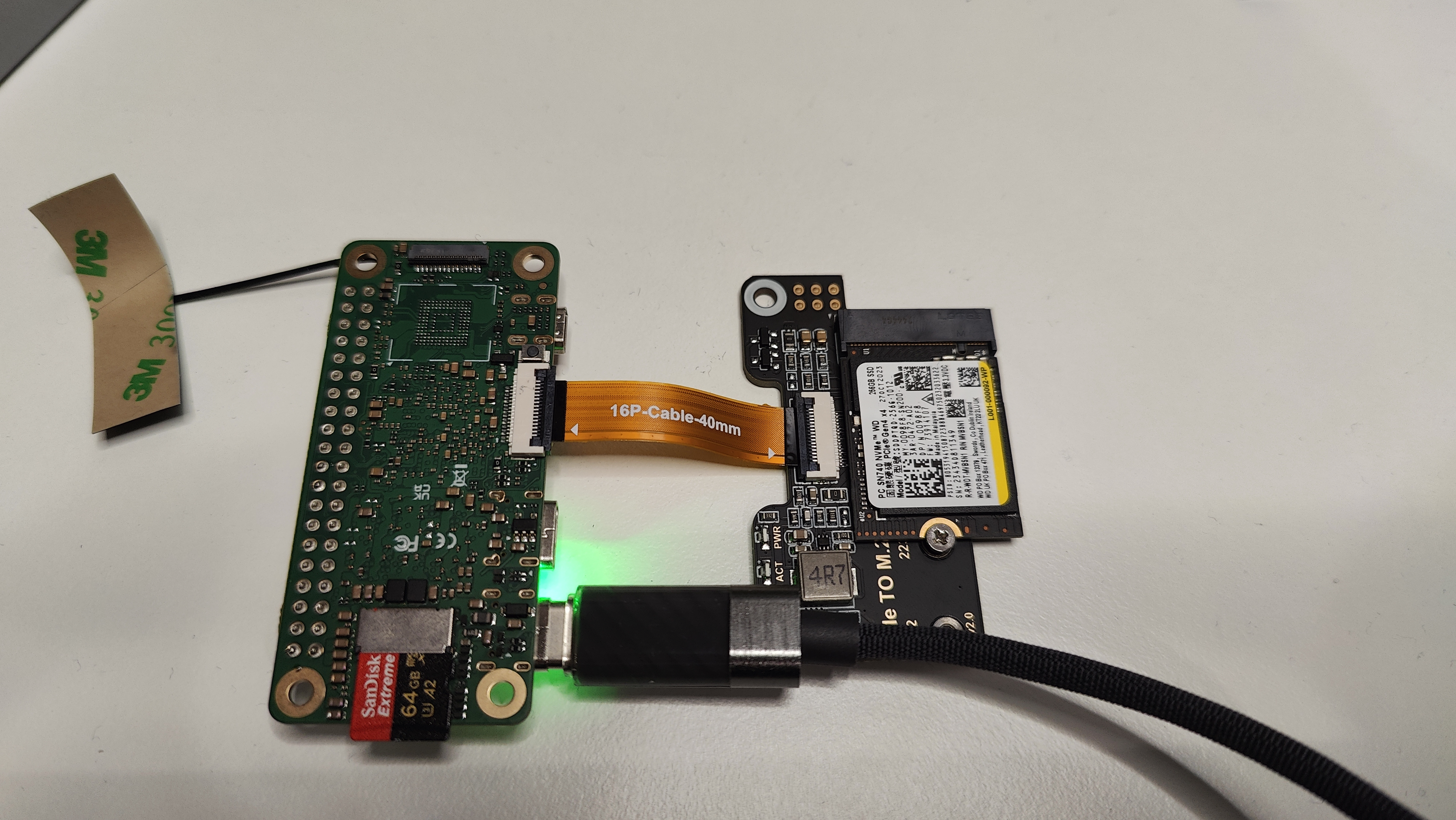

It seems there’s a difference already at the U-Boot stage: the SSD is detected on the A7A but not on the A7Z. Have you tried replacing the SSD or the adapter board? On my end, the one used with the Raspberry Pi 5 M.2 HAT is working normally.

Hey @feng,

I changed to a different NVMe HAT from 52Pi with PM9B1, and I see that the power LED is turned on.
But the NVMe is not available in the lsblk command.
This is the serial output.

[213]HELLO! BOOT0 is starting!!
[216]BOOT0 commit : {9f6fab4f-dirty}

[230]dram_para_total:0xf
[233]vaild para:6  select dram para10
[237][mmc]: mmc driver ver 2024-03-20 10:36
[246][mmc]: Wrong media type 0x0
[249][mmc]: ***Try SD card 0***
[264][mmc]: HSSDR52/SDR25 4 bit
[268][mmc]: 50000000 Hz
[270][mmc]: 60350 MB
[272][mmc]: ***SD/MMC 0 init OK!!!***
[277]DRAM BOOT DRIVE INFO: V0.601
[282]DRAM_VCC set to 1100 mv
[284]DRAM CLK =1800 MHZ
[287]DRAM Type =8 (8:LPDDR4,9:LPDDR5)
[387]Training result is = 7
[390]DRAM Pstate 1 training, frequency is 1200 Mhz
[500]Training result is = 7
[502]DRAM Pstate 2 training, frequency is 800 Mhz
[709]Training result is = 7
[711]DRAM Pstate 3 training, frequency is 400 Mhz
[3915]Training result is = 7
[3918]DRAM Pstate 0 training, frequency is 1800 Mhz
[3926]Actual DRAM SIZE =4096 M
[3929]DRAM SIZE =4096 MBytes, para1 = 310a, para2 = 10001001, dram_tpr13 = 6067
[3944]DRAM simple test OK.
[3952]error:bad magic.
[4018]error: dtb not found for scp
[4021]mmc not para
[4023]Jump to ATF: monitor_base = 0x48000000, uboot_base = 0x4a000000, optee_base = 0x0
NOTICE:  BL31: OP-TEE 32bit detected
NOTICE:  BL31: U-BOOT 32bit detected
NOTICE:  BL31: v2.5(debug):5fc237a6a
NOTICE:  BL31: Built : 09:05:28, Feb 26 2025
NOTICE:  BL31: No DTB found.
ERROR:   Error initializing runtime service opteed_fast


U-Boot 2018.07-10-boot-aw2501-g56bb8c6a2ea-dirty (Sep 16 2025 - 08:32:16 +0000) Allwinner Technology

[04.075]CPU:   Allwinner Family
[04.078]Model: Radxa Cubie A7A
I2C:   ready
[04.141]DRAM:  4 GiB
[04.150]Relocation Offset is: 75d89000
[04.204]secure enable bit: 0
[04.207]PMU: AXP8191
[04.209]PMU: AXP8191 VER_A
FDT ERROR:fdt_get_regulator_name:get property handle twi-supply error:FDT_ERR_INTERNAL
[04.221]bmu_axp515_probe pmic_bus_read fail
[04.225][AXP8191] onoff status: 0x50 = 0x1, 0x51 = 0x0
[04.230][AXP8191] charge status: 0x4 = 0x0
[04.233]CPU=1014 MHz,PLL6=1200 Mhz,AHB=200 Mhz, APB1=24Mhz  MBus=600Mhz
[04.240]gic: sec monitor mode
SPI ALL:   ready
[04.284]flash init start
[04.286]workmode = 0,storage type = 1
[04.290][mmc]: mmc driver ver uboot2018:2024-10-18 9:01:00 -- uboot2018:2025-03-28 10:03:00
[04.298][mmc]: get sdc_type fail and use default host:tm1.
[04.306][mmc]: can't find node "mmc0",will add new node
[04.311][mmc]: fdt err returned <no error>
[04.314][mmc]: Using default timing para
[04.318][mmc]: SUNXI SDMMC Controller Version:0x50530
[04.341][mmc]: card_caps:0x3000000a
[04.344][mmc]: host_caps:0x3000003f
[04.348]sunxi flash init ok
get value error
[04.357]Loading Environment from SUNXI_FLASH... OK
No ethernet found.
[04.366]Failed to found available display route
[04.370]Get sunxi drm device fail!
[04.380]the secure storage item0 copy0 magic is bad
[04.391]the secure storage item0 copy1 magic is bad
[04.396]usb burn from boot
delay time 0
[04.402]usb prepare ok
[04.705]overtime
[04.709]do_burn_from_boot usb : no usb exist
skip update boot_param
cann't get the boot_base from the env
[04.722]update part info
[04.727]battery temp is -1
[04.732]update bootcmd
[04.739](not enough data: expected >= 8 cells, got 4 cells)
pcie link up success
PCIe speed of Gen3
Override default fdtfile to allwinner/sun60i-a733-cubie-a7z.dtb
[05.061]libfdt fdt_check_header(): FDT_ERR_BADMAGIC
[05.067]libfdt fdt_path_offset() returned FDT_ERR_BADMAGIC
[05.072][mmc]: get sunxi-mmc0 string failed
[05.077]The storage not support sample function
[05.083]## error: update_fdt_dram_para_from_bootpara : FDT_ERR_NOTFOUND
[05.089]Invalid phandle:0
[05.091]only find 1073741818 phandle, format:endpoints=<&disp0_out_tcon0 &tcon0_out_rgb0>;
[05.100]Failed to found available display route
[05.105]chip id : 0x00005100 0x00004900 0x00004810 0x000022e2
[05.110]mac addr => 08:51:49:58:c0:b2
[05.113]chip id : 0x00005100 0x00004900 0x00004810 0x000022e2
[05.119]mac addr => 08:51:49:58:c0:b3
[05.123]/chosen/rng-seed node not exit
[05.126]no battery, disabled battery functons
[05.131]Could not find nodeoffset for bat_supply
[05.135]update dts
curr_device:0
Device: SUNXI SD/MMC
Manufacturer ID: ad
OEM: 4c53
Name: LX64G 
Bus Speed: 50000000
Mode : SD High Speed (50MHz)
Rd Block Len: 512
SD version 3.0
High Capacity: Yes
Capacity: 58.9 GiB
Bus Width: 4-bit
Erase Group Size: 512 Bytes
[ufs]info:Driver version 0.0.24 2024.12.30 16:00
[ufs]info:Cal words 0x60:val 0x959a0000, 0x64:val 0x4f219861
[ufs]err:uic c 16,uic a 0,1,0
[ufs]err:e 80000010,0,0,0,0
[ufs]err:int s 0,400
[ufs]err:Device not present
[ufs]err:wait device link startup failed
[ufs]info:peer link startup timeout
[ufs]info:Cal words 0x60:val 0x959a0000, 0x64:val 0x4f219861
[ufs]err:uic c 16,uic a 0,1,0
[ufs]err:e 80000010,0,0,0,0
[ufs]err:int s 0,400
[ufs]err:Device not present
[ufs]err:wait device link startup failed
[ufs]info:peer link startup timeout
[ufs]info:Cal words 0x60:val 0x959a0000, 0x64:val 0x4f219861
[ufs]err:uic c 16,uic a 0,1,0
[ufs]err:e 80000010,0,0,0,0
[ufs]err:int s 0,400
[ufs]err:Device not present
[ufs]err:wait device link startup failed
[ufs]info:peer link startup timeout
[ufs]info:Cal words 0x60:val 0x959a0000, 0x64:val 0x4f219861
[ufs]err:uic c 16,uic a 0,1,0
[ufs]err:e 80000010,0,0,0,0
[ufs]err:int s 0,400
[ufs]err:Device not present
[ufs]err:wait device link startup failed
[ufs]info:peer link startup timeout
[ufs]err:link startup failed -6
[ufs]err:ufshcd_probe() failed -6
fail to init ufs
sunxi_flash - sunxi_flash sub-system

Usage:
sunxi_flash sunxi_flash init storage_type
sunxi_flash read mem_addr part_name [size]
sunxi_flash read_mtd mem_addr part_name [size]
sunxi_flash write <mem_addr> <part_name> [size]
sunxi_flash write <mem_addr> <part_name> [offset] [size]
sunxi_flash write_mtd <mem_addr> <part_name>
sunxi_flash boot0 force_dram_update_size <new_val> 
sunxi_flash boot0 force_dram_update_flag <new_val> 

Hit any key to stop autoboot:  0 
starting USB...
USB0:   start sunxi  USB-DRD...
config usb clk ok
sunxi USB-DRD init ok...
USB EHCI 1.00
scanning bus 0 for devices... 1 USB Device(s) found
USB1:   start sunxi  USB1-Host...
config usb clk ok
sunxi USB1-Host init ok...
USB EHCI 1.00
scanning bus 1 for devices... 1 USB Device(s) found
       scanning usb for storage devices... 0 Storage Device(s) found

Device 0: device type unknown
... is now current device
** Bad device usb 0 **
mmc0 is current device
Scanning mmc 0:2...
Scanning mmc 0:3...
Found /boot/extlinux/extlinux.conf
Retrieving file: /boot/extlinux/extlinux.conf
1307 bytes read in 12 ms (105.5 KiB/s)
U-Boot menu
1:      Debian GNU/Linux 11 (bullseye) 5.15.147-11-a733
2:      Debian GNU/Linux 11 (bullseye) 5.15.147-11-a733 (rescue target)
Enter choice: 1:        Debian GNU/Linux 11 (bullseye) 5.15.147-11-a733
Retrieving file: /boot/initrd.img-5.15.147-11-a733
13546417 bytes read in 567 ms (22.8 MiB/s)
Retrieving file: /boot/vmlinuz-5.15.147-11-a733
19030528 bytes read in 795 ms (22.8 MiB/s)
append: root=UUID=a8f02731-860a-4d1c-abb7-fbd744b11bbe console=ttyAS0,115200n8 rootwait clk_ignore_unused mac_addr=08:51:49:58:c0:b2 mac1_addr=08:51:49:58:c0:b3 quiet splash loglevel=4 rw earlycon consoleblank=0 console=tty1 coherent_pool=2M irqchip.gicv3_pseudo_nmi=0 cgroup_enable=cpuset cgroup_memory=1 cgroup_enable=memory swapaccount=1 kasan=off
Retrieving file: /usr/lib/linux-image-5.15.147-11-a733/allwinner/sun60i-a733-cubie-a7z.dtb
193550 bytes read in 76 ms (2.4 MiB/s)
[12.851]libfdt fdt_path_offset() returned FDT_ERR_BADMAGIC
[12.860]The storage not support sample function
[12.944]Invalid phandle:0
[12.946]only find 1073741818 phandle, format:endpoints=<&disp0_out_tcon0 &tcon0_out_rgb0>;
[12.955]Failed to found available display route
[12.962]mac addr => 08:51:49:58:c0:b2
[12.965]mac addr => 08:51:49:58:c0:b3
[12.970]no battery, disabled battery functons
[12.977]update dts
stop sunxi USB-DRD ok...
stop sunxi USB1-Host ok...
   Loading Ramdisk to 49314000, end 49fff3b1 ... OK
[13.027]Starting kernel ...

[13.029]total: 13029 ms

[13.031][mmc]: MMC Device 2 not found
[13.035][mmc]: mmc 2 not find, so not exit
NOTICE:  [SCP] :wait arisc ready....
NOTICE:  [SCP] :arisc version: [d463b9da43dc50320f21ba51c6c51afe2db20d83]
NOTICE:  [SCP] :arisc startup ready
NOTICE:  [SCP] :arisc startup notify message feedback
NOTICE:  [SCP] :sunxi-arisc driver is starting
NOTICE:  BL3-1: Next image address = 0x40200000
NOTICE:  BL3-1: Next image spsr = 0x3c5
[    0.000000][    T0] AW BSP version: 2b77705786, 2025-10-27 03:01:52, RadxaOS SDK
[    0.077485][    T1] iommu_master csi_iommu: attach fail:-517
[    0.077529][    T1] sunxi-iommu-v2 3900000.iommu: master probe failed with -517
[    0.215964][    T1] sunxi:ccu_ddr:[ERR]: dram_clk:1800
[    0.215979][    T1] sunxi:ccu_ddr:[ERR]: dram_div:0x11080503
[    0.216234][    T1] sunxi:pin-2000000.pinctrl:[ERR]: unknown pin 
[    0.216238][    T1] sunxi:pin-2000000.pinctrl:[ERR]: unknown pin 
[    0.216287][    T1] sunxi:pin-2000000.pinctrl:[ERR]: unknown pin 
[    0.216290][    T1] sunxi:pin-2000000.pinctrl:[ERR]: unknown pin 
[    0.282768][    T1] sunxi:sunxi_mmc_host-4022000.sdmmc:[ERR]: manual set ocr
[    0.320046][    C0] sunxi:sunxi_mmc_host-4022000.sdmmc:[ERR]: smc 1 p2 err, cmd 1, RTO !!
[    0.330158][    C0] sunxi:sunxi_mmc_host-4022000.sdmmc:[ERR]: smc 1 p2 err, cmd 1, RTO !!
[    0.340258][    C0] sunxi:sunxi_mmc_host-4022000.sdmmc:[ERR]: smc 1 p2 err, cmd 1, RTO !!
[    0.350338][    C0] sunxi:sunxi_mmc_host-4022000.sdmmc:[ERR]: smc 1 p2 err, cmd 1, RTO !!
[    0.360414][    C0] sunxi:sunxi_mmc_host-4022000.sdmmc:[ERR]: smc 1 p2 err, cmd 1, RTO !!
[    0.369668][    T1] sunxi:sunxi_mmc_host-4021000.sdmmc:[ERR]: manual set ocr
[    0.377578][    C0] sunxi:sunxi_mmc_host-4022000.sdmmc:[ERR]: smc 1 p2 err, cmd 1, RTO !!
[    0.387637][    C0] sunxi:sunxi_mmc_host-4022000.sdmmc:[ERR]: smc 1 p2 err, cmd 1, RTO !!
[    0.397705][    C0] sunxi:sunxi_mmc_host-4022000.sdmmc:[ERR]: smc 1 p2 err, cmd 1, RTO !!
[    0.407773][    C0] sunxi:sunxi_mmc_host-4022000.sdmmc:[ERR]: smc 1 p2 err, cmd 1, RTO !!
[    0.417837][    C0] sunxi:sunxi_mmc_host-4022000.sdmmc:[ERR]: smc 1 p2 err, cmd 1, RTO !!
[    0.427912][    C0] sunxi:sunxi_mmc_host-4022000.sdmmc:[ERR]: smc 1 p2 err, cmd 1, RTO !!
[    0.437098][    C0] sunxi:sunxi_mmc_host-4021000.sdmmc:[ERR]: smc 2 p1 err, cmd 52, RTO !!
[    0.447278][    C0] sunxi:sunxi_mmc_host-4021000.sdmmc:[ERR]: smc 2 p1 err, cmd 52, RTO !!
[    0.456557][    C0] sunxi:sunxi_mmc_host-4022000.sdmmc:[ERR]: smc 1 p2 err, cmd 1, RTO !!
[    0.466642][    C0] sunxi:sunxi_mmc_host-4022000.sdmmc:[ERR]: smc 1 p2 err, cmd 1, RTO !!
[    0.476713][    C0] sunxi:sunxi_mmc_host-4022000.sdmmc:[ERR]: smc 1 p2 err, cmd 1, RTO !!
[    0.486800][    C0] sunxi:sunxi_mmc_host-4022000.sdmmc:[ERR]: smc 1 p2 err, cmd 1, RTO !!
[    0.495977][    C0] sunxi:sunxi_mmc_host-4021000.sdmmc:[ERR]: smc 2 p1 err, cmd 8, RTO !!
[    0.505955][    C0] sunxi:sunxi_mmc_host-4021000.sdmmc:[ERR]: smc 2 p1 err, cmd 5, RTO !!
[    0.515142][    C0] sunxi:sunxi_mmc_host-4022000.sdmmc:[ERR]: smc 1 p2 err, cmd 1, RTO !!
[    0.524320][    C0] sunxi:sunxi_mmc_host-4021000.sdmmc:[ERR]: smc 2 p1 err, cmd 5, RTO !!
[    0.534344][    C0] sunxi:sunxi_mmc_host-4021000.sdmmc:[ERR]: smc 2 p1 err, cmd 5, RTO !!
[    0.543582][    C0] sunxi:sunxi_mmc_host-4022000.sdmmc:[ERR]: smc 1 p2 err, cmd 1, RTO !!
[    0.544210][    T1] sunxi:sunxi_sidefuse init success!
[    0.552803][    C0] sunxi:sunxi_mmc_host-4021000.sdmmc:[ERR]: smc 2 p1 err, cmd 5, RTO !!
[    0.558560][    T1] sunxi:sunxi_smcdrm config service not available: FFFFFFFF
[    0.575855][    C0] sunxi:sunxi_mmc_host-4021000.sdmmc:[ERR]: smc 2 p1 err, cmd 55, RTO !!
[    0.585218][    C0] sunxi:sunxi_mmc_host-4021000.sdmmc:[ERR]: smc 2 p1 err, cmd 55, RTO !!
[    0.594549][    C0] sunxi:sunxi_mmc_host-4021000.sdmmc:[ERR]: smc 2 p1 err, cmd 55, RTO !!
[    0.603866][    C0] sunxi:sunxi_mmc_host-4021000.sdmmc:[ERR]: smc 2 p1 err, cmd 55, RTO !!
[    0.604427][    T1] sunxi:dwc3_sunxi_plat-12.usbc2:[ERR]: couldn't get drvvbus supply
[    0.622797][    C0] sunxi:sunxi_mmc_host-4022000.sdmmc:[ERR]: smc 1 p2 err, cmd 1, RTO !!
[    0.632032][    C0] sunxi:sunxi_mmc_host-4021000.sdmmc:[ERR]: smc 2 p1 err, cmd 1, RTO !!
[    0.642109][    C0] sunxi:sunxi_mmc_host-4022000.sdmmc:[ERR]: smc 1 p2 err, cmd 1, RTO !!
[    0.651623][    T1] debugfs: File 'port' in directory '/' already present!
[    0.652187][    C0] sunxi:sunxi_mmc_host-4022000.sdmmc:[ERR]: smc 1 p2 err, cmd 1, RTO !!
[    0.653083][    C0] sunxi:sunxi_mmc_host-4022000.sdmmc:[ERR]: smc 1 p2 err, cmd 1, RTO !!
[    0.653957][    C0] sunxi:sunxi_mmc_host-4022000.sdmmc:[ERR]: smc 1 p2 err, cmd 1, RTO !!
[    0.654823][    C0] sunxi:sunxi_mmc_host-4022000.sdmmc:[ERR]: smc 1 p2 err, cmd 1, RTO !!
[    0.655713][    C0] sunxi:sunxi_mmc_host-4022000.sdmmc:[ERR]: smc 1 p2 err, cmd 1, RTO !!
[    0.656586][    C0] sunxi:sunxi_mmc_host-4022000.sdmmc:[ERR]: smc 1 p2 err, cmd 1, RTO !!
[    0.657448][    C0] sunxi:sunxi_mmc_host-4022000.sdmmc:[ERR]: smc 1 p2 err, cmd 1, RTO !!
[    0.658312][    C0] sunxi:sunxi_mmc_host-4022000.sdmmc:[ERR]: smc 1 p2 err, cmd 1, RTO !!
[    0.659193][    C0] sunxi:sunxi_mmc_host-4022000.sdmmc:[ERR]: smc 1 p2 err, cmd 1, RTO !!
[    0.660074][    C0] sunxi:sunxi_mmc_host-4022000.sdmmc:[ERR]: smc 1 p2 err, cmd 1, RTO !!
[    0.678204][    T1] et7304 14-004e: fail to register tcpci port, -517
[    0.681120][    T1] sunxi:axp8191_temp_ctrl:[ERR]: axp8191-temp-ctrl device is not configed
[    0.732904][    C0] sunxi:sunxi_mmc_host-4022000.sdmmc:[ERR]: smc 1 p2 err, cmd 1, RTO !!
[    0.777944][    C0] sunxi:sunxi_mmc_host-4022000.sdmmc:[ERR]: smc 1 p2 err, cmd 1, RTO !!
[    0.788077][    C0] sunxi:sunxi_mmc_host-4022000.sdmmc:[ERR]: smc 1 p2 err, cmd 1, RTO !!
[    0.798163][    C0] sunxi:sunxi_mmc_host-4022000.sdmmc:[ERR]: smc 1 p2 err, cmd 1, RTO !!
[    0.807458][  T108] sunxi:sunxi_mmc_host-4022000.sdmmc:[ERR]: retry:set phase failed or over retry times
[    0.818164][  T108] sunxi:sunxi_mmc_host-4022000.sdmmc:[ERR]: retry:give up
[    0.864418][   T63] sunxi:sunxi_mmc_host-4020000.sdmmc:[ERR]: sdc0 :the host don't support tuning in kernel
[    0.892421][    T9] [drm:sunxi_drm_bind] *ERROR* none mode found init_connecting
[    0.900721][    T9] [drm:sunxi_drm_get_logo_info] *ERROR* init connecting not found sunxi_drm_get_logo_info
[    1.070082][    T9] sunxi:pcie-rc-6000000.pcie:[ERR]: Speed change timeout
[    1.102571][  T104] sunxi-ufs-pltfm 4520000.ufs: link startup failed 1
[    1.109938][  T104] sunxi-ufs-pltfm 4520000.ufs: UFS Host state=0
[    1.116788][  T104] sunxi-ufs-pltfm 4520000.ufs: outstanding reqs=0x0 tasks=0x0
[    1.125062][  T104] sunxi-ufs-pltfm 4520000.ufs: saved_err=0x0, saved_uic_err=0x0
[    1.133491][  T104] sunxi-ufs-pltfm 4520000.ufs: Device power mode=1, UIC link state=0
[    1.142405][  T104] sunxi-ufs-pltfm 4520000.ufs: PM in progress=0, sys. suspended=0
[    1.151027][  T104] sunxi-ufs-pltfm 4520000.ufs: Auto BKOPS=0, Host self-block=0
[    1.159342][  T104] sunxi-ufs-pltfm 4520000.ufs: Clk gate=1
[    1.160565][    T9] et7304 14-004e: et7304_probe successful
[    1.166168][  T104] sunxi-ufs-pltfm 4520000.ufs: last_hibern8_exit_tstamp at 0 us, hibern8_exit_cnt=0
[    1.182270][  T104] sunxi-ufs-pltfm 4520000.ufs: last intr at 1099210 us, last intr status=0x404
[    1.192078][  T104] sunxi-ufs-pltfm 4520000.ufs: error handling flags=0x0, req. abort count=0
[    1.201587][  T104] sunxi-ufs-pltfm 4520000.ufs: hba->ufs_version=0x300, Host capabilities=0x11870f1f, caps=0x0
[    1.201590][  T104] sunxi-ufs-pltfm 4520000.ufs: quirks=0x0, dev. quirks=0x0
[    1.201600][  T104] host_regs: 00000000: 11870f1f 00000000 00000300 00000000
[    1.220712][  T104] host_regs: 00000010: 00000000 00000926 00000000 00000000
[    1.220714][  T104] host_regs: 00000020: 00000000 e0000470 00000000 00000000
[    1.236460][  T104] host_regs: 00000030: 00000008 00000001 00000000 00000000
[    1.236462][  T104] host_regs: 00000040: 00000000 00000000 00000000 00000000
[    1.236463][  T104] host_regs: 00000050: 00000000 00000000 00000000 00000000
[    1.236464][  T104] host_regs: 00000060: 00000000 00000000 00000000 00000000
[    1.236466][  T104] host_regs: 00000070: 00000000 00000000 00000000 00000000
[    1.236468][  T104] host_regs: 00000080: 00000000 00000000 00000000 00000000
[    1.236469][  T104] host_regs: 00000090: 00000000 00000000 00000000 00000000
[    1.236471][  T104] sunxi-ufs-pltfm 4520000.ufs: No record of pa_err
[    1.236473][  T104] sunxi-ufs-pltfm 4520000.ufs: No record of dl_err
[    1.236475][  T104] sunxi-ufs-pltfm 4520000.ufs: No record of nl_err
[    1.236476][  T104] sunxi-ufs-pltfm 4520000.ufs: No record of tl_err
[    1.236477][  T104] sunxi-ufs-pltfm 4520000.ufs: No record of dme_err
[    1.236479][  T104] sunxi-ufs-pltfm 4520000.ufs: No record of auto_hibern8_err
[    1.236480][  T104] sunxi-ufs-pltfm 4520000.ufs: No record of fatal_err
[    1.236482][  T104] sunxi-ufs-pltfm 4520000.ufs: link_startup_fail[0] = 0x1 at 1100501 us
[    1.236484][  T104] sunxi-ufs-pltfm 4520000.ufs: link_startup_fail: total cnt=1
[    1.236485][  T104] sunxi-ufs-pltfm 4520000.ufs: No record of resume_fail
[    1.236487][  T104] sunxi-ufs-pltfm 4520000.ufs: No record of suspend_fail
[    1.236488][  T104] sunxi-ufs-pltfm 4520000.ufs: dev_reset[0] = 0x0 at 483895 us
[    1.236490][  T104] sunxi-ufs-pltfm 4520000.ufs: dev_reset: total cnt=1
[    1.236492][  T104] sunxi-ufs-pltfm 4520000.ufs: No record of host_reset
[    1.236494][  T104] sunxi-ufs-pltfm 4520000.ufs: No record of task_abort
[  OK  ] Finished Tell Plymouth To Write Out Runtime Data.
[  OK  ] Finished Coldplug All udev Devices.
[  OK  ] Finished Flush Journal to Persistent Storage.
         Starting Create Volatile Files and Directories...
[  OK  ] Started Rule-based Manager for Device Events and Files.
         Starting Show Plymouth Boot Screen...
[  OK  ] Finished Create Volatile Files and Directories.
[  OK  ] Started Entropy Daemon based on the HAVEGE algorithm.
         Starting Network Name Resolution...
         Starting Network Time Synchronization...
         Starting Update UTMP about System Boot/Shutdown...
[  OK  ] Started Show Plymouth Boot Screen.
[  OK  ] Started Forward Password R…s to Plymouth Directory Watch.
[  OK  ] Reached target Local Encrypted Volumes.
[  OK  ] Finished Update UTMP about System Boot/Shutdown.
[  OK  ] Found device /dev/ttyAS0.
[  OK  ] Reached target Hardware activated USB gadget.
[  OK  ] Started Network Time Synchronization.
[  OK  ] Reached target System Initialization.
[  OK  ] Started CUPS Scheduler.
[  OK  ] Started local-apt-repository.path.
[  OK  ] Started Daily Cleanup of Temporary Directories.
[  OK  ] Reached target Paths.
[  OK  ] Reached target System Time Set.
[  OK  ] Reached target System Time Synchronized.
[  OK  ] Started Daily apt download activities.
[  OK  ] Started Daily apt upgrade and clean activities.
[  OK  ] Started Periodic ext4 Onli…ata Check for All Filesystems.
[  OK  ] Started Discard unused blocks once a week.
[  OK  ] Started Refresh fwupd metadata regularly.
[  OK  ] Started Daily man-db regeneration.
[  OK  ] Reached target Timers.
[  OK  ] Listening on Avahi mDNS/DNS-SD Stack Activation Socket.
[  OK  ] Listening on CUPS Scheduler.
[  OK  ] Listening on D-Bus System Message Bus Socket.
[  OK  ] Reached target Sockets.
[  OK  ] Reached target Basic System.
         Starting Accounts Service...
         Starting Avahi mDNS/DNS-SD Stack...
[  OK  ] Started D-Bus System Message Bus.
         Starting Network Manager...
         Starting Remove Stale Onli…t4 Metadata Check Snapshots...
[    3.952011][  T318] sunxi:sound-mach:[ERR]: 514 simple_parse_of(): simple_dai_link_of failed
[    3.965969][  T104] sunxi:sound-mach:[ERR]: 514 simple_parse_of(): simple_dai_link_of failed
[    3.970271][  T283] sunxi:sound-codec-hdmi:[ERR]: 442 sunxi_codec_dev_probe(): register codec-hdmi success
[    3.982018][  T104] sunxi:sound-mach:[ERR]: 514 simple_parse_of(): simple_dai_link_of failed
[    3.995988][  T104] sunxi:sound-mach:[ERR]: 514 simple_parse_of(): simple_dai_link_of failed
[  OK  ] Started irqbalance daemon.
[    4.015240][  T104] debugfs: Directory '2535000.i2s3_plat' with parent 'allwinner-hdmi' already present!
[    4.055693][  T302] sunxi:vin:[ERR]: failed to get vipp16 IRQ resource
[    4.068410][  T302] sunxi:vin:[ERR]: failed to get vipp17 IRQ resource
         Starting Initialize hardware monitoring sensors...
[    4.125946][  T302] sunxi:vin:[ERR]: fetch vind_mclkpin_vol from device_tree failed
[    4.134724][  T302] sunxi:vin:[ERR]: vin_pinpower_get_set: set vind_mclkpin error, fail to set regulator voltage!
[  OK  ] Started rsetup configuration service.
         Starting RealtimeKit Scheduling Policy Service...
         Starting User Login Management...
         Starting Disk Manager...
         Starting Daemon for power management...
         Starting WPA supplicant...
         Starting Linux zramswap setup...
[  OK  ] Started Network Name Resolution.
[  OK  ] Finished Remove Stale Onli…ext4 Metadata Check Snapshots.
[  OK  ] Finished Initialize hardware monitoring sensors.
[  OK  ] Started Avahi mDNS/DNS-SD Stack.
[  OK  ] Started Network Manager.
[  OK  ] Started User Login Management.
[  OK  ] Started RealtimeKit Scheduling Policy Service.
[  OK  ] Created slice system-systemd\x2dfsck.slice.
[  OK  ] Reached target Host and Network Name Lookups.
[  OK  ] Listening on Load/Save RF …itch Status /dev/rfkill Watch.
         Starting Save/Restore Sound Card State...
         Starting Authorization Manager...
         Starting File System Check…/dev/disk/by-uuid/2F75-E89B...
         Starting Hostname Service...
[  OK  ] Started File System Check Daemon to report status.
[  OK  ] Started Authorization Manager.
[  OK  ] Started Hostname Service.
[  OK  ] Started Accounts Service.
[  OK  ] Started WPA supplicant.
[  OK  ] Reached target Network.
[  OK  ] Reached target Radxa USB OTG services.
         Starting OpenBSD Secure Shell server...
         Starting Permit User Sessions...
[  OK  ] Finished Linux zramswap setup.
         Starting File System Check…/dev/disk/by-uuid/2F76-3C7C...
[  OK  ] Finished Permit User Sessions.
         Starting Hold until boot process finishes up...
         Starting Terminate Plymouth Boot Screen...
[  OK  ] Started Simple Desktop Display Manager.
         Starting HDMI toggle (1280… 1920x1080) once after boot...
[    6.373933][  T319] ieee80211 phy0: 
[    6.373933][  T319] *******************************************************
[    6.373933][  T319] ** CAUTION: USING PERMISSIVE CUSTOM REGULATORY RULES **
[    6.373933][  T319] *******************************************************
[    7.686863][  T565] dma dma0chan0: The timeout func is not suportted or chan->private is NULL, timeout mode not used

Debian GNU/Linux 11 radxa-cubie-a7z ttyAS0

radxa-cubie-a7z login: radxa

I do see in the logs this time.

pcie link up success
PCIe speed of Gen3

Ok, It seems that u-boot can be recognized, but you mentioned that it isn’t detected in the system. You can run “lspci -vvv” to check the logs. Additionally, you can use the command “sudo dmesg” to export the system’s boot logs for inspection, as some logs don’t appear in the serial port

This is the output from the lspci -vvv

radxa@radxa-cubie-a7z:~$ sudo lspci -vvv
[sudo] password for radxa: 
00:00.0 PCI bridge: Device 1f6d:abcd (rev 01) (prog-if 00 [Normal decode])
        Control: I/O+ Mem+ BusMaster+ SpecCycle- MemWINV- VGASnoop- ParErr- Stepping- SERR+ FastB2B- DisINTx-
        Status: Cap+ 66MHz- UDF- FastB2B- ParErr- DEVSEL=fast >TAbort- <TAbort- <MAbort- >SERR- <PERR- INTx-
        Latency: 0, Cache Line Size: 32 bytes
        Interrupt: pin A routed to IRQ 255
        Region 0: Memory at 22000000 (32-bit, non-prefetchable) [size=1M]
        Bus: primary=00, secondary=01, subordinate=ff, sec-latency=0
        I/O behind bridge: 0000f000-00000fff [disabled]
        Memory behind bridge: fff00000-000fffff [disabled]
        Prefetchable memory behind bridge: 00000000fff00000-00000000000fffff [disabled]
        Secondary status: 66MHz- FastB2B- ParErr- DEVSEL=fast >TAbort- <TAbort- <MAbort- <SERR- <PERR-
        Expansion ROM at 22100000 [disabled] [size=64K]
        BridgeCtl: Parity- SERR+ NoISA- VGA- VGA16- MAbort- >Reset- FastB2B-
                PriDiscTmr- SecDiscTmr- DiscTmrStat- DiscTmrSERREn-
        Capabilities: [40] Power Management version 3
                Flags: PMEClk- DSI- D1+ D2- AuxCurrent=375mA PME(D0+,D1+,D2-,D3hot+,D3cold-)
                Status: D0 NoSoftRst+ PME-Enable- DSel=0 DScale=0 PME-
        Capabilities: [50] MSI: Enable- Count=1/1 Maskable+ 64bit+
                Address: 0000000000000000  Data: 0000
                Masking: 00000000  Pending: 00000000
        Capabilities: [70] Express (v2) Root Port (Slot-), MSI 00
                DevCap: MaxPayload 512 bytes, PhantFunc 0
                        ExtTag- RBE+
                DevCtl: CorrErr- NonFatalErr- FatalErr- UnsupReq-
                        RlxdOrd+ ExtTag- PhantFunc- AuxPwr- NoSnoop-
                        MaxPayload 128 bytes, MaxReadReq 512 bytes
                DevSta: CorrErr- NonFatalErr+ FatalErr- UnsupReq- AuxPwr- TransPend-
                LnkCap: Port #0, Speed 8GT/s, Width x1, ASPM L0s L1, Exit Latency L0s unlimited, L1 <64us
                        ClockPM- Surprise- LLActRep+ BwNot+ ASPMOptComp+
                LnkCtl: ASPM Disabled; RCB 64 bytes, Disabled- CommClk-
                        ExtSynch- ClockPM- AutWidDis- BWInt- AutBWInt-
                LnkSta: Speed 2.5GT/s (downgraded), Width x1 (ok)
                        TrErr- Train- SlotClk+ DLActive- BWMgmt- ABWMgmt-
                RootCap: CRSVisible+
                RootCtl: ErrCorrectable- ErrNon-Fatal- ErrFatal- PMEIntEna- CRSVisible+
                RootSta: PME ReqID 0000, PMEStatus- PMEPending-
                DevCap2: Completion Timeout: Range ABCD, TimeoutDis+ NROPrPrP+ LTR+
                         10BitTagComp- 10BitTagReq- OBFF Not Supported, ExtFmt- EETLPPrefix-
                         EmergencyPowerReduction Not Supported, EmergencyPowerReductionInit-
                         FRS+ LN System CLS Not Supported, TPHComp- ExtTPHComp- ARIFwd-
                         AtomicOpsCap: Routing- 32bit- 64bit- 128bitCAS-
                DevCtl2: Completion Timeout: 50us to 50ms, TimeoutDis- LTR- OBFF Disabled, ARIFwd-
                         AtomicOpsCtl: ReqEn- EgressBlck-
                LnkCap2: Supported Link Speeds: 2.5-8GT/s, Crosslink- Retimer- 2Retimers- DRS+
                LnkCtl2: Target Link Speed: 8GT/s, EnterCompliance- SpeedDis-
                         Transmit Margin: Normal Operating Range, EnterModifiedCompliance- ComplianceSOS-
                         Compliance De-emphasis: -6dB
                LnkSta2: Current De-emphasis Level: -3.5dB, EqualizationComplete- EqualizationPhase1-
                         EqualizationPhase2- EqualizationPhase3- LinkEqualizationRequest-
                         Retimer- 2Retimers- CrosslinkRes: unsupported, DRS-
                         DownstreamComp: Link Down - Not Determined
        Capabilities: [d0] Vital Product Data
                Not readable
        Capabilities: [100 v2] Advanced Error Reporting
                UESta:  DLP- SDES- TLP- FCP- CmpltTO+ CmpltAbrt- UnxCmplt- RxOF- MalfTLP- ECRC- UnsupReq- ACSViol-
                UEMsk:  DLP- SDES- TLP- FCP- CmpltTO- CmpltAbrt- UnxCmplt- RxOF- MalfTLP- ECRC- UnsupReq- ACSViol-
                UESvrt: DLP+ SDES+ TLP- FCP+ CmpltTO- CmpltAbrt- UnxCmplt- RxOF+ MalfTLP+ ECRC- UnsupReq- ACSViol-
                CESta:  RxErr- BadTLP- BadDLLP- Rollover- Timeout- AdvNonFatalErr-
                CEMsk:  RxErr- BadTLP- BadDLLP- Rollover- Timeout- AdvNonFatalErr+
                AERCap: First Error Pointer: 0e, ECRCGenCap+ ECRCGenEn- ECRCChkCap+ ECRCChkEn-
                        MultHdrRecCap- MultHdrRecEn- TLPPfxPres- HdrLogCap-
                HeaderLog: 00000000 00000000 00000000 00000000
                RootCmd: CERptEn- NFERptEn- FERptEn-
                RootSta: CERcvd- MultCERcvd- UERcvd+ MultUERcvd+
                         FirstFatal- NonFatalMsg+ FatalMsg- IntMsg 0
                ErrorSrc: ERR_COR: 0000 ERR_FATAL/NONFATAL: 0000
        Capabilities: [148 v1] Virtual Channel
                Caps:   LPEVC=0 RefClk=100ns PATEntryBits=1
                Arb:    Fixed+ WRR32- WRR64- WRR128-
                Ctrl:   ArbSelect=Fixed
                Status: InProgress-
                VC0:    Caps:   PATOffset=00 MaxTimeSlots=1 RejSnoopTrans-
                        Arb:    Fixed- WRR32- WRR64- WRR128- TWRR128- WRR256-
                        Ctrl:   Enable+ ID=0 ArbSelect=Fixed TC/VC=ff
                        Status: NegoPending+ InProgress-
                VC1:    Caps:   PATOffset=00 MaxTimeSlots=1 RejSnoopTrans-
                        Arb:    Fixed- WRR32- WRR64- WRR128- TWRR128- WRR256-
                        Ctrl:   Enable- ID=0 ArbSelect=Fixed TC/VC=00
                        Status: NegoPending- InProgress-
        Capabilities: [178 v1] Secondary PCI Express
                LnkCtl3: LnkEquIntrruptEn- PerformEqu-
                LaneErrStat: 0
        Capabilities: [188 v1] Access Control Services
                ACSCap: SrcValid+ TransBlk+ ReqRedir+ CmpltRedir+ UpstreamFwd+ EgressCtrl+ DirectTrans-
                ACSCtl: SrcValid- TransBlk- ReqRedir- CmpltRedir- UpstreamFwd- EgressCtrl- DirectTrans-
        Capabilities: [19c v1] L1 PM Substates
                L1SubCap: PCI-PM_L1.2+ PCI-PM_L1.1+ ASPM_L1.2+ ASPM_L1.1+ L1_PM_Substates+
                          PortCommonModeRestoreTime=10us PortTPowerOnTime=10us
                L1SubCtl1: PCI-PM_L1.2- PCI-PM_L1.1- ASPM_L1.2- ASPM_L1.1-
                           T_CommonMode=10us LTR1.2_Threshold=0ns
                L1SubCtl2: T_PwrOn=10us
        Capabilities: [1dc v1] FRS Queueing <?>
        Capabilities: [1ec v1] Readiness Time Reporting <?>
        Capabilities: [1f8 v1] Precision Time Measurement
                PTMCap: Requester:+ Responder:+ Root:+
                PTMClockGranularity: 16ns
                PTMControl: Enabled:- RootSelected:-
                PTMEffectiveGranularity: Unknown
        Capabilities: [204 v1] Vendor Specific Information: ID=0004 Rev=1 Len=054 <?>

here is the dmesg output
dmesg.txt.zip (14.7 KB)

From the logs you sent, it appears the kernel hasn’t detected your SSD at all. Coincidentally, we recently tested the latest image and found there are still a few incompatible SSD models. Additionally, the test results for A7A and A7Z may also have slight differences. Could you try replacing your SSD with a different one and test again?
I believe there is still room for optimization, and we need to maintain continuous communication with Allwinner.

Let me test the SSD and HAT from the 52Pi I showed earlier on both the A7A and A7Z with the Samsung PM9B1 and Western Digital SSD I have here. I will not use the Waveshare HAT any more for the tests.

I also have ordered the official Raspberry Pi HAT and will test on that also.