Hey @feng ,
I tested the latest build you provided. I still have the same behaviour.
Results:
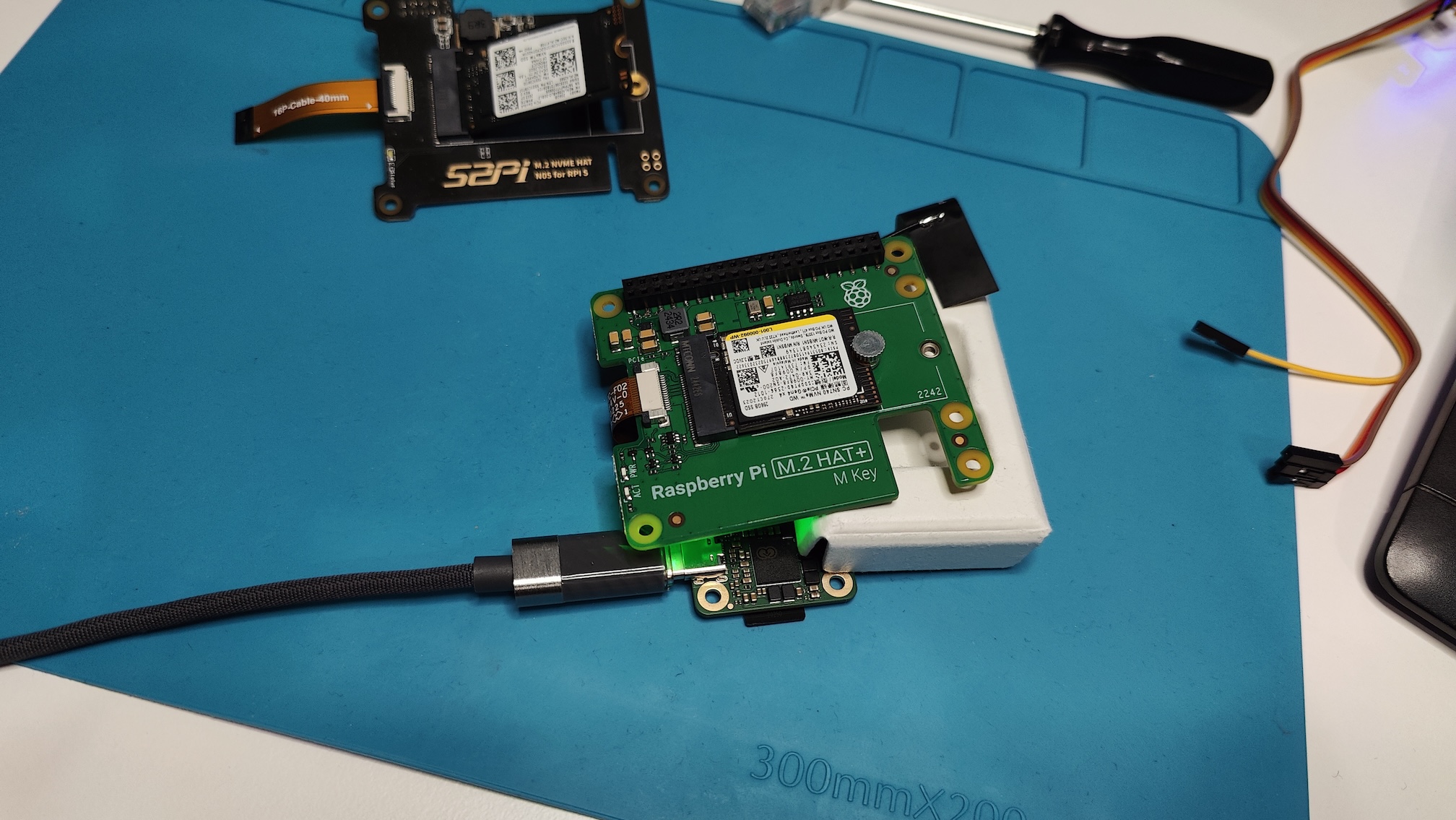
HAT Used: Raspberry pi HAT
NVMe: WD PC SN740 → Working with Gen3 speeds about 628 MB/s
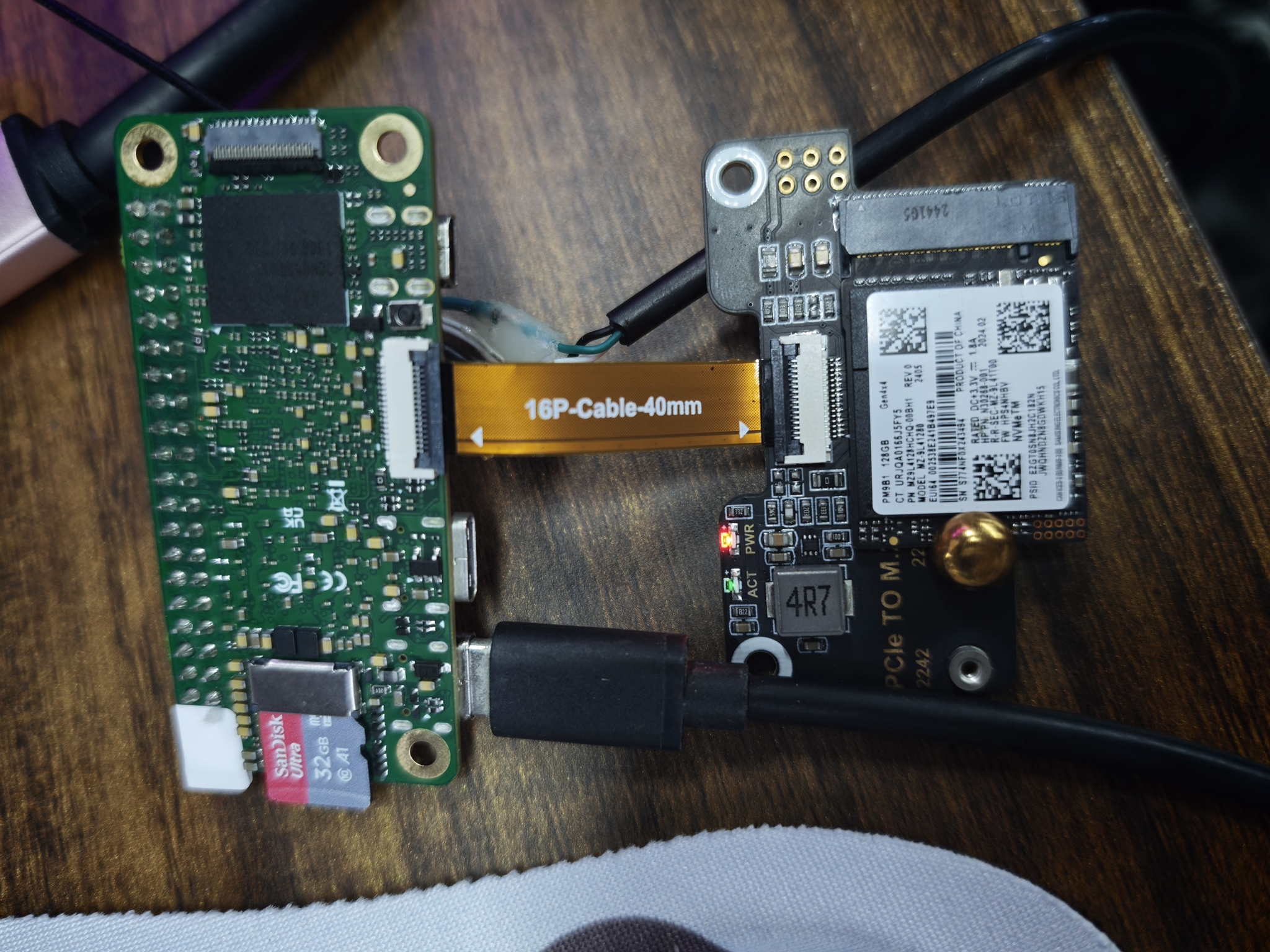
NVMe: Samsung PM9B1 Gen4x4 → Not working
UART logs show timeout
[71]HELLO! BOOT0 is starting!
[74]BOOT0 commit : {9f6fab4f-dirty}
[88]dram_para_total:0xf
[90]vaild para:6 select dram para10
[94][mmc]: mmc driver ver 2024-03-20 10:36
[104][mmc]: Wrong media type 0x0
[107][mmc]: ***Try SD card 0***
[122][mmc]: HSSDR52/SDR25 4 bit
[125][mmc]: 50000000 Hz
[127][mmc]: 60350 MB
[129][mmc]: ***SD/MMC 0 init OK!!!***
[135]DRAM BOOT DRIVE INFO: V0.601
[139]DRAM_VCC set to 1100 mv
[142]DRAM CLK =1800 MHZ
[144]DRAM Type =8 (8:LPDDR4,9:LPDDR5)
[245]Training result is = 7
[247]DRAM Pstate 1 training, frequency is 1200 Mhz
[357]Training result is = 7
[360]DRAM Pstate 2 training, frequency is 800 Mhz
[566]Training result is = 7
[569]DRAM Pstate 3 training, frequency is 400 Mhz
[3773]Training result is = 7
[3775]DRAM Pstate 0 training, frequency is 1800 Mhz
[3784]Actual DRAM SIZE =4096 M
[3787]DRAM SIZE =4096 MBytes, para1 = 310a, para2 = 10001001, dram_tpr13 = 6067
[3802]DRAM simple test OK.
[3810]error:bad magic.
[3875]error: dtb not found for scp
[3878]mmc not para
[3880]Jump to ATF: monitor_base = 0x48000000, uboot_base = 0x4a000000, optee_base = 0x0
NOTICE: BL31: OP-TEE 32bit detected
NOTICE: BL31: U-BOOT 32bit detected
NOTICE: BL31: v2.5(debug):5fc237a6a
NOTICE: BL31: Built : 09:05:28, Feb 26 2025
NOTICE: BL31: No DTB found.
ERROR: Error initializing runtime service opteed_fast
U-Boot 2018.07-11-boot-aw2501-g4f803d1684e-dirty (Dec 05 2025 - 10:08:58 +0000) Allwinner Technology
[03.932]CPU: Allwinner Family
[03.935]Model: Radxa Cubie A7A
I2C: ready
[03.999]DRAM: 4 GiB
[04.007]Relocation Offset is: 75d89000
[04.061]secure enable bit: 0
[04.065]PMU: AXP8191
[04.067]PMU: AXP8191 VER_A
FDT ERROR:fdt_get_regulator_name:get property handle twi-supply error:FDT_ERR_INTERNAL
[04.079]bmu_axp515_probe pmic_bus_read fail
[04.082][AXP8191] onoff status: 0x50 = 0x1, 0x51 = 0x0
[04.087][AXP8191] charge status: 0x4 = 0x0
[04.091]CPU=1014 MHz,PLL6=1200 Mhz,AHB=200 Mhz, APB1=24Mhz MBus=600Mhz
[04.097]gic: sec monitor mode
SPI ALL: ready
[04.142]flash init start
[04.144]workmode = 0,storage type = 1
[04.147][mmc]: mmc driver ver uboot2018:2024-10-18 9:01:00 -- uboot2018:2025-03-28 10:03:00
[04.155][mmc]: get sdc_type fail and use default host:tm1.
[04.163][mmc]: can't find node "mmc0",will add new node
[04.168][mmc]: fdt err returned <no error>
[04.172][mmc]: Using default timing para
[04.176][mmc]: SUNXI SDMMC Controller Version:0x50530
[04.198][mmc]: card_caps:0x3000000a
[04.201][mmc]: host_caps:0x3000003f
[04.205]sunxi flash init ok
get value error
[04.215]Loading Environment from SUNXI_FLASH... OK
No ethernet found.
[04.252]NOT support bridge yet
[04.254]Warn: no find panel or bridge
[04.259]hdmi0@5520000 disconnected
[04.262]drm hdmi get mode: 1920x1080@60Hz
hdmi0@5520000: use force output detailed mode clock 148500 kHz, flags[5]
H: 1920 2008 2052 2200
V: 1080 1084 1089 1125
bus_format: 0
clk_set_rate: <NULL> has NULL parent
[04.366]suxni tcon hdmi set rate: 148500000Hz and get diff: -148500000Hz
[04.440]the secure storage item0 copy0 magic is bad
[04.451]the secure storage item0 copy1 magic is bad
[04.456]usb burn from boot
delay time 0
[04.462]usb prepare ok
[04.765]overtime
[04.769]do_burn_from_boot usb : no usb exist
skip update boot_param
cann't get the boot_base from the env
[04.782]update part info
[04.787]battery temp is -1
[04.791]update bootcmd
[04.799](not enough data: expected >= 8 cells, got 4 cells)
Link up timeout
Speed change timeout
PCIe speed of Gen1
Override default fdtfile to allwinner/sun60i-a733-cubie-a7z.dtb
[07.243]libfdt fdt_check_header(): FDT_ERR_BADMAGIC
[07.249]libfdt fdt_path_offset() returned FDT_ERR_BADMAGIC
[07.255][mmc]: get sunxi-mmc0 string failed
[07.259]The storage not support sample function
[07.265]## error: update_fdt_dram_para_from_bootpara : FDT_ERR_NOTFOUND
ret 0
[07.276]chip id : 0x00005100 0x00004900 0x00004810 0x000022e2
[07.281]mac addr => 08:51:49:58:c0:b2
[07.284]chip id : 0x00005100 0x00004900 0x00004810 0x000022e2
[07.290]mac addr => 08:51:49:58:c0:b3
[07.294]/chosen/rng-seed node not exit
[07.297]no battery, disabled battery functons
[07.302]Could not find nodeoffset for bat_supply
[07.306]update dts
curr_device:0
Device: SUNXI SD/MMC
Manufacturer ID: ad
OEM: 4c53
Name: LX64G
Bus Speed: 50000000
Mode : SD High Speed (50MHz)
Rd Block Len: 512
SD version 3.0
High Capacity: Yes
Capacity: 58.9 GiB
Bus Width: 4-bit
Erase Group Size: 512 Bytes
[ufs]info:Driver version 0.0.24 2024.12.30 16:00
[ufs]info:Cal words 0x60:val 0x959a0000, 0x64:val 0x4f219861
[ufs]err:uic c 16,uic a 0,1,0
[ufs]err:e 80000010,0,0,0,0
[ufs]err:int s 0,400
[ufs]err:Device not present
[ufs]err:wait device link startup failed
[ufs]info:peer link startup timeout
[ufs]info:Cal words 0x60:val 0x959a0000, 0x64:val 0x4f219861
[ufs]err:uic c 16,uic a 0,1,0
[ufs]err:e 80000010,0,0,0,0
[ufs]err:int s 0,400
[ufs]err:Device not present
[ufs]err:wait device link startup failed
[ufs]info:peer link startup timeout
[ufs]info:Cal words 0x60:val 0x959a0000, 0x64:val 0x4f219861
[ufs]err:uic c 16,uic a 0,1,0
[ufs]err:e 80000010,0,0,0,0
[ufs]err:int s 0,400
[ufs]err:Device not present
[ufs]err:wait device link startup failed
[ufs]info:peer link startup timeout
[ufs]info:Cal words 0x60:val 0x959a0000, 0x64:val 0x4f219861
[ufs]err:uic c 16,uic a 0,1,0
[ufs]err:e 80000010,0,0,0,0
[ufs]err:int s 0,400
[ufs]err:Device not present
[ufs]err:wait device link startup failed
[ufs]info:peer link startup timeout
[ufs]err:link startup failed -6
[ufs]err:ufshcd_probe() failed -6
fail to init ufs
sunxi_flash - sunxi_flash sub-system
Usage:
sunxi_flash sunxi_flash init storage_type
sunxi_flash read mem_addr part_name [size]
sunxi_flash read_mtd mem_addr part_name [size]
sunxi_flash write <mem_addr> <part_name> [size]
sunxi_flash write <mem_addr> <part_name> [offset] [size]
sunxi_flash write_mtd <mem_addr> <part_name>
sunxi_flash boot0 force_dram_update_size <new_val>
sunxi_flash boot0 force_dram_update_flag <new_val>
Hit any key to stop autoboot: 0
starting USB...
USB0: start sunxi USB-DRD...
config usb clk ok
sunxi USB-DRD init ok...
USB EHCI 1.00
scanning bus 0 for devices... 1 USB Device(s) found
USB1: start sunxi USB1-Host...
config usb clk ok
sunxi USB1-Host init ok...
USB EHCI 1.00
scanning bus 1 for devices... 1 USB Device(s) found
scanning usb for storage devices... 0 Storage Device(s) found
Device 0: device type unknown
... is now current device
** Bad device usb 0 **
** Bad device usb 0 **
mmc0 is current device
Scanning mmc 0:2...
Scanning mmc 0:3...
Found /boot/extlinux/extlinux.conf
Retrieving file: /boot/extlinux/extlinux.conf
1307 bytes read in 8 ms (159.2 KiB/s)
U-Boot menu
1: Debian GNU/Linux 11 (bullseye) 5.15.147-12-a733
2: Debian GNU/Linux 11 (bullseye) 5.15.147-12-a733 (rescue target)
Enter choice: 1: Debian GNU/Linux 11 (bullseye) 5.15.147-12-a733
Retrieving file: /boot/initrd.img-5.15.147-12-a733
31162598 bytes read in 1295 ms (22.9 MiB/s)
Retrieving file: /boot/vmlinuz-5.15.147-12-a733
19096064 bytes read in 800 ms (22.8 MiB/s)
append: root=UUID=594ce9e9-a8f6-477f-8871-ef6c16944293 console=ttyAS0,115200n8 rootwait clk_ignore_unused mac_addr=08:51:49:58:c0:b2 mac1_addr=08:51:49:58:c0:b3 quiet splash loglevel=4 rw earlycon consoleblank=0 console=tty1 coherent_pool=2M irqchip.gicv3_pseudo_nmi=0 cgroup_enable=cpuset cgroup_memory=1 cgroup_enable=memory swapaccount=1 kasan=off
Retrieving file: /usr/lib/linux-image-5.15.147-12-a733/allwinner/sun60i-a733-cubie-a7z.dtb
193692 bytes read in 84 ms (2.2 MiB/s)
[15.762]libfdt fdt_path_offset() returned FDT_ERR_BADMAGIC
[15.771]The storage not support sample function
ret 0
[15.873]mac addr => 08:51:49:58:c0:b2
[15.877]mac addr => 08:51:49:58:c0:b3
[15.881]no battery, disabled battery functons
[15.888]update dts
stop sunxi USB-DRD ok...
stop sunxi USB1-Host ok...
Loading Ramdisk to 48247000, end 49fff0e6 ... OK
ERROR: reserving fdt memory region failed (addr=48000000 size=1000000)
[15.968]Starting kernel ...
[15.971]total: 15971 ms
[15.973][mmc]: MMC Device 2 not found
[15.976][mmc]: mmc 2 not find, so not exit
NOTICE: [SCP] :wait arisc ready....
NOTICE: [SCP] :arisc version: [d463b9da43dc50320f21ba51c6c51afe2db20d83]
NOTICE: [SCP] :arisc startup ready
NOTICE: [SCP] :arisc startup notify message feedback
NOTICE: [SCP] :sunxi-arisc driver is starting
NOTICE: BL3-1: Next image address = 0x40200000
NOTICE: BL3-1: Next image spsr = 0x3c5
[ 0.000000][ T0] AW BSP version: 1745c46935, 2025-12-09 07:23:26, RadxaOS SDK
[ 0.077748][ T1] iommu_master csi_iommu: attach fail:-517
[ 0.077792][ T1] sunxi-iommu-v2 3900000.iommu: master probe failed with -517
[ 0.215432][ T1] sunxi:ccu_ddr:[ERR]: dram_clk:1800
[ 0.215447][ T1] sunxi:ccu_ddr:[ERR]: dram_div:0x11080503
[ 0.215711][ T1] sunxi:pin-2000000.pinctrl:[ERR]: unknown pin
[ 0.215716][ T1] sunxi:pin-2000000.pinctrl:[ERR]: unknown pin
[ 0.215760][ T1] sunxi:pin-2000000.pinctrl:[ERR]: unknown pin
[ 0.215763][ T1] sunxi:pin-2000000.pinctrl:[ERR]: unknown pin
[ 0.283031][ T1] sunxi:sunxi_mmc_host-4022000.sdmmc:[ERR]: manual set ocr
[ 0.322535][ C0] sunxi:sunxi_mmc_host-4022000.sdmmc:[ERR]: smc 1 p2 err, cmd 1, RTO !!
[ 0.332617][ C0] sunxi:sunxi_mmc_host-4022000.sdmmc:[ERR]: smc 1 p2 err, cmd 1, RTO !!
[ 0.342699][ C0] sunxi:sunxi_mmc_host-4022000.sdmmc:[ERR]: smc 1 p2 err, cmd 1, RTO !!
[ 0.352749][ C0] sunxi:sunxi_mmc_host-4022000.sdmmc:[ERR]: smc 1 p2 err, cmd 1, RTO !!
[ 0.362818][ C0] sunxi:sunxi_mmc_host-4022000.sdmmc:[ERR]: smc 1 p2 err, cmd 1, RTO !!
[ 0.372068][ T1] sunxi:sunxi_mmc_host-4021000.sdmmc:[ERR]: manual set ocr
[ 0.372887][ C0] sunxi:sunxi_mmc_host-4022000.sdmmc:[ERR]: smc 1 p2 err, cmd 1, RTO !!
[ 0.390006][ C0] sunxi:sunxi_mmc_host-4022000.sdmmc:[ERR]: smc 1 p2 err, cmd 1, RTO !!
[ 0.400077][ C0] sunxi:sunxi_mmc_host-4022000.sdmmc:[ERR]: smc 1 p2 err, cmd 1, RTO !!
[ 0.410141][ C0] sunxi:sunxi_mmc_host-4022000.sdmmc:[ERR]: smc 1 p2 err, cmd 1, RTO !!
[ 0.420215][ C0] sunxi:sunxi_mmc_host-4022000.sdmmc:[ERR]: smc 1 p2 err, cmd 1, RTO !!
[ 0.430281][ C0] sunxi:sunxi_mmc_host-4022000.sdmmc:[ERR]: smc 1 p2 err, cmd 1, RTO !!
[ 0.440333][ C0] sunxi:sunxi_mmc_host-4022000.sdmmc:[ERR]: smc 1 p2 err, cmd 1, RTO !!
[ 0.449501][ C0] sunxi:sunxi_mmc_host-4021000.sdmmc:[ERR]: smc 2 p1 err, cmd 52, RTO !!
[ 0.459604][ C0] sunxi:sunxi_mmc_host-4021000.sdmmc:[ERR]: smc 2 p1 err, cmd 52, RTO !!
[ 0.468880][ C0] sunxi:sunxi_mmc_host-4022000.sdmmc:[ERR]: smc 1 p2 err, cmd 1, RTO !!
[ 0.478977][ C0] sunxi:sunxi_mmc_host-4022000.sdmmc:[ERR]: smc 1 p2 err, cmd 1, RTO !!
[ 0.489058][ C0] sunxi:sunxi_mmc_host-4022000.sdmmc:[ERR]: smc 1 p2 err, cmd 1, RTO !!
[ 0.499173][ C0] sunxi:sunxi_mmc_host-4022000.sdmmc:[ERR]: smc 1 p2 err, cmd 1, RTO !!
[ 0.508361][ C0] sunxi:sunxi_mmc_host-4021000.sdmmc:[ERR]: smc 2 p1 err, cmd 8, RTO !!
[ 0.518369][ C0] sunxi:sunxi_mmc_host-4021000.sdmmc:[ERR]: smc 2 p1 err, cmd 5, RTO !!
[ 0.527541][ C0] sunxi:sunxi_mmc_host-4022000.sdmmc:[ERR]: smc 1 p2 err, cmd 1, RTO !!
[ 0.536725][ C0] sunxi:sunxi_mmc_host-4021000.sdmmc:[ERR]: smc 2 p1 err, cmd 5, RTO !!
[ 0.546702][ C0] sunxi:sunxi_mmc_host-4021000.sdmmc:[ERR]: smc 2 p1 err, cmd 5, RTO !!
[ 0.555901][ C0] sunxi:sunxi_mmc_host-4022000.sdmmc:[ERR]: smc 1 p2 err, cmd 1, RTO !!
[ 0.556534][ T1] sunxi:sunxi_sidefuse init success!
[ 0.565086][ C0] sunxi:sunxi_mmc_host-4021000.sdmmc:[ERR]: smc 2 p1 err, cmd 5, RTO !!
[ 0.570820][ T1] sunxi:sunxi_smcdrm config service not available: FFFFFFFF
[ 0.588017][ C0] sunxi:sunxi_mmc_host-4021000.sdmmc:[ERR]: smc 2 p1 err, cmd 55, RTO !!
[ 0.597287][ C0] sunxi:sunxi_mmc_host-4021000.sdmmc:[ERR]: smc 2 p1 err, cmd 55, RTO !!
[ 0.606567][ C0] sunxi:sunxi_mmc_host-4021000.sdmmc:[ERR]: smc 2 p1 err, cmd 55, RTO !!
[ 0.615846][ C0] sunxi:sunxi_mmc_host-4021000.sdmmc:[ERR]: smc 2 p1 err, cmd 55, RTO !!
[ 0.617047][ T1] sunxi:dwc3_sunxi_plat-12.usbc2:[ERR]: couldn't get drvvbus supply
[ 0.634742][ C0] sunxi:sunxi_mmc_host-4022000.sdmmc:[ERR]: smc 1 p2 err, cmd 1, RTO !!
[ 0.643914][ C0] sunxi:sunxi_mmc_host-4021000.sdmmc:[ERR]: smc 2 p1 err, cmd 1, RTO !!
[ 0.653955][ C0] sunxi:sunxi_mmc_host-4022000.sdmmc:[ERR]: smc 1 p2 err, cmd 1, RTO !!
[ 0.663991][ C0] sunxi:sunxi_mmc_host-4022000.sdmmc:[ERR]: smc 1 p2 err, cmd 1, RTO !!
[ 0.674038][ C0] sunxi:sunxi_mmc_host-4022000.sdmmc:[ERR]: smc 1 p2 err, cmd 1, RTO !!
[ 0.684080][ T1] et7304 14-004e: fail to register tcpci port, -517
[ 0.684105][ C0] sunxi:sunxi_mmc_host-4022000.sdmmc:[ERR]: smc 1 p2 err, cmd 1, RTO !!
[ 0.701327][ C0] sunxi:sunxi_mmc_host-4022000.sdmmc:[ERR]: smc 1 p2 err, cmd 1, RTO !!
[ 0.711367][ C0] sunxi:sunxi_mmc_host-4022000.sdmmc:[ERR]: smc 1 p2 err, cmd 1, RTO !!
[ 0.721407][ C0] sunxi:sunxi_mmc_host-4022000.sdmmc:[ERR]: smc 1 p2 err, cmd 1, RTO !!
[ 0.722365][ T1] sunxi:axp8191_temp_ctrl:[ERR]: axp8191-temp-ctrl device is not configed
[ 0.740796][ C0] sunxi:sunxi_mmc_host-4022000.sdmmc:[ERR]: smc 1 p2 err, cmd 1, RTO !!
[ 0.750837][ C0] sunxi:sunxi_mmc_host-4022000.sdmmc:[ERR]: smc 1 p2 err, cmd 1, RTO !!
[ 0.760896][ C0] sunxi:sunxi_mmc_host-4022000.sdmmc:[ERR]: smc 1 p2 err, cmd 1, RTO !!
[ 0.771011][ C0] sunxi:sunxi_mmc_host-4022000.sdmmc:[ERR]: smc 1 p2 err, cmd 1, RTO !!
[ 0.781075][ C0] sunxi:sunxi_mmc_host-4022000.sdmmc:[ERR]: smc 1 p2 err, cmd 1, RTO !!
[ 0.791157][ C0] sunxi:sunxi_mmc_host-4022000.sdmmc:[ERR]: smc 1 p2 err, cmd 1, RTO !!
[ 0.801192][ C0] sunxi:sunxi_mmc_host-4022000.sdmmc:[ERR]: smc 1 p2 err, cmd 1, RTO !!
[ 0.810415][ T108] sunxi:sunxi_mmc_host-4022000.sdmmc:[ERR]: retry:set phase failed or over retry times
[ 0.821060][ T108] sunxi:sunxi_mmc_host-4022000.sdmmc:[ERR]: retry:give up
[ 0.851796][ T63] sunxi:sunxi_mmc_host-4020000.sdmmc:[ERR]: sdc0 :the host don't support tuning in kernel
[ 1.087139][ T104] sunxi-ufs-pltfm 4520000.ufs: link startup failed 1
[ 1.094497][ T104] sunxi-ufs-pltfm 4520000.ufs: UFS Host state=0
[ 1.101340][ T104] sunxi-ufs-pltfm 4520000.ufs: outstanding reqs=0x0 tasks=0x0
[ 1.109559][ T104] sunxi-ufs-pltfm 4520000.ufs: saved_err=0x0, saved_uic_err=0x0
[ 1.117961][ T104] sunxi-ufs-pltfm 4520000.ufs: Device power mode=1, UIC link state=0
[ 1.126867][ T104] sunxi-ufs-pltfm 4520000.ufs: PM in progress=0, sys. suspended=0
[ 1.135464][ T104] sunxi-ufs-pltfm 4520000.ufs: Auto BKOPS=0, Host self-block=0
[ 1.135469][ T104] sunxi-ufs-pltfm 4520000.ufs: Clk gate=1
[ 1.135472][ T104] sunxi-ufs-pltfm 4520000.ufs: last_hibern8_exit_tstamp at 0 us, hibern8_exit_cnt=0
[ 1.135476][ T104] sunxi-ufs-pltfm 4520000.ufs: last intr at 1083679 us, last intr status=0x404
[ 1.135480][ T104] sunxi-ufs-pltfm 4520000.ufs: error handling flags=0x0, req. abort count=0
[ 1.135484][ T104] sunxi-ufs-pltfm 4520000.ufs: hba->ufs_version=0x300, Host capabilities=0x11870f1f, caps=0x0
[ 1.135488][ T104] sunxi-ufs-pltfm 4520000.ufs: quirks=0x0, dev. quirks=0x0
[ 1.135503][ T104] host_regs: 00000000: 11870f1f 00000000 00000300 00000000
[ 1.135507][ T104] host_regs: 00000010: 00000000 00000926 00000000 00000000
[ 1.135511][ T104] host_regs: 00000020: 00000000 e0000470 00000000 00000000
[ 1.135515][ T104] host_regs: 00000030: 00000008 00000001 00000000 00000000
[ 1.135519][ T104] host_regs: 00000040: 00000000 00000000 00000000 00000000
[ 1.135522][ T104] host_regs: 00000050: 00000000 00000000 00000000 00000000
[ 1.135526][ T104] host_regs: 00000060: 00000000 00000000 00000000 00000000
[ 1.135530][ T104] host_regs: 00000070: 00000000 00000000 00000000 00000000
[ 1.135534][ T104] host_regs: 00000080: 00000000 00000000 00000000 00000000
[ 1.135538][ T104] host_regs: 00000090: 00000000 00000000 00000000 00000000
[ 1.135542][ T104] sunxi-ufs-pltfm 4520000.ufs: No record of pa_err
[ 1.135545][ T104] sunxi-ufs-pltfm 4520000.ufs: No record of dl_err
[ 1.135548][ T104] sunxi-ufs-pltfm 4520000.ufs: No record of nl_err
[ 1.135551][ T104] sunxi-ufs-pltfm 4520000.ufs: No record of tl_err
[ 1.135553][ T104] sunxi-ufs-pltfm 4520000.ufs: No record of dme_err
[ 1.135556][ T104] sunxi-ufs-pltfm 4520000.ufs: No record of auto_hibern8_err
[ 1.135559][ T104] sunxi-ufs-pltfm 4520000.ufs: No record of fatal_err
[ 1.135561][ T104] sunxi-ufs-pltfm 4520000.ufs: link_startup_fail[0] = 0x1 at 1084823 us
[ 1.135566][ T104] sunxi-ufs-pltfm 4520000.ufs: link_startup_fail: total cnt=1
[ 1.135569][ T104] sunxi-ufs-pltfm 4520000.ufs: No record of resume_fail
[ 1.135571][ T104] sunxi-ufs-pltfm 4520000.ufs: No record of suspend_fail
[ 1.135574][ T104] sunxi-ufs-pltfm 4520000.ufs: dev_reset[0] = 0x0 at 501254 us
[ 1.135578][ T104] sunxi-ufs-pltfm 4520000.ufs: dev_reset: total cnt=1
[ 1.135581][ T104] sunxi-ufs-pltfm 4520000.ufs: No record of host_reset
[ 1.135584][ T104] sunxi-ufs-pltfm 4520000.ufs: No record of task_abort
[ 1.712192][ T116] et7304 14-004e: et7304_probe successful
[ 2.113083][ T65] cma: cma_alloc: reserved: alloc failed, req-size: 512 pages, ret: -12
[ 64.965031][ T104] nvme 0000:01:00.0: can't change power state from D3cold to D0 (config space inaccessible)
[ OK ] Finished Coldplug All udev Devices.
[ OK ] Finished Tell Plymouth To Write Out Runtime Data.
[ OK ] Finished Flush Journal to Persistent Storage.
Starting Create Volatile Files and Directories...
[ OK ] Finished Create Volatile Files and Directories.
[ OK ] Started Entropy Daemon based on the HAVEGE algorithm.
Starting Network Name Resolution...
Starting Network Time Synchronization...
Starting Update UTMP about System Boot/Shutdown...
[ OK ] Started Rule-based Manager for Device Events and Files.
Starting Show Plymouth Boot Screen...
[ OK ] Finished Update UTMP about System Boot/Shutdown.
[ OK ] Started Show Plymouth Boot Screen.
[ OK ] Started Forward Password Requests to Plymouth Directory Watch.
[ OK ] Reached target Local Encrypted Volumes.
[ OK ] Started Network Time Synchronization.
[ OK ] Reached target System Initialization.
[ OK ] Started CUPS Scheduler.
[ OK ] Started local-apt-repository.path.
[ OK ] Started Daily Cleanup of Temporary Directories.
[ OK ] Reached target Paths.
[ OK ] Reached target System Time Set.
[ OK ] Reached target System Time Synchronized.
[ OK ] Started Daily apt download activities.
[ OK ] Started Daily apt upgrade and clean activities.
[ OK ] Started Periodic ext4 Online Metadata Check for All Filesystems.
[ OK ] Started Discard unused blocks once a week.
[ OK ] Started Refresh fwupd metadata regularly.
[ OK ] Started Daily man-db regeneration.
[ OK ] Reached target Timers.
[ OK ] Listening on Avahi mDNS/DNS-SD Stack Activation Socket.
[ OK ] Listening on CUPS Scheduler.
[ OK ] Listening on D-Bus System Message Bus Socket.
[ OK ] Reached target Sockets.
[ OK ] Reached target Basic System.
Starting Accounts Service...
Starting Avahi mDNS/DNS-SD Stack...
[ OK ] Started D-Bus System Message Bus.
Starting Network Manager...
Starting Remove Stale Online ext4 Metadata Check Snapshots...
[ OK ] Started irqbalance daemon.
[ 67.404848][ T311] sunxi:sound-mach:[ERR]: 535 simple_parse_of(): simple_dai_link_of failed
[ 67.406729][ T312] sunxi:sound-codec-hdmi:[ERR]: 442 sunxi_codec_dev_probe(): register codec-hdmi success
[ 67.419425][ T104] sunxi:sound-mach:[ERR]: 535 simple_parse_of(): simple_dai_link_of failed
Starting Initialize hardware monitoring sensors...
[ 67.450752][ T104] debugfs: Directory '2535000.i2s3_plat' with parent 'allwinner-hdmi' already present!
[ OK ] Started rsetup configuration service.
Starting RealtimeKit Scheduling Policy Service...
[ 67.643860][ T307] sunxi:vin:[ERR]: failed to get vipp16 IRQ resource
[ 67.652730][ T307] sunxi:vin:[ERR]: failed to get vipp17 IRQ resource
Starting User Login Management...
[ 67.701334][ T307] sunxi:vin:[ERR]: fetch vind_mclkpin_vol from device_tree failed
[ 67.714724][ T307] sunxi:vin:[ERR]: vin_pinpower_get_set: set vind_mclkpin error, fail to set regulator voltage!
Starting Disk Manager...
Starting Daemon for power management...
Starting WPA supplicant...
Starting Linux zramswap setup...
[ OK ] Started Network Name Resolution.
[ OK ] Finished Remove Stale Online ext4 Metadata Check Snapshots.
[ OK ] Found device /dev/ttyAS0.
[ OK ] Finished Initialize hardware monitoring sensors.
[ OK ] Started Network Manager.
[ OK ] Started RealtimeKit Scheduling Policy Service.
[ OK ] Started Avahi mDNS/DNS-SD Stack.
[ OK ] Started User Login Management.
[ OK ] Started WPA supplicant.
[ OK ] Created slice system-systemd\x2dfsck.slice.
[ OK ] Reached target Network.
[ OK ] Reached target Host and Network Name Lookups.
[ OK ] Reached target Radxa USB OTG services.
[ OK ] Reached target Hardware activated USB gadget.
[ OK ] Listening on Load/Save RF Kill Switch Status /dev/rfkill Watch.
Starting Save/Restore Sound Card State...
Starting Load Kernel Module drm...
Starting Authorization Manager...
Starting OpenBSD Secure Shell server...
Starting File System Check on /dev/disk/by-uuid/12C5-643B...
Starting File System Check on /dev/disk/by-uuid/12C5-AEC6...
Starting Hostname Service...
Starting Permit User Sessions...
[ OK ] Finished Load Kernel Module drm.
[ OK ] Finished Linux zramswap setup.
[ OK ] Started File System Check Daemon to report status.
[ OK ] Finished Permit User Sessions.
Starting Hold until boot process finishes up...
Starting Terminate Plymouth Boot Screen...
[ OK ] Started Simple Desktop Display Manager.
Starting HDMI toggle (1280x1024 -> 1920x1080) once after boot...
[ OK ] Started Authorization Manager.
[ 69.925295][ T330] ieee80211 phy0:
[ 69.925295][ T330] *******************************************************
[ 69.925295][ T330] ** CAUTION: USING PERMISSIVE CUSTOM REGULATORY RULES **
[ 69.925295][ T330] *******************************************************
[ 71.561631][ T558] dma dma0chan0: The timeout func is not suportted or chan->private is NULL, timeout mode not used
Debian GNU/Linux 11 radxa-cubie-a7z ttyAS0
radxa-cubie-a7z login: radxa
Password:
Linux radxa-cubie-a7z 5.15.147-12-a733 #12 SMP PREEMPT Tue Dec 9 07:24:08 UTC 2025 aarch64

 Critical issue: This also copies the SD card’s GPT partition table, which only covers 29.5GB. The NVMe is 476GB, so the GPT header reports the wrong disk size. This causes the backup GPT to be placed in the wrong location, leading to corruption on every reboot.