I purchased a Rock Pi S in 2021 for a project that did not happen. It sat on the shelf until today, when I tried to revive it for a new project.
Based on the instructions here, I have a rock pi s v1.3 (no emmc chip). I proceeded to follow the instructions to create an sd card. The instructions pointed to this as the latest image I should use:
However, my device will not boot from that image. The green light is on solid, but there is no activity from the blue user led.
I then tried the latest debian image from the Armbian site, which produced the same result.
I then proceeded to browse past image releases from the radxa github site. This image from 2022 boots just fine (blue user led flashes, and I can ssh into the device):
This is the oldest image from that site. I am not sure if I am looking at a bug or perhaps the older Rock Pi S’ simply don’t support the newest images? If that is the case, the documentation does not mention this.
What is the most recent image that should work with the Radxa Rock Pi S v1.3?
I have the exact same problem with a board from 20190910, which was used once for an audio project in 2021 and then sat on a shelf.
I had hoped that the merge of Rock Pi S patches into the mainline kernel since version 6 would mean that the board would not only stay usable, but become even more reliable.
Unfortunately, I don’t have a USB-to-serial device that can do the default 1.5M baud rate, and my attempts to lower the baud rate in u-boot (e.g. via /boot/armbianEnv.txt) have not been successful.
Do you have a serial adapter to see what u-boot prints during early boot? IIUC the blue LED indicates that the kernel is being executed, so with the green LED lit but the blue LED off I guess that u-boot fails to pass execution over to the kernel. Would be interesting to see what it spits out on the serial console.
The Armbian_22.05.0-trunk_Rockpi-s_bullseye_current_5.15.35_minimal.img image you mentioned does not boot for me, but it does have a blinking blue LED (which I think is good). The LED blinks two times, pauses, and then repeats.
Yes, I do have usb-to-serial device that works. With the serial output, I was able to determine that, kernels newer that what I have found to work experimentally, can no longer read the device tree files. I forget the exact error. At the time I found a relevant link in Armbian forum that pointed out a newer uboot was needed and linked to deb package that would upgrade it.
However, as soon as I applied that, I immediately got the same result as the newer rockpi-s images. Namely, nothing. The serial console produced zero output, with nothing but a blinking cursor, after that point.
It was at this point that I just gave up and stuck with the 5.15.x kernel. Technically I didn’t have to have the latest kernel for my application.
If you are interested, I could find the two Armbian forum threads that helped me get to this point.
I was able to upgrade the armbian bullseye image to bookworm, as long as I masked the kernel and uboot packages.
It actually does boot. The hostname had changed from rockpis to rockpi-s, and on first boot it took quite a bit longer for the SSH service to become available.
I was able to SSH (with root and 1234) and try different ways to upgrade the system. As recommended, I tried to get the new u-boot installed:
apt update
apt upgrade

# installing armbian-config does not work, so we do it manually
apt install libtext-iconv-perl  # for armbian-config
wget https://armbian.atomonetworks.com/debs/pool/bullseye-utils/a/armbian-config/armbian-config_25.2.0-trunk.357.0119.220246_all.deb
dpkg -i armbian-config_25.2.0-trunk.357.0119.220246_all.deb

# install newer u-boot
wget https://armbian.atomonetworks.com/beta/pool/main/l/linux-u-boot-rockpi-s-current/linux-u-boot-rockpi-s-current_26.2.0-trunk.383_arm64__2024.10-Sf919-Pe466-H8e96-V0789-B2eb2-R448a.deb
dpkg -i linux-u-boot-rockpi-s-current_26.2.0-trunk.383_arm64__2024.10-Sf919-Pe466-H8e96-V0789-B2eb2-R448a.deb

nand-sata-install
The result was the same as starting with a recent Armbian image: green LED lit, no other activity.
So I started over with the known-good image and decided to upgrade from there, holding back u-boot and the kernel image.
I’m still waiting for apt full-upgrade to run to completion.
Ultimately, I’d really like to understand how to build the kernel and u-boot from scratch. I’ve had success with doing this for RockPro64 with Guix System, and I’d like to do the same for this Rock Pi S board. This will have to wait until after an investigation of how the 5.15.35 kernel and u-boot in the above Armbian image were built.
Some information about the known good kernel: the image’s accompanying txt file records the builder rev as 94d321253619be0c1fb4428e06773c85ad6c8c91. This would suggest that the files originate from here: GitHub - armbian/build at 94d321253619be0c1fb4428e06773c85ad6c8c91
Looks like you arrived at the same point I arrived at. This whole thing is weird. As best I can tell from the photos on the Radxa wiki, I have a version 1.3 board, but some v1.3 owners don’t seem to have this issue (as reported in Armbian forum). That begs the question. What is different about our boards?
After upgrading the system to armbian bookworm without upgrading the kernel or device tree, I imaged the filesystem and began testing.
If I upgraded just the kernel, after a reboot I could see on the console the new kernel did not understand the format of the dtb files. If I upgraded both the kernel and the dtb package (forget the name), the rockpi-s would not even try to boot. The symptoms were the same as if an sd card was not even inserted.
After falling back to my known good image, I then installed the same linux-u-boot-rockpi-s-current package you linked to. That resulted in no output from the console after a reboot i.e. as if no sd card was inserted.
I suspect whatever the issue is, it has its origins with Radxa’s kernel/uboot config. Armbian is just duplicating what Radxa did. You can build their kernel and uboot using their bsp tool, but I suspect the result would not be any different than the images shown on their releases page.
Note also that I was never able to access the SD nand flash. The OS would not detect it, and rkdeveloptool could not write to it. It is definitely there, soldered to the board.
Note that my rockpi-s is currently at remote location w/o internet. I’m writing this from what I recall from memory, which is already fading. If you need me to check something, I’ll need to be onsite which is typically over the weekend.
My application does not use audio, but I seem to recall chatter about that either here in the Radxa forum or over in Armbian. You may have found the relevant threads already.
Your information on the last known-good image has already been very helpful!
Based on the information I gathered above I have built a kernel and custom u-boot from scratch with Guix, but I’m still trying to reproduce it exactly. I don’t feel comfortable with using stateful build tools and prefer to have a reproducible description of the kernel and u-boot in Guix.
I’m trying to build exactly the same kernel (same version, same patches, same config) and the same u-boot with the same version of the radxa blobs. This is already a little murky. (For example, I’ve found that Armbian used a blob that I couldn’t find in the official radxa repository.) My goal is to figure out the exact ingredients needed for a bootable system and then start fiddling with individual components.
I just got myself a new USB to TTL device and hope I will soon be able to access the serial console on this thing. So far I haven’t been successful in getting screen /dev/ttyUSB0 1500000,8n1 to display any output at all, so I must be doing something wrong still.
When I finally have a working kernel and u-boot I’ll post my Guix recipe here.
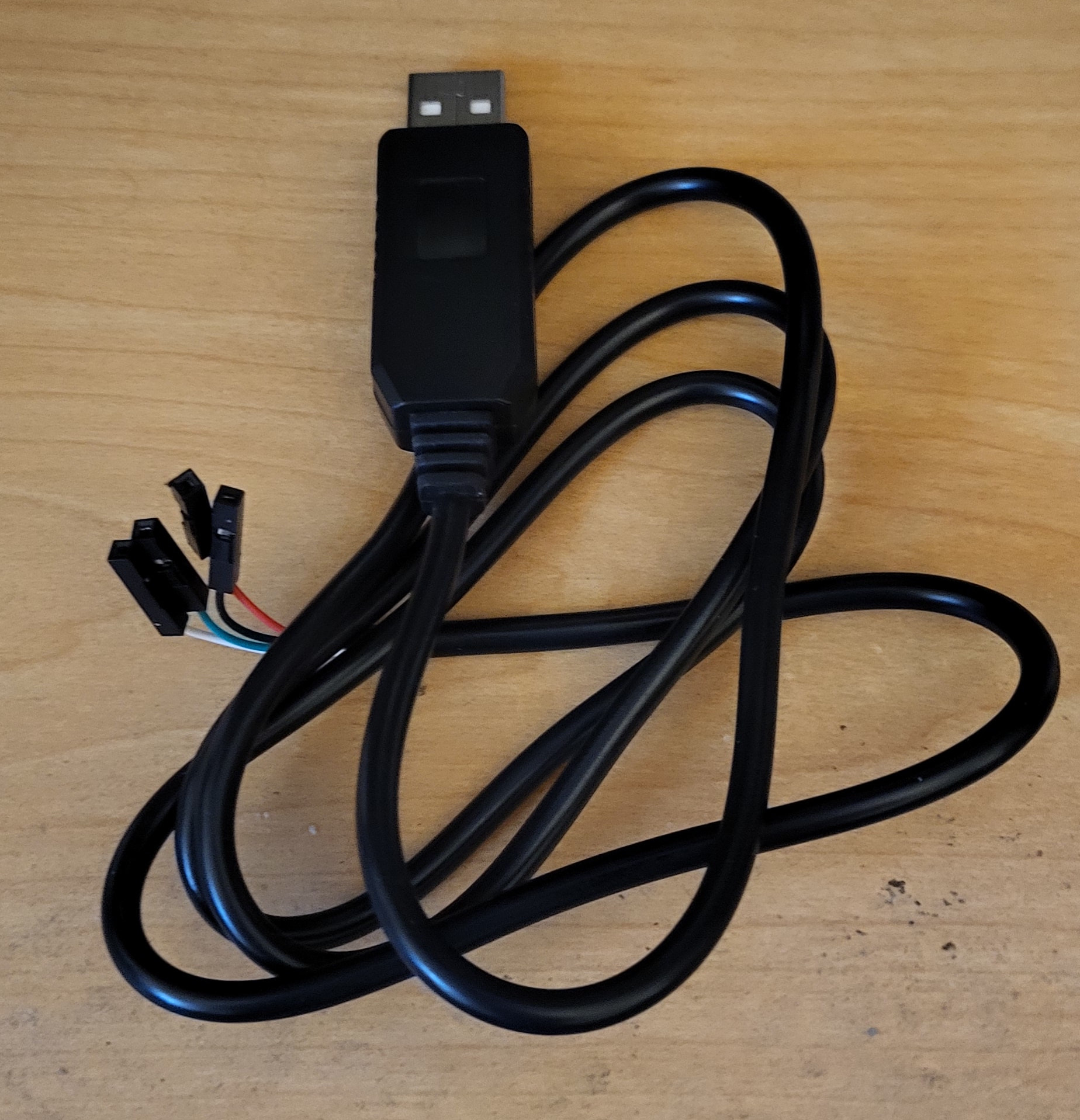
This is the USB to serial adapter I used. It is a generic module one can get for just a few dollars on EBay. I used minicom, but screen should work too.
Verify the Uart your kernel is using by looking at the kernel boot parameters under the /boot folder. Kernel boot parameters are stored in a text file (forget the name).
The kernel I am using booted with console=serial2, which told me to use GPIO pins 19 and 21, rather than pins 8 & 10. You probably know this already, but make sure to cross the Tx/Rx pins. e.g. attach the USB Tx jumper to the the Rx GPIO pin. It is easy to mix these up.
You should have just three jumpers attached to the gpio pins: Tx, Rx, and Ground. Do not attach the other jumpers.
Turns out it works with minicom, but not with screen. Weird, as I’ve always been able to use screen for this. Oh well.
The active UART with this image is UART2, so the TX and RX pins are 19 and 21, respectively. (The “Getting Started” document from Radxa uses UART0 on pins 8 and 10.)
I’ve played around with the known-good image for a while and compared it to what I’ve generated from source. At first I did the obvious thing of taking the first 16M from the known-good image and writing it to my generated system image. As expected, u-boot works fine. It doesn’t boot the kernel, because it looks for the device tree file for evb_rk3308. Looking at the binary image I also see references to evb-rk3308 instead of rock-pi-s-rk3308. This raises doubts about the provenance of the image. Perhaps it was not in fact generated from the sources at the commits I identified earlier.
At offset 0x00800800 I see what looks like the binary for u-boot.bin. I’ll compare it with my own generated u-boot.bin next to see if there are any important differences.
Another thing to try is to edit the image to override the name of the device tree file it should load when booting the kernel. This way I might be able to boot a more recent kernel with the known-good 16M of the boot image.
I have been trying to make progress without the proprietary rk tools, so I don’t use miniloader and don’t generate trust.img (there are already enough mystery blobs in the boot image). Instead I’m trying to get the SPL variant to work.
I’ve done this successfully to boot into my custom build of Linux 5.15.25 (Guix System instead of Armbian). I changed the FTD directory prefix to include the “rockchip” subdirectory (which is where the DTB for rock-pi-s is located in my kernel build), then aborted the failing boot loop in u-boot, changed the “board” and “board_name” variables with “env set”, and then issued “boot” again.
I’ll try building a more recent kernel and boot it with the same approach.
I successfully booted Linux libre 6.12.67 after patching the dtbs for rock-pi-s to enable uart2 (I applied the Armbian patch board-rockpis-0024-add-uart2-for-debug-rock-pi-s-dts.patch to the otherwise unmodified kernel with the default patches for Linux on Guix System).