First i tried Ubuntu, installed the OpenCV 4 package, but with ubuntu I got errors when accessing the camera (do I have to install an additional driver? I just add the v4l2-ctl lib) .
After that, I used the Debian Desktop img. But there is no Opencv Package and a build from the opencv source get me various errors.
So, what is a working combination with a driver for the raspi cam (v2) and a OpenCV Installation?
Both opencv and raspi cam V2 can work seperately on debian.
But, only gstreamer is confirmed to work well with raspi cam v2, because “raspi cam v2” is only supported via the gstreamer elements, now.
Crash happens, when opening camera via opencv4, on latest kernel.
> import cv2
>cv2.__version__
‘4.0.1’
>cam = cv2.VideoCapture(0)
Using mplane plugin for capture
^C
(python:1154): GStreamer-CRITICAL **:
Trying to dispose element pipeline0, but it is in PAUSED instead of the NULL state.
You need to explicitly set elements to the NULL state before
dropping the final reference, to allow them to clean up.
This problem may also be caused by a refcounting bug in the
application or some element.
(python:1154): GStreamer-CRITICAL **: gst_element_get_state: assertion ‘GST_IS_ELEMENT (element)’ failed
VIDEOIO ERROR: V4L2: Unable to capture video memory.VIDEOIO ERROR: V4L: can’t open camera by index 0
I have read all these forum posts. But if I can only use the Rapi Cam on the Debian desktop, I need an OpenCV package for that. But currently there seems to be only one for Ubuntu right?
We have made a pre-built openCV 4.0 package for ROCK Pi. Please refer: https://wiki.radxa.com
/Rockpi4>/Ubuntu Basically
i didn’t found pre-built openCV 4.0 for Debian as well.
Although Radxa Apt says there it is…
I searched a lot, before I built opencv4.0 from source code.
btw, If you want to build it from source code on rockpi4, please have a check of your gcc version and spec.
because current gcc in debian image, is not built with support of NEON nor VFP, which is required by opencv.
Thanks for your tip. Before I start, you’ve also successfully built Opencv from the Source and used it with the standard RockPi driver and the Rpi Cam?
sorry for the question, but the last time I built OpenCv, I needed a whole weekend for it
Is it enough if I get the gcc 7 from the debian experimental deb list (for NEON und VFP support)?
deb http://deb.debian.org/debian experimental main
OpenCv under Ubuntu it is not a problem (OpenCV 4 or 3 both work) but, the Pi-Cam does not work under Ubuntu. It works only on the Debian desktop. Or which driver do you use with Ubuntu?
That’s exactly my problem. Under Ubuntu the Pi Cam does not work and under Debian Desktop OpenCV does not work. Unfortunately I can not use the Rock Pi 4 for our project. I was very interested in the high performance of the Rock Pi. Now I hope that Radxa helps here.
Hello jack. What is your recommendation to use OpenCV with the Pi Cam? Ubuntu does not work (no Cam driver), Debian does not work (no OpenCV package and compiler is also not up to date)?
Last weekend I compiled the gcc 8.3 for debian on the Rock Pi. After that I was able to build OpenCV 4.0.1. Unfortunately there are still bugs with the opencv_python bindings (the python dist on the Rock Pi Image ist too old (3.5.X). The next problem, the image quality with the current rock-chip driver is very bad.
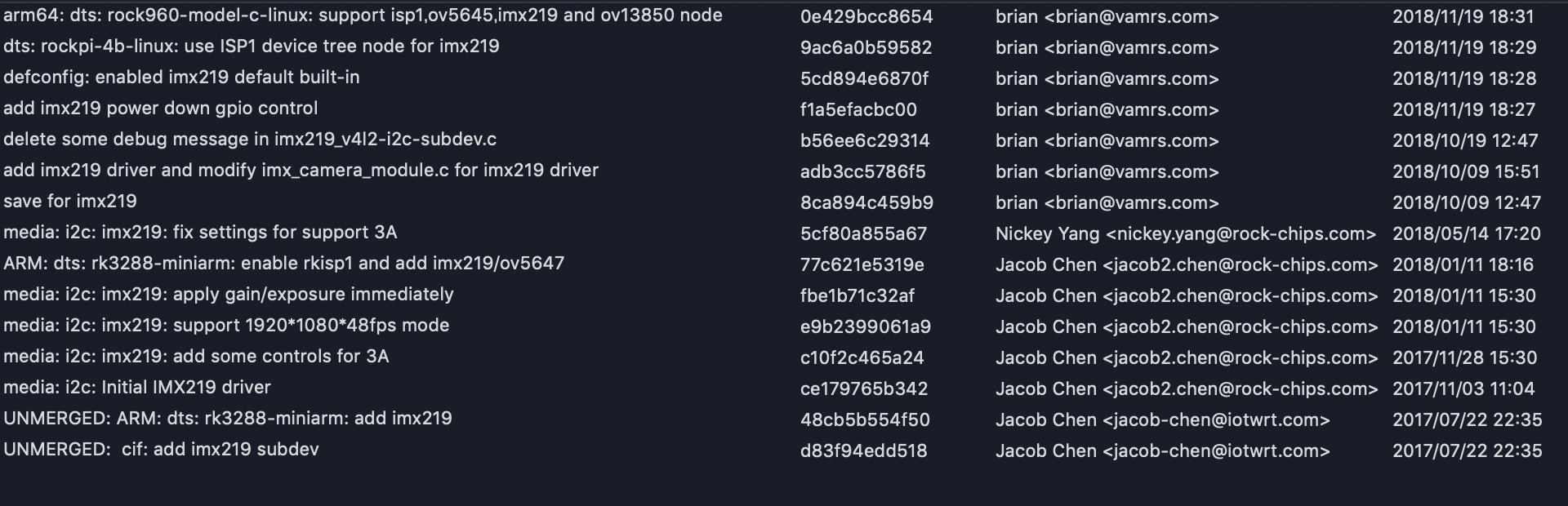
Here is all about the commit history in kernel about imx219, the imaging sensor.
Maybe you can find some hint of how to modify.
Just for your reference.
In gstreamer-rockchip-extra , you can find rkcamsrc, which is the middle ware containing most wrapper functions of v4l2 and UNOPENED functions, that is implemented in librk_aiq.so.
In kernel, all imx219-related functions are implemented in imx219.c. And that will not be a big problem to understand it, with the help of imx219 datasheet document referenced here.
So, there are 2 ways for tuning imx219 imaging sensor on RockPI 4.
Asking radxa for helping, to get the details of librk_aiq.so.
Modifying the kernel source, imx219.c, to extend the existed v4l2 method.
ANOUNCEMENT!!
All these above is just my opinion from the github OSS.