Hi guys,
I spent some time on this doing a lot of trial and error, so I’d like to share the result with you.
I managed to install Debian 13 on my Radxa Orion O6N with a working graphics driver.
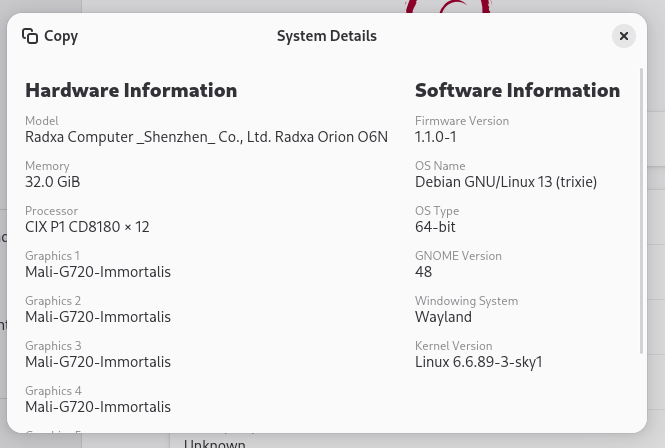
It’s actually not that difficult.
Install debian 13 from the “official” arm image
Download:
https://get.debian.org/images/archive/13.1.0/arm64/iso-cd/debian-13.1.0-arm64-netinst.iso
Steps:
- Copy the ISO to a USB stick
- Insert it into the board
- Press ESC at boot
- Select the USB stick
- Install Debian normally with the GNOME desktop
Install linux kernel from radxa git hub
After the first boot, the GUI should already work, but only with the generic driver, so you won’t be able to change the resolution.
Download and install the kernel:
su -
wget https://github.com/radxa-pkg/linux-sky1/releases/download/6.6.89-3/linux-headers-6.6.89-3-sky1_6.6.89-3_arm64.deb
wget https://github.com/radxa-pkg/linux-sky1/releases/download/6.6.89-3/linux-image-6.6.89-3-sky1_6.6.89-3_arm64.deb
wget https://github.com/radxa-pkg/linux-sky1/releases/download/6.6.89-3/linux-libc-dev_6.6.89-3_arm64.deb
dpkg -i *.deb
cp /usr/lib/linux-image-6.6.89-3-sky1/cix/sky1-orion-o6.dtb /boot

# For Orion O6 Network device, download it now that we have an internet connection
wget https://radxa-repo.github.io/bookworm/pool/main/r/r8126/r8126-dkms_10.015.00-2_all.deb
Configure boot (Grub)
I’m not 100% sure which parts are strictly required here, but this is what worked for me.
Get your filesystem UUID:
su -
blkid
Search for the UUID with ext4 type.
Add a new kernel entry in grub
su -
nano /etc/grub.d/40_custom
Add:
menuentry 'Debian GNU/Linux, with Linux 6.6.89-3-sky1 - DT'  {
  savedefault
  insmod gzio
  insmod part_gpt
  insmod ext2
  search --no-floppy --fs-uuid --set=root 51eef252-f59c-49a2-a9ef-c05a2d005db8
  echo    'Loading Linux 6.6.89-3-sky1 ...'
  linux   /boot/vmlinuz-6.6.89-3-sky1 root=UUID=51eef252-f59c-49a2-a9ef-c05a2d005db8 ro console=ttyAMA2,115200 earlycon=pl011,0x040d0000 loglevel=7 ignore_loglevel kasan=off
  echo    'Loading initial ramdisk ...'
  initrd  /boot/initrd.img-6.6.89-3-sky1
  devicetree /boot/sky1-orion-o6.dtb
}
Replace 51eef252-f59c-49a2-a9ef-c05a2d005db8 by your filesystem UUID
Optionally if you want grub to remember your kernel selection
su -
nano /etc/default/grub
Replace GRUB_DEFAULT=0 by
GRUB_DEFAULT=saved
GRUB_SAVEDEFAULT=true
Then start update-grub
Install cix drivers
The moment of truth:
now reboot your device and select Debian GNU/Linux, with Linux 6.6.89-3-sky1 DT in grub menu
The screen will go black for a moment, then you should reach the login screen. At this point the correct graphics driver is loaded, but rendering is still done in software.
Network drivers (Orion O6 only, not needed for Orion O6N)
The network drivers does not work out of the box on the orion O6.
Installed it from the previously downloaded deb file
su -
dpkg -i r8126-dkms_10.015.00-2_all.deb
Now you can reboot the device and the networking should works on your board (thank you @blood )
Graphics drivers
Download cix-go-2025q4.tar.gz from https://developer.cixtech.com/ (you need to register)
Now install the drivers:
su -
tar xzf cix-go-2025q4.tar.gz
cd cix-go/
bash install.sh --dkms
You can enable HDMI audio output
su -
wget https://github.com/cixtech/cix_p1_ubuntu_adaption_debs/blob/cix_k6.6_25q4_ubuntu_dev/debs/cix-alsa-conf_1.0.0_arm64.deb
touch /etc/rc.local
dpkg -i cix-alsa-conf_1.0.0_arm64.deb
Now you can reboot.
What is working
- Networking
- Vulkan (version 1.4)
- WebGL
- HDMI audio output
- YouTube plays smoothly but video decoding is still done in software
What does not work “yet”:
- Hardware video decoding
- I was not able to run any steam game with hardware acceleration
Did not try:
- NPU


