All of them fail in exactly the same way:
• Only solid green LED, no UART output at all (tested with multiple USB–TTL adapters at 115200 8N1).
• Tried several A1-rated SD cards (SanDisk / ADATA / Kingston).
• Power supply is 5V 5A, also tested with other adapters.
• Tried different HDMI cables and displays (including HDMI capture card).
• The board shows no reaction, it (only seems to enter FEL mode???) and never boots from SD.
• No visible reaction.
• Tried different image writing methods (PhoenixCard, dd, Etcher, Rufus) on different host systems – result is always the same.
At this point I’m unsure what else to try.
Has anyone successfully booted these images on the Cubie A5E?
Any suggestions for additional troubleshooting steps would be greatly appreciated.
After knocking on the board a few times, it can be turned on. Is it a hardware problem?
(Using the same image and same sd card and smae power and same hdmi cable and same monitor)
I’ve had a similar issue with the same images and tried everything that you did. Getting them to boot is a roulette. If I do get one to boot then things are randomly broken like no HDMI, no WiFi, no ethernet, artifacts, and terrible performance.
I managed to get a 100% success rate with the unofficial NVME image flashed to an NVME drive with the unofficial SPI NOR. I think my board has a faulty micro SD card reader, but I’ve been ghosted by support via email.
Hi, thanks for sharing your experience — sounds exactly like what I ran into.
Can I ask how you managed to get your board working stably in the end?
• Did you first boot from SD into the system and then flash the unofficial SPI NOR image from there?
• Or did you use a tool like LiveSuit/PhoenixSuit to flash it directly? (As far as I know, LiveSuit doesn’t support the NVMe-bootable SPI images since they’re not in Tina format, so I’m a bit confused how you did it.)
Thanks a lot for clarifying — it would really help me figure out whether my issue is the same.
I flashed the OS image that’s provided with the SPI NOR release to an SD card and also my NVME. I connected both the SD and NVME to the board. I eventually managed to get a proper boot of the image via SD and then flashed the SPI NOR image from there. I then edited the file in the NVME partition as instructed (you can see my post on the issue in the GitHub repo). I removed the SD and could boot from NVME without fail.
Thanks a lot for sharing your experience, that’s really helpful
Can I ask roughly how many attempts it took you before you managed to get a stable boot from the SD in order to flash the SPI NOR? On my board it’s almost impossible to get into the system — most of the time it just freezes during boot, and my personal best record was about one minute after entering the system before it crashed again.
I just tried to flash the spi, and it was succeed. However, even using NVMe, it still cannot boot — Nvme and SD boot rarely works, and when it does, the system freezes within about a minute. Is that normal?
I managed to get the SD card to boot around 1 in 10 tries. I should mention that I had to put a heatsink and a fan on the board as it was getting that hot that the chip couldn’t be touched even briefly. It was definitely getting too hot for itself. I eventually put it into the official case once I had NVME working.
Thanks.
My board is basically not hot when it enters the system, but sometimes it freezes before even loading xfce, and sometimes it freezes after loading the wallpaper. The rarest case is that it freezes after entering xfce for dozens of seconds, but the above are rare cases. The most common case is that it does not boot at all (no output from uart).
Do you think it is a quality issue? Should I go to the retailer to exchange it?
Which retailer did you order from? I ordered mine from allnet and when I filed a return for quality issues, they disappeared without a reply. I’m very disappointed with this retailer and this board either.
I ordered from the official Radxa store on AliExpress and would have been able to return it via Ali’s return process. Instead, I thought I’d go through the route of emailing radxa support so I could get help but also be help for others in the same situation. I got one reply which thankfully gave me access to this forum, but I have been ghosted since. I have a Rock 5C and that has been a great experience so I would have liked to have at least half of that. I believe my board is version 1.2 which could have something to do with everything. I’d honestly say they need to halt sales and get the images out of a beta state before this board should be sold.
True, I have a good experience with radxa rock 4cp tbh, but not this one, my board is also ver 1.2, and I don’t really think is the software’s problem, cause we have done what we should done but it still like that, So it definitely is a hardware defective.
Hello, we are very sorry for the poor communication experience and product usage issues we have caused you. We take the problems you reported very seriously and hope to assist in resolving them as soon as possible.
To verify your order information and trace the communication records more efficiently, could you please provide the following details:
The AliExpress order number for your purchase (usually available in the “My Orders” section on AliExpress);
Besides the official customer support email, have you communicated with any other members of our team? If yes, please kindly provide the name or contact email of the relevant person (which will help us locate the contact person more quickly).
In addition, regarding the issues you mentioned about the board (Version 1.2) and the system images, we will also forward this information to our technical team for priority verification. We will contact you promptly as soon as there is any progress. We apologize again for the previous communication interruption and thank you for your understanding and cooperation.
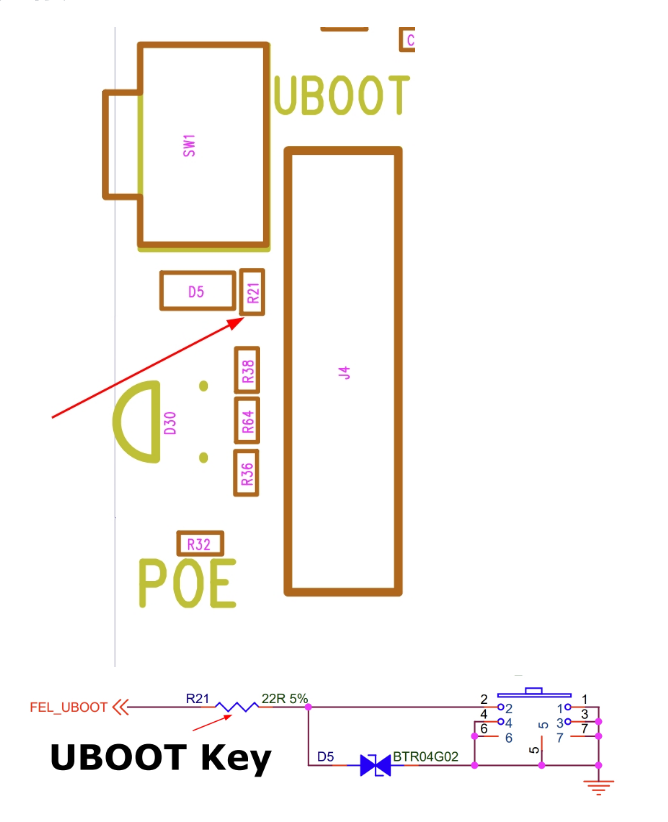
We sincerely apologize for the unpleasant experience. Regarding this issue, we would like to check if you have any hardware measurement tools on your side. As you mentioned, the cubie a5e has entered FEL mode. If possible, could you please help check the voltage levels of the resistors marked in the diagram when the anomaly occurs?