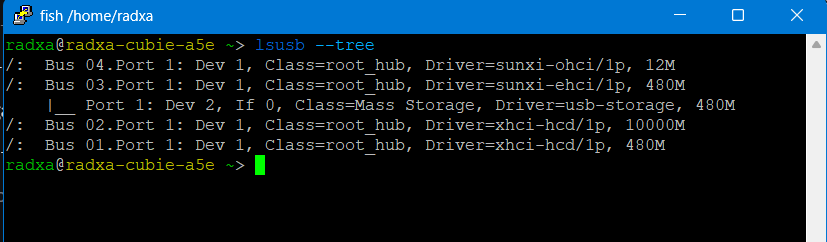
I just disabled PCIe from “rsetup” within the terminal. After that, I connected the USB 3.0 supported device to the Type A port of the board to confirm that if it works or not. But unfortunately, it is not working even though the USB 3.0 port got initialised.
Kindly, I need help. Want to build a high-speed media server with this facility.
/: Bus 04.Port 1: Dev 1, Class=root_hub, Driver=sunxi-ohci/1p, 12M
/: Bus 03.Port 1: Dev 1, Class=root_hub, Driver=sunxi-ehci/1p, 480M
|__ Port 1: Dev 2, If 0, Class=Mass Storage, Driver=usb-storage, 480M
/: Bus 02.Port 1: Dev 1, Class=root_hub, Driver=xhci-hcd/1p, 10000M
/: Bus 01.Port 1: Dev 1, Class=root_hub, Driver=xhci-hcd/1p, 480M
My USB storage device is USB 3.0 certified. I’ve tried with USB 3.0 devices like two portable HDD, pendrive, card reader. None of them got USB 3.0 speed from A5E. These devices gets undoubtedly recognised by my laptop as USB 3 device in windows 11 settings.
According to your description, when the USB flash drive is connected to the A5E, is it recognized as a USB 3.0 device but not achieving USB 3.0 standard speeds, or is it actually recognized as a USB 2.0 device instead? Can you show some log as below:
radxa@radxa-cubie-a5e:~$ lsusb -t
/: Bus 04.Port 1: Dev 1, Class=root_hub, Driver=sunxi-ohci/1p, 12M
/: Bus 03.Port 1: Dev 1, Class=root_hub, Driver=sunxi-ehci/1p, 480M
|__ Port 1: Dev 6, If 0, Class=Mass Storage, Driver=usb-storage, 480M
/: Bus 02.Port 1: Dev 1, Class=root_hub, Driver=xhci-hcd/1p, 10000M
/: Bus 01.Port 1: Dev 1, Class=root_hub, Driver=xhci-hcd/1p, 480M
radxa@radxa-cubie-a5e:~$ lsusb -t
/: Bus 04.Port 1: Dev 1, Class=root_hub, Driver=sunxi-ohci/1p, 12M
/: Bus 03.Port 1: Dev 1, Class=root_hub, Driver=sunxi-ehci/1p, 480M
/: Bus 02.Port 1: Dev 1, Class=root_hub, Driver=xhci-hcd/1p, 10000M
|__ Port 1: Dev 4, If 0, Class=Mass Storage, Driver=usb-storage, 5000M
/: Bus 01.Port 1: Dev 1, Class=root_hub, Driver=xhci-hcd/1p, 480M
]]]]]]Linux radxa-cubie-a5e 5.15.147-7-aw2501 #7 SMP PREEMPT Sat Aug 2 10:20:34 UTC 2025 aarch64
The programs included with the Debian GNU/Linux system are free software;
the exact distribution terms for each program are described in the
individual files in /usr/share/doc/*/copyright.
Debian GNU/Linux comes with ABSOLUTELY NO WARRANTY, to the extent
permitted by applicable law.
Last login: Fri Aug 15 03:22:15 2025 from 192.168.0.102
radxa@radxa-cubie-a5e:~$ lsusb -t
/: Bus 04.Port 1: Dev 1, Class=root_hub, Driver=sunxi-ohci/1p, 12M
/: Bus 03.Port 1: Dev 1, Class=root_hub, Driver=sunxi-ehci/1p, 480M
|__ Port 1: Dev 3, If 0, Class=Mass Storage, Driver=uas, 480M
/: Bus 02.Port 1: Dev 1, Class=root_hub, Driver=xhci-hcd/1p, 10000M
/: Bus 01.Port 1: Dev 1, Class=root_hub, Driver=xhci-hcd/1p, 480M
From the logs you shared on Reddit, there seems to be no log output related to the USB 3.0 controller. However, with the same T4 image on our end, we can indeed recognize USB 3.0 storage devices.
Then what’s wrong with my Radxa cubie A5E unit? Without POE hat, can you check if yours is doing the same or not.
And about enabling USB 3 in cubie A5E port, is there any other things that I need to enable/disable to let my storage device recognize as USB 3 by the radxa debian system? I just enabled first option of overlay from “rsetup”.
The log above is what I captured from the device in my hand. With the enable-usb3 overlay enabled (same as your setup), you can see that it properly recognizes both USB 2.0 and USB 3.0 devices. I used a USB 3.0 flash drive for testing. However, it’s important to note that when connecting an SSD via a USB adapter board: if the USB cable is too long, it may cause insufficient power supply, leading to malfunction.
That said, looking at your log, there are no error messages or any entries related to the USB 3.0 bus at all. So I’m not sure if there might be an issue with your hardware connection.
Then I am now downloading the T5-released image from the repository. Will notify you after testing. Kindly let me know if there is any update/upgrade to make after booting up the system for the first time or not.
I am going to try out a USB 3.1 card reader made by Transcend and a USB 3.1 ADATA 64 GB pen drive to check if the communication of USB 3.0 happens or not.
I can confirm this same issue on the t6 image, cubie 1.2. Several USB 3 flashdrives tested, but all are on USB2 only:
/: Bus 04.Port 1: Dev 1, Class=root_hub, Driver=sunxi-ohci/1p, 12M
/: Bus 03.Port 1: Dev 1, Class=root_hub, Driver=sunxi-ehci/1p, 480M
|__ Port 1: Dev 5, If 0, Class=Mass Storage, Driver=usb-storage, 480M
/: Bus 02.Port 1: Dev 1, Class=root_hub, Driver=xhci-hcd/1p, 10000M
/: Bus 01.Port 1: Dev 1, Class=root_hub, Driver=xhci-hcd/1p, 480M
and it recognises my USB 3.0 NVMe adapter as a USB 2.0 device.
radxa@radxa-cubie-a5e:~$ lsusb -t
/:  Bus 04.Port 1: Dev 1, Class=root_hub, Driver=sunxi-ohci/1p, 12M
/:  Bus 03.Port 1: Dev 1, Class=root_hub, Driver=sunxi-ehci/1p, 480M
    |__ Port 1: Dev 3, If 0, Class=Mass Storage, Driver=usb-storage, 480M
/:  Bus 02.Port 1: Dev 1, Class=root_hub, Driver=xhci-hcd/1p, 10000M
/:  Bus 01.Port 1: Dev 1, Class=root_hub, Driver=xhci-hcd/1p, 480M
My SD card is not corrupted. It is a well-branded micro SD card with possibly zero defects. I have successfully flashed the R7 variant image of Cubie A5E by Balena Eicher.