I would be nice if everything works on launch day.
1 Like
So I installed the UFS module, flashed and image and plugged the machine today. I tried the image found on github (the -512 one) and “nothing happened”. I finally connected a UART to the 40-pin header to see boot messages:
          GND RX  TX  <- adapter
  5V  5V  GND TX  RX  <- board
 +---+---+---+---+---+---
 | 2 | 4 | 6 | 8 |10 |12 ...
 +---+---+---+---+---+---
 | 1 | 3 | 5 | 7 | 9 |11
 +---+---+---+---+---+---
  3V              GND
It ends like this:
UEFI Start     [ 1828]
 - 0x09FA01000 [ 1831] Sec.efi
ASLR        : ON
DEP         : ON (RTB)
Timer Delta : +4 mS
RAM Entry 0 : Base 0x0080000000  Size 0x003A800000
RAM Entry 1 : Base 0x00C0000000  Size 0x0001800000
RAM Entry 2 : Base 0x00C3400000  Size 0x007CC00000
RAM Entry 3 : Base 0x0140000000  Size 0x00C0000000
Total Available RAM : 6028 MB (0x0178C00000)
Total Installed RAM : 6144 MB (0x0180000000)
Init CPU core 1
  > Scheduler up on Core 1
UEFI Ver    : 6.0.250722.BOOT.MXF.1.0.c1-00364-KODIAKLA-1
Build Info  : 64b Jul 22 2025 12:33:35
Boot Device : NVME
PROD Mode   : TRUE
Retail      : TRUE
After Create Event Status (0x0)
ShmBridgeInitialize: enable status 0
PM_DT_PARSING_ERR: cagrhpispiPM0: 47, PM1: 63, PM2: 49, PM8: 46,
Boot up PwrKey press 75 ms detected is less than expected 400 ms duration. Release_time 75, Press_time 0
Module cannot re-initialize DAL module environment
UFS GPIO7 value is 0
UFS INQUIRY ID: SAMSUNG KLUDG4UHGC-B0E1 3203
UFS Boot LUN: 1
UFSDxe: PMIC SDAM read returned 0x0
UFS GEAR: 4
ufs_error_log: 35
ufs_error_log: 2b0
Given the final UFS-related messages, I removed the UFS flash and tried again. This time I’m seeing that it seems to go a bit further and mentions “Ubuntu 24.04.3 LTS”. But then after several seconds it says:
Start EBS        [ 6549]
BDS: LogFs sync skipped, No Media
App Log Flush : 0 ms
Gunyah based bootup
Exit EBS        [ 6558] UEFI End
[    0.000000] OF: reserved mem: Reserved memory: failed to reserve memory for node 'mpss@8b800000': base 0x000000008b800000, size 246 MiB
The reboots in loops, timing out on USB stuff every 10s or so:
B -  48528763 - usb: init start
B -  48532606 - usb: qusb_dci_init
B -  48535565 - usb: usb: skip vbus detection and set ss_lane_2nd
B -  48545081 - usb: usb_shared_xbl_dtb_node_init dtb status
B -  48547094 - usb: ssusb_phy_init_success_lane_B , 0x1
B -  48550632 - usb: usb_shared_xbl_dtb_node_init dtb status
B -  49565916 - usb: usb: chgr , 0x7
B -  49566678 - usb: timer_start , 0x4c4b40
B -  55268562 - usb: timer_expired
B -  55268592 - usb: enum_tiemout , 0x4c4b40
B -  55271795 - usb: Disconnect no enum
B -  55275912 - USB DUMP failed, because USB cable disconnect
B -  55279603 - usb: bulk_shutdown
B -  55315318 - usb: endxfer EP0 OUT
B -  55315471 - Uncached Heap Deinit Fail
The only way to end this loop is to power-cycle it.
I also once had this before the reboot loop:
Disp init wait [ 2392]
-----------------------------
Platform Init  [ 2393] BDS
Var Store  : WARNING, not persistent
UEFI Ver   : 6.0.250722.BOOT.MXF.1.0.c1-00364-KODIAKLA-1
Platform           : IOT
Subtype            : 2
Boot Device        : NVME
Chip Name          : QCS6490
Chip Ver           : 1.0
Chip Serial Number : 0xA9414C62
Locate RPMB Protocol failed, status = 0xE
-----------------------------
LocateProtocol(DPP) returned Status:Not Found
Locate pMorPpiProtocol failed 0xE 00000010
Platform Init End : 2432
-----------------------------
[QcomBds] Removable boot path
Error reset tuning block:error code -1

LaunchAppFromGuidedFv: Load image from guided FV failed, Not Found
Failed to launch default Fastboot app, status: Not Found
ERROR: C90000002:V03000007 I0 5A50AA81-C3AE-4608-A0E3-41A2E69BAF94
ASSERT PlatformBdsLib.c +2617: 0
I saw on the docs page the availability of an updated boot loader, which requires a special tool to update it, so for now I preferred to stay with the stock settings if that helps diagnose possible issues that would later disappear.
I finally picked the 250731 system image from the resource downloads page.
On first boot it left the screen with a frozen cursor on the top left of the screen, and nothing responding on the serial port. Power-cycling it gave me a “ubuntu” login screen with huge fonts, and from there it worked. The serial port still has no console by the way, not sure if it’s entirely disabled or just enabled on an alternate port. I verified that re-plugging the UFS device on it prevents the machine from booting, so it was clearly not related to the other image on the flash.
I noticed that the kernel was apparently a stock 6.15.7, which is pretty encouraging. Port 22 responded only once then stopped responding. I’ll try to (re-)install sshd after upgrading everything.
I’m not used at all to that graphic environment which is extremely disturbing to me with its huge inexpressive icons and super-large, bold and anti-aliased fonts that are blurry when you reduce them to make the terminal fit on a single screen. Makes me feel of a bad imitation of windows 95, but I guess that it’s what people want nowadays, not sure how they can find this pleasant nor convenient to use personally…
I’ll run some performance and stability tests on it as time permits. I must confess that it feels much more of a terminal-type machine than the server-like ones that I’m used to, so I’m certain that my tests will not match what most people are expecting. I feel a bit uneasy with it given that I don’t even have any idea how to test most of the board’s features, so I’ll leave that to other more knowledgeable testers.
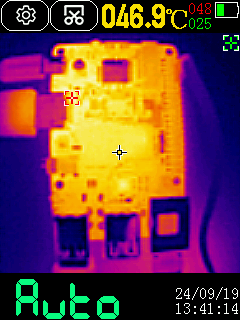
Edit: here’s an IR capture of the board in idle (graphics environment disabled). I find it a bit hot for idle (47°C), it consumes 2.05W which seem on the high side IMHO.
Starting a build reaches 7.8W for one second, and the hwmon inputs instantly report 90-91°C then the power draw drops and the cpu frequency drops as well. So the board will definitely need to run with a heatsink, though it handles overheating quite well. Building haproxy on it takes 1m01 while it takes 17.0s on the Orion:
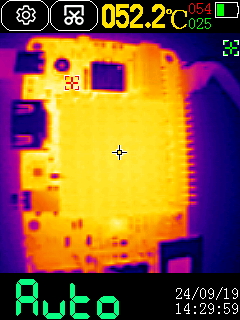
I’ve added a 40x40 heatsink which perfectly fits, on top of a thermal pad covering the DRAM and the SoC. It builds longer before reaching 90°C and throttling, so it builds in 49..53s now. The heat is not well transferred though, as the heatsink reaches around 53°C:
Also one point to note is that build speed heavily depends on RAM speed. Here the latency is very good (around 120ns) but the data rate is limited due to the 32-bit bus (around 15.8 GB/s in my tests), where the Orion gives me 45.7, so in addition to half big cores, it also explains a significant difference here.
It’s highly recommended to update to the latest boot firmware, which will solve your UFS problem. There are two options for updating the firmware, both of which require the edl-ng tool from: https://github.com/strongtz/edl-ng/releases/latest
- On-device update
First, navigate to the directory of the unpacked firmware package (dragon-q6a_flat_build_250829.zip/flat_build/spinor/dragon-q6a). Then, run the following command directly on the device:
sudo edl-ng --hostdev-as-target /dev/mtd0 rawprogram rawprogram0.xml patch0.xml
- Update via a Host Computer
This method requires a USB A-to-A cable to connect your device to another computer.
-
Make sure your device is in EDL mode.
-
On your host computer, navigate to the unpacked firmware package directory (dragon-q6a_flat_build_250829.zip/flat_build/spinor/dragon-q6a).
-
Execute the following command:
sudo edl-ng --memory spinor --loader prog_firehose_ddr.elf rawprogram rawprogram0.xml patch0.xml
The firmware on the Resource Downloads page hasn’t yet been updated. You can download from Discord or from this link temporarily.
1 Like
OK thank you for the explanations. I downloaded it from the link and will run these from the board.
Edit: OK it worked, now I can boot from the SD with the UFS module connected to the board:
sda           8:0    0 119.2G  0 disk
`-sda1        8:1    0 119.2G  0 part
sdb           8:16   0     4M  0 disk
sdc           8:32   0     4M  0 disk
mmcblk2     179:0    0  29.7G  0 disk
|-mmcblk2p1 179:1    0   112M  0 part
`-mmcblk2p2 179:2    0  29.6G  0 part /
Will now try to flash it.
@strongtz I could flash the -4096 image from the github repo here to the UFS and boot from it. BTW it was my first encounter with UFS and I’m impressed by the performance, it reads around at 1.6-1.8 GB/s. I tried ubuntu/radxa as mentioned on the doc, then many other combinations but couldn’t find a working one. I’ve checked the readme.md on the repository, none is mentioned, neither in changelogs. I must admit that it’s often a problem I’m facing with Radxa’s images, the difficulty to find a working login/passwd for a given image. It should really be stored in a text file along with the images (or even in their names). Does anyone know the correct login/pwd for this image ? Thanks!
try ubuntu ubuntu maybe?
Already tried of course. I tried various combinations of ubuntu, radxa, root. Will reboot it on the microSD and change it manually. Edit: finally found: radxa/radxa. I’m fairly certain I tried it already but possibly with a typo which caused it to fail. Anyway I’m leaving it here in case it can help others.
And FWIW once the UFS module is connected, the board doesn’t boot from SD nor USB, it only boots from UFS. That might complicate updates and fixes. At least I have not found how to interrupt its boot nor force it to boot from other devices.
Currently there’s no way to set a preferred boot device. But you can interrupt it by pressing ‘c’ in the GRUB menu, then use the command ‘exit’ to make it try to boot from other media.
1 Like
I didn’t see the boot menu on the console, only the backwards counting of seconds before booting. I tried Escape and it didn’t enter the menu. I’ll retry.
The kernel on the new image (6.16.7) configures the RAM a bit faster, I’m getting 18 GB/s vs 15 previously, with a peak at 20 for CPU7 alone (vs 16 before). I’ve tried the haproxy build again and it fell to 57s (still throttling). I’ve installed a powerful fan connected to the 12V header and managed to do a full build never going beyond 79°C and never throttling. The build time fell to 50s for all cores, or 57 for only the A78 cores. As a reminder, the Orion gives 17s for the big cores only, but that’s twice the cores and 2.5 times the memory bandwidth, so the ratio seems to make sense.
Edit: I forgot to add, I find the 12V header close to USB-C quite dangerous. It’s super convenient to connect a fan for testing, but the 12V pin is 1.5mm away from the connector’s ground and is extremely prone to short circuits. I think it should be connected to a diode (or a mosfet) so that it doesn’t deliver 12V, otherwise problems will be reported.
The boot menu isn’t displayed correctly and will be fixed in a future firmware release. You just need to press ‘c’ and it will enter the grub command-line shell.
OK noted, thank you!
FYI: people serious about open source will stay away from Discord for obvious reasons. Since @meco mentioned a ‘Debug Party’ happening on Discord I guess things got worse over the years (why on earth is Radxa favouring Discord over their own forum?)
There is more than one image flying around, some on Github (radxa:radxa) and some on the resource download page. For me the t1 from Github did not work at all (in the beginning I had neiter serial console nor display connected) and with the one from the download page it was ubuntu:ubuntu that worked but password had to be changed immediately.
1 Like
I could connect an NVME SSD (samsung 980). It’s properly detected and reads fast (1.3 GB/s). It’s detected as Gen3 x2 (I have the full lspci output if interested). While trying to test another SSD I noticed that it tried to boot on the CIX kernel because that’s what I had on that SSD. As such, this means that boot priority order is the following:
- NVME
- UFS
- SD or USB
So in case of UFS destruction, it should be possible to connect an NVME SSD to try to recover control. Of course it would be better if it would pick SD/USB before the two other ones.
Another thing I noticed is that powering off the board via software leaves it in low-to-medium consumption state (1.9 to 2.5W noticed here). I suspect that it depends on the frequency the CPUs were running when typing “halt”.
Do you have any IMX415 camera module available to test on the board? What about the hw encoder and decoder? Have you tried to build an image from scratch? I would like to ask you about NPU - are there any demos available or any thoughts?
If the question is for me, then no I’m not aware of anything matching that in my boxes.
No idea how to detect or even test that. As I mentioned earlier, I’m really not a desktop application testing guy, I’m terribly lacking knowledge in this area (by not being interested to be honest). Ask me about real CPU frequency, memory latency or network max packet rates and I can test and respond. But ask me about gaming FPS or video playing speed, and beyond starting youtube in a browser and saying “it looks OK enough to me”, I’m lost, I don’t even have an mpeg file available to feed mplayer nor do I have any idea how to count skipped frames. I’ll leave all that to others, that’s probably why Radxa sends devices to multiple people 
@avaf video decoder and encoder work. There is a mainline driver called qualcomm-venus which utilises v4l2-m2m
1 Like
Do you mean you can access the VPU without the SDK (https://docs.qualcomm.com/bundle/publicresource/topics/80-70014-20/overview.html)?
I have the Rubik Pi (not Dragon)… however NPU works and is well supported. Qualcomm have like 3 different SDK’s for the NPU each offering different levels of developer control which is probably the most confusing thing about what to pick when starting out. It is a case of information overload and trying to filter through to understand everything.
It is also supported in ONNXRuntime which I found the quickest/easiest way to get low level control for inference via C/C++.
So it is all well supported.
Thanks for the info.
I totally forgot about rubik, it seems they are still working on the encoder/decoder for mainline due to qc compressed NV12, i think. If that is the case ( i really don’t know much about it ) , the maker needs to have access to SDK source code, or you accept the SDK conditions.
Maybe someone could try to build and check the current status of the running kernel:
[https://github.com/quic/v4l-video-test-app]