Hi,
  [  582.755361] systemd-gpt-auto-generator[3904]: Failed to dissect: Input/output error
  [  583.034302] systemd-gpt-auto-generator[3917]: Failed to dissect: Input/output error
  [  583.199432] systemd-gpt-auto-generator[3933]: Failed to dissect: Input/output error
   Created symlink /etc/systemd/system/multi-user.target.wants/rsync.service → /lib/systemd /system/rsync.service.
  [  583.665757] systemd-gpt-auto-generator[3952]: Failed to dissect: Input/output error
   Setting up kpartx (0.7.4-2ubuntu3) ...
  Processing triggers for systemd (237-3ubuntu10.31) ...
  [583.875734] systemd-gpt-auto-generator[3966]: Failed to dissect: Input/output error
Thanks & Regards
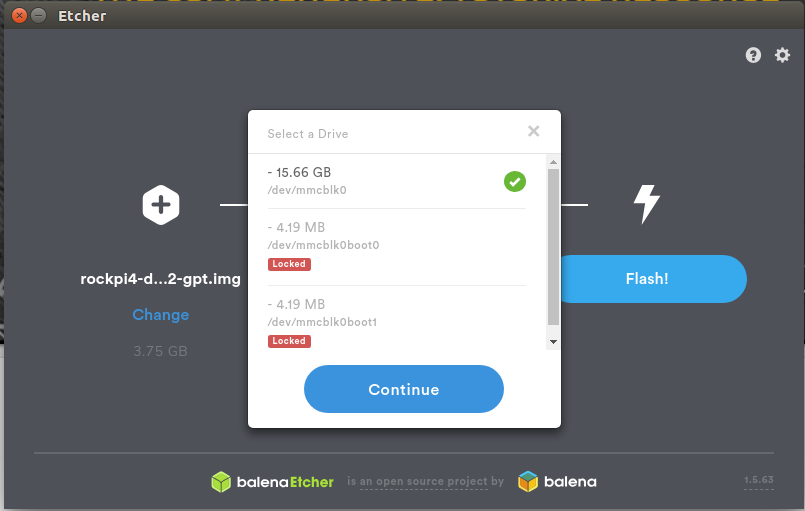
I noticed whenever we used sd card no error is coming if we use emmc most of time Input/Output error is coming.
Why only emmc we getting Input/Output error ?
Thanks & Regards
jack
November 21, 2019, 9:28am
3
Hi,
This error is normal because for eMMC, this is extra partition for boot can not be accessed directly:
/dev/mmcblk0boot0 - BOOT0 partition
/dev/mmcblk0boot1 - BOOT1 partition
/dev/mmcblk0rpmb - RPMB partition
Check this thread:
Hi,
You can just use it as how you use it on other platform. It’s an eMMC feature, not ROCK Pi 4. Basically configure the boot partition as the default partition with mmc-utils.
eMMC devices are partitioned into several hardware partitions but only one can be selected at a time:
BOOT - one or more small partitions intended for boot firmware (eMMC 4.3 spec requires 2 boot and 1 user partition)
RPMB - Replay Protected Memory Block - intended to store secure data (ie DRM content protection key…
Hi Jack,
Thanks & Regards
Hi Jack,
Thanks & Regards
aaditya
November 26, 2019, 8:05am
6
It is an issue with upstream systemd, said to be fixed in later version:
opened 07:35PM - 25 Apr 17 UTC
closed 03:40PM - 22 Jun 17 UTC
gpt-auto
### Submission type
- [X] Bug report
- [ ] Request for enhancement (RFE)…
### systemd version the issue has been seen with
systemd-233-3.fc26.armv7hl
### Used distribution
Fedora 26 armv7hl
### In case of bug report: Unexpected behaviour you saw
systemd-gpt-auto-generator[1765]: Failed to dissect: Input/output error
### In case of bug report: Steps to reproduce the problem
I'm using a GPT partition layout on the Toshiba AC100 ARM device. It use a NVIDIA tegra20 SOC and the rootfs is located on a 16G eMMC. In this case the bootloader (upstream uboot) is located in the boot area of the eMMC. (/dev/mmcblk1boot1 and /dev/mmcblk1boot2).
I expect this might be the problem for the failure to dissect the partition layout.
The other candidate for the failure is also the availability of /dev/mmcblk1rpmb
(see https://lwn.net/Articles/682276/ )
---
LANG=C fdisk -l -o "Device,Start,End,Sectors,Size,Type,Type-UUID,Attrs,Name,UUID"
Disk /dev/mmcblk1: 15 GiB, 16055795712 bytes, 31358976 sectors
Units: sectors of 1 * 512 = 512 bytes
Sector size (logical/physical): 512 bytes / 512 bytes
I/O size (minimum/optimal): 512 bytes / 512 bytes
Disklabel type: gpt
Disk identifier: 3A26EA3C-EAB6-4124-853C-E7AADD7948E2
Device Start End Sectors Size Type Type-UUID Attrs Name UUID
/dev/mmcblk1p1 2048 1026047 1024000 500M Linux filesystem 0FC63DAF-8483-4772-8E79-3D69D8477DE4 3E410973-BADE-46FD-9255-3EEB76EEDFD8
/dev/mmcblk1p2 1026048 15706111 14680064 7G Linux filesystem 0FC63DAF-8483-4772-8E79-3D69D8477DE4 A065B4FD-AD31-422B-A61E-6A5214A4A95C
/dev/mmcblk1p3 15706112 16730111 1024000 500M Linux filesystem 0FC63DAF-8483-4772-8E79-3D69D8477DE4 0EB211F3-64CC-4FCE-95D5-92644A8A1DFB
/dev/mmcblk1p4 16730112 31358942 14628831 7G Linux filesystem 0FC63DAF-8483-4772-8E79-3D69D8477DE4 531DBE8A-F643-4C3A-8F08-3C3851069815
Disk /dev/mmcblk1boot1: 2 MiB, 2097152 bytes, 4096 sectors
Units: sectors of 1 * 512 = 512 bytes
Sector size (logical/physical): 512 bytes / 512 bytes
I/O size (minimum/optimal): 512 bytes / 512 bytes
Disk /dev/mmcblk1boot0: 2 MiB, 2097152 bytes, 4096 sectors
Units: sectors of 1 * 512 = 512 bytes
Sector size (logical/physical): 512 bytes / 512 bytes
I/O size (minimum/optimal): 512 bytes / 512 bytes
---
To “solve” the issue, would need to update to a version of systemd that has this fix.
aaditya
November 26, 2019, 8:10am
7
Hi aaditya,
aaditya
November 26, 2019, 8:42am
9
Its because eMMC can contain some special partitions as @jack explained, which systemd didnt handle correctly.
SD card dont have those special features.
Kind regards