Rock F2 Waveshare 1xNVMe HAT not showing up (PCI Express problem)

Hello,
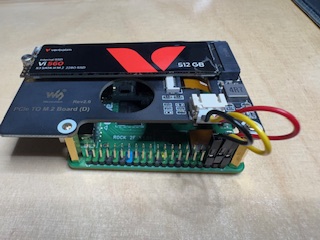
I currently have this version rock-2_bookworm_xfce_t1 installed on my Radxa ROCK 2F and would like to use this expansion board: https://spotpear.com/wiki/Raspberry-Pi-5-PCIe-M.2-NVMe-SSD-Board-D.html. Unfortunately, I can’t get a proper connection.

I get this message in the log:

sudo dmesg | grep -i pcie

[ 6.470446] vcc3v3_pcie20: will resolve supply early: vin

[ 6.470455] reg-fixed-voltage vcc3v3-pcie20: Looking up vin-supply from device tree

[ 6.470466] vcc3v3_pcie20: supplied by vcc5v0_sys

[ 6.470509] vcc3v3_pcie20: 3300 mV, enabled

[ 6.470657] reg-fixed-voltage vcc3v3-pcie20: vcc3v3_pcie20 supplying 3300000uV

[ 8.081466] rk-pcie fe4f0000.pcie: invalid prsnt-gpios property in node

[ 8.081488] rk-pcie fe4f0000.pcie: Looking up vpcie3v3-supply from device tree

[ 8.082362] rk-pcie fe4f0000.pcie: max MSI vector is 8

[ 8.082426] rk-pcie fe4f0000.pcie: host bridge /pcie@fe4f0000 ranges:

[ 8.082463] rk-pcie fe4f0000.pcie: IO 0x00fc100000..0x00fc1fffff -> 0x00fc100000

[ 8.082483] rk-pcie fe4f0000.pcie: MEM 0x00fc200000..0x00fdffffff -> 0x00fc200000

[ 8.082499] rk-pcie fe4f0000.pcie: MEM 0x0100000000..0x013fffffff -> 0x0100000000

[ 8.082698] rk-pcie fe4f0000.pcie: iATU unroll: enabled

[ 8.082711] rk-pcie fe4f0000.pcie: iATU regions: 8 ob, 8 ib, align 64K, limit 8G

[ 8.289115] rk-pcie fe4f0000.pcie: PCIe Linking... LTSSM is 0x0

[ 8.314662] rk-pcie fe4f0000.pcie: PCIe Linking... LTSSM is 0x0

[ 8.341300] rk-pcie fe4f0000.pcie: PCIe Linking... LTSSM is 0x0

[ 8.367977] rk-pcie fe4f0000.pcie: PCIe Linking... LTSSM is 0x0

[ 8.394683] rk-pcie fe4f0000.pcie: PCIe Linking... LTSSM is 0x1

[ 8.424677] rk-pcie fe4f0000.pcie: PCIe Linking... LTSSM is 0x0

[ 8.454693] rk-pcie fe4f0000.pcie: PCIe Linking... LTSSM is 0x0

[ 8.481346] rk-pcie fe4f0000.pcie: PCIe Linking... LTSSM is 0x0

[ 8.508005] rk-pcie fe4f0000.pcie: PCIe Linking... LTSSM is 0x1

[ 8.534680] rk-pcie fe4f0000.pcie: PCIe Linking... LTSSM is 0x0

[ 10.978078] rk-pcie fe4f0000.pcie: PCIe Link Fail, LTSSM is 0x0, hw_retries=0

[ 10.978295] rk-pcie fe4f0000.pcie: failed to initialize host

Unfortunately, no LEDs are lit on this board. I also have an NVMe SSD card
installed (S3 SATA III M.2 2280 SSD) 512 GB from Verbatim: Vi560 S3 M.2 SSD | 512 GB | Internes Solid-State-Laufwerk | Verbatim
This card is also not being recognized.

Unfortunately, no LEDs are lit on this board. I’ve already read this article: Waveshare 2xNVME HAT not showing up (PCI-Express issue) , but unfortunately, it didn’t help me.

Can anyone help me with this? Do I need to use a different Bluetooth version, for example, Armbian_25.11.1_Rock-2f_bookworm_vendor_6.1.115-omv_minimal.img.xz

Thanks in advance.

Best regards,

Olaf
The OS version shouldn’t really matter as they both use the vendor kernel and PCIE support should be enabled in both. At least it was in my case, after testing the Radxa distro and armbian.

In my experience it’s probably just a problem with power (excluding the possibility that you put the cable the wrong way). If I use a powered PCIE x1 HAT, the connection always works.

Hello,
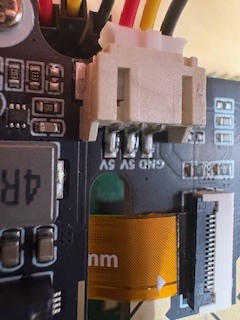
I’ve checked again. I’ve connected the additional 5V power supply from the motherboard, and the data cable is also connected correctly (Pin 1 to Pin 1).

Summary

This text will be hidden

1 Like

I’ve now tried a separate 5V power supply from the USB power adapter, but that didn’t help either.

I can’t see anything wrong. Maybe you’re using a version of the system old enough for the overlay to be needed? Try armbian

Using the Rock 2F’s PCI-e slot is terrible; I’ve tried everything and can’t get it to work, it’s very frustrating. I’ve tried several OS images and it doesn’t work, it gives the same problem as yours. I’ve already tried 3 different HATs for NVMe and I can’t get it to work. The “ Enable PCI-E” option doesn’t even appear in rsetup. I’ve checked the cable about 10 times and everything seems fine, apparently the problem is with the board and not with us. I’m preferring the Orange Pi.

I suspect the PCI-e slot isn’t enabled because the HAT’s power LED isn’t lighting up.

I don’t think enabling or disabling this in the device tree can affect delivery of power to the slot. Might be wrong though.

Power should be always on. Check if you connect the cable in wrong orientation.

In any case, we did not come up with this kind of PCIe slot. RPi made it popular, same with their 40-pin header.

The cable is connected correctly. Just to illustrate how bizarre this is, I connected an external power supply to the HAT before powering the board, and the board turned on just by powering the HAT. This means the PCI-e cable is connected correctly because it powered the board.

This is expected, as the standard exposed main 5V rail on the connector. If you power the HAT it is the same as powering the underlying board via 5V pins on the GPIO header.

Can you detect the SSD when powering via the HAT? Your issue sounds like insufficient power from 2F, which is limited to 5V@3A for the whole system.

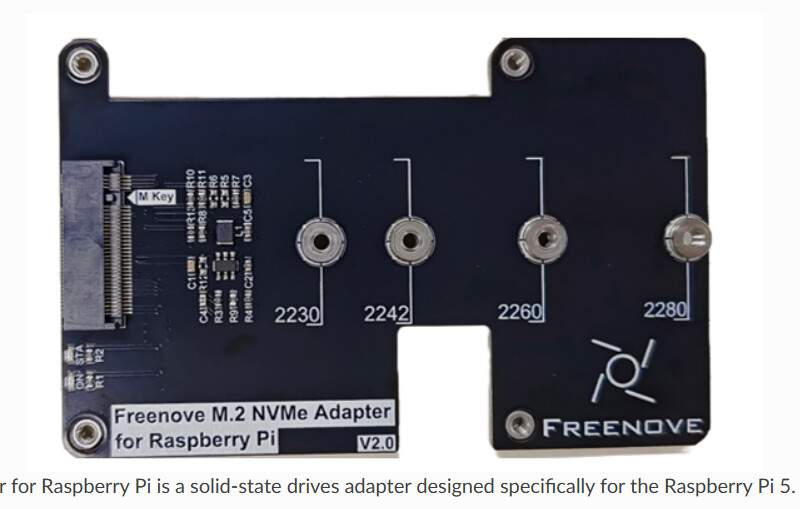
What do you mean, expected? you stated that it is compatible with raspberry. So solve this massive problem. Issue instructions to users on how to fix whether additional power needs to be supplied. You lose your reputation by not doing anything to the community. I bought a nat freenove (it works on ROCK 5C) and the problem is 0x0 like everyone else on rock2f.

This was expected.

@feng please check if you can reproduce the issue.