Rock 5B connecting HDD over USB3.1

Hi,

I currently use my Rock 5B as a media server with DietPi as the OS and Jellyfin & Ente Photos.

Will probable add something for streaming music as well later. Other than that only Pi-hole is running on it. I already populated the M.2 slot with either an 500 GB or 1 TB SSD. I don’t remember which and checking is a bit complicated since I removed the sticker thinking it was E-waste only to later find out that the firmware of the external enclosure where I had used it before was the reason why I behaved like it was broken.

What’s important that the M.2 slot is already populated and since it isn’t a 5B+it doesn’t have another.

Now for streaming movies an M.2 SSD is quite helpful (maybe also for streaming music) however for backing up photos and other files an HDD should still do.

I have a spare 2.5’’ 1TB HGST HDD from my PS4 Pro after replacing the HDD with an SSD and there is also a 3.5’’ HDD in my dads PC that he doesn’t need since he doesn’t have that many files on it. I have heard from this post that the Penta SATA HAT isn’t recommended for the Rock 5B/5B+ due to blocking the SOC under it which makes cooling it harder. Currently, I don’t have any cooling on the Rock 5B, neither a heat sink nor a fan. I have 1 Sabrent SATA to USB3.1 (Type A) adapter which comes in quite handy when transferring files while backing stuff up. Since the Rock 5B has two USB3.1 ports I could in theory connect both HDDs using USB with one of those adapters, right? Cause that seems like the most sensible option to me. No need for extra power cables and if I wanted to add cooling to the SOC I’m not limited in any way.

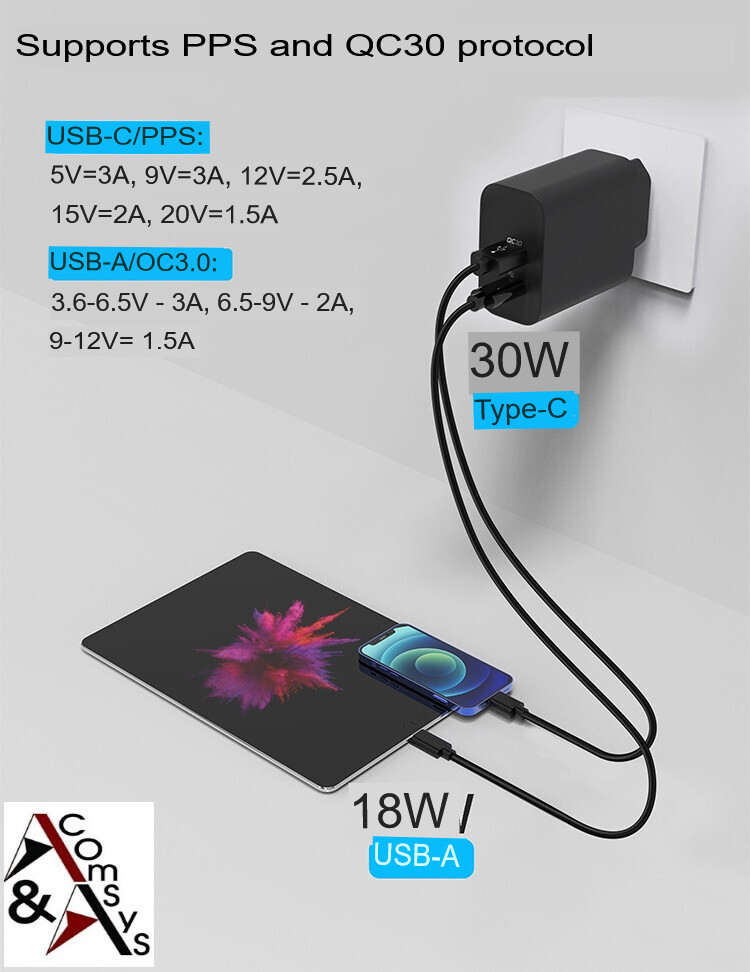
I currently power the Rock 5B with a 30W PD3.0 USB-C to USB-C charger.
Streaming movies and music is a very lightweight task for a ROCK5B (RK3588) with an M.2 SSD. It is 4-lane PCIE v3 so speed is around at least 1500 MByte/s where video is roughly 1 MByte/s and music about 0.16 MByte/s. Maybe you mean just its size (500 or 1000), but almost anything can serve music. Decades ago we used about 5 CD-ROM drives each with a disc inserted with 100+ .mp3 files on them all linked together on a Linux PC via mounts/symlinks so about 500 songs to select from (an no internet at that time of course).

What the M.2 SSD is about you can show with:

root@rock5b:~# smartctl -x /dev/nvme0n1

ROCK5B has no USB3.1, it is 3.0, but even if it was only USB2, would also be fine as USB2 can do about 35 MByte/s, so fast enough.

What might be the usual problem is power supply. A ROCK5B has solid on-board 5V power supply for it’s USB port, assuming its USB-C input is at 9V or higher (up to 20V is possible). I use 12V fixed for my ROCK5B, but don’t remember if I ever had a 2.5inch HDD connected, but it should work. Same as it works on a PC that also has internal 12V DC/DC down to 5V etc.

The other option (that I use on ROCK3A and ROCK5B) is use the Radxa SATA M.2 E-key breakout board. But that needs own 5V (and also 12V for 3.5” HDD) power wires. I am very happy with that, especially on the ROCK5B as it can simply be enabled in the EDK2 UEFI v1.1 BIOS (if you use that firmware). So also means, only a HDD is enough in principle, the OS can also run from it. I use 8T 3.5inch HDDs because I had those from PC’s, but anything will work, even the SMR ones as video/music is mostly read-only.

You don’t need any cooling/heatsink if you use lightweight tasks. But if CPU load would go all the way up for longer time, the RK3588 will severely limit its clockspeed so that temperature does not get >85 Celcius. But then it is smarter to use the Radxa metal case for example, it cools enough even at max load for longer time and you also keep the maximum clockspeed.

Huh, when I was streaming some 4K movies to my TV, I did have to lower the bitrate a bit; otherwise, it buffered. My PC screen isn’t 4K but 1440p, so maybe downsampling to that resolution also puts a bit of strain on the SoC. I don’t really like watching movies or TV shows on smartphones, so the only screen with a 1080p resolution that comes to mind is that of my laptop.

Yeah, I meant the size of the SSD, either 500 GB or 1 TB. I removed the sticker because in Germany we separate trash, so the plastic sticker was sent to recycling before I realized that the SSD was still fully functional.

If ROCK5B doesn’t have USB 3.1, whoever put it in the tech specs might want to adjust it. In the picture it’s correct. Do you know what USB 3.0 HOS means? Because googling the term didn’t help me understand it? Is the T just missing, and does it mean USB 3.0 HOST?

The PSU for the board is this, which I currently have connected with a USB-C to USB-A adapter and then a USB-A to USB-C cable because I didn’t have a USB-C to USB-C cable lying around:

If it’s too wonky, I will look for a USB-C to USB-C cable that I know can handle the correct voltage and amps. Unfortunately, USB-C cables aren’t all the same, but I can understand why there is so much variety because it keeps costs down when all the USB-C features aren’t needed.

Yeah, I was thinking about getting the metal case because if I can get away with passive cooling, I prefer that.

Thanks for all the info.

That means only 15W (5V 3A)

Recipe for problems …

Due to USB-A being limited to 5V? How do the 18 W over USB-A work, then? It says 12V and 1.5A. So my best bet without USB-C to USB-C would be to plug the USB-A to USB-C cable into the USB-A port of the PSU to at least get 18W, right? Oh, and I have an old Sony power bank that I was thinking about using as an uninterruptible power supply (UPS) for the Rock 5B because it uses micro USB for the input and USB-A for the output when all my devices have USB-C now. Its input and output are limited to 5V 1.5A, so if I did, I would be limiting my power to 7.5W, making it a bad idea.

USB-A connector does not have the CC signals that are needed to negotiate higher voltages for more power.

Only proper USB-C<=>USB-C cables with a chip in each connector should be used. There are many fakes or ones with too thin internal wires.

You should read the ROCK5B getting started how to power. And educate yourself on powering issues. You sound like the 10s or 100s of people on RPI forum who bought a RPI5 and also think they can use a sort of random PSU to get the thing running with USB HDD connected.

I read the guide and was planning to just buy the official PSU.

But since I got the Rock 5B from eBay with a Wi-Fi/Bluetooth card included (which I didn’t really need because I planned to connect it over Ethernet) due to either ALLNET or ARACE not accepting my credit card and it being out of stock on AliExpress, I couldn’t just add it to my order.

So since it said USB Type-C PD Version 2.0 with 9V/2A, 12V/2A, 15V/2A, and 20V/2A (that’s 40W at the max) and they recommended a 30W charger for the 5B (without the +), I looked for one on eBay. Where I found this thing (it’s in German because I’m German), which claimed to provide 30W with USB Type-C PD version 3.0 from the USB-C outlet. However, I have never heard of either PPS, QC3.0 or even PD before.

I previously built my own PC, but for that, all you have to keep in mind is the total wattage of the PSU, the 80+ rating, and how trustworthy the manufacturer is. I didn’t think I would have to go into the details of USB power delivery. I thought I could just use whatever cable came with the Rock 5B (don’t remember whether it did come with one) or which I had lying around. I’ve never bought USB cables from AliExpress or any other Chinese supplier before. Just from Amazon, where I assumed that the seller wouldn’t be trying to scam me. I knew that SD cards coming from there nowadays can be fakes, but cables? How would I check that? Use a multimeter or what? Because I don’t have access to an X-ray machine to check for MCUs inside cable connectors. Maybe if I go to the airport or a doctor and ask nicely if I could use theirs for a second, but that’s about it.

The idea with the power bank only came later because recently there have been a few power outages, and I doubt that’s good for the server. First the connection to the grid failed, and we had to take our solar installation offline until they replaced it. Then our stove from the 90s got replaced because we couldn’t replace the lamp in it anymore due to grease having fused it shut (also one of the LEDs from the stovetop was broken), and we wanted to switch from electric to induction anyway. So the power was cut for installing the stove. Then we installed a heat pump to heat the house because our gas boiler failed after 30 years, and they had to cut the power again. While we installed solar, the electricians told us that our electrical panel, probably from the 60s when the house was built, should be replaced. So we hired another electrician to get it replaced, meaning another power cut. Now our dishwasher failed, constantly tripping the fuse while it did. It should be replaced this week, meaning this should be the end of the power cuts for some time anyway.

I apologize for rambling a bit, but I thought you needed a bit of context for why I even want a UPS for the server. The power in Germany is quite stable normally. Anyway, the Rock 5B is only connected to power and Ethernet, and I remote into it from another machine. Meaning I didn’t know how to safely shut it down every time they had to cut the power. I hope at worst I only corrupted data stored on the server by failing to shut it down properly, but hey, what can you do?