I have Radxa Cubie A7S with Radxa Camera 13M 214. There is no overlay for A7S, only for A7A. With A7A overlay system crashes at boot. Without overlay camera heats up but is not detected. When will there be proper support for A7S camera?
@feng do you know this?
Hi @radxa @feng , my Radxa Cubie A7S and imx214 are on the way, and i would like to know how is the state of gstreamer regarding this sensor.
Is Gstreamer open source for Radxa Cubie platform? Can you point me to the source code and instructions to build for this platform?
I’m getting old, but I think I can dust off my memories from the old Cubie board days and see if I can use some of that knowledge to learn a bit more and take advantage of it. Let’s see…
I just received my Cubie A7S and the imx214 and did a quick first test using the latest radxa from here: radxa-a733-bullseye-cli-r6 (Latest): supports booting from microSD and onboard eMMC. And would like to report this first attempt.
My board has no eMMC installed.
- Selected the imx214 overlay:
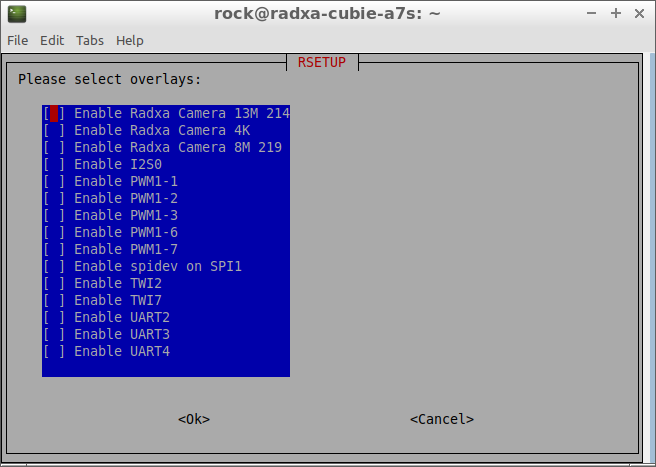
- Rebooted
And the the kernel crashed and the board turned off. I don’t have the logs right now.
- Manually disabled the the imx214 overlay and tried to boot again.
Kernel booted, but board is unresponsive, possibly stuck waiting for something, i can’t provide the logs yet, i’m not comfortable with overlays and have to find out a bit more but just following the instructions below can reproduce the issue.
I have not tried any other image. Any suggestions other than trying with other images?
Here is the log after disabling imx214 overlay manually, no usb-c to hdmi display, i had to start ssh via systemctl to get access again, it seems to have rolled back to firt-boot state after the first crash when imx214 overlay was enabled via rsetup. Judging by the extensive mmc error message, the sd card is now corrupt. It looks like a kernel crash can easily corrupt the sd card.
Anyway, i will try fsck to see if the card can be repaired.
[80]HELLO! BOOT0 is starting!
[83]BOOT0 commit : {4721ad08}
[86]board gpio withstand voltage auto mode
[100]dram_para_total:0xf
[103]vaild para:6  select dram para0
[mmc]: mmc driver ver 2025-10-16 17:10
[mmc]: Wrong media type 0x0
[mmc]: Try SD card 0
[mmc]: HSSDR52/SDR25 4 bit
[mmc]: 50000000 Hz
[mmc]: 55000 MB
[mmc]: SD/MMC 0 init OK!!!
[139]DRAM BOOT DRIVE INFO: V0.601
[144]DRAM_VCC set to 560 mv
[147]DRAM CLK =2400 MHZ
[149]DRAM Type =9 (8:LPDDR4,9:LPDDR5)
[297]Training result is = 7
[300]DRAM Pstate 1 training, frequency is 1200 Mhz
[478]Training result is = 7
[481]DRAM Pstate 2 training, frequency is 800 Mhz
[825]Training result is = 7
[828]DRAM Pstate 3 training, frequency is 400 Mhz
[910]Training result is = 7
[913]DRAM Pstate 0 training, frequency is 2400 Mhz
[922]Actual DRAM SIZE =4096 M
[925]DRAM SIZE =4096 MBytes, para1 = a0fa, para2 = 10001001, dram_tpr13 = 65
[939]DRAM simple test OK.
[945]error:bad magic.
[1009]error: dtb not found for scp
[1013]mmc not para
[1014]Jump to ATF: monitor_base = 0x48000000, uboot_base = 0x4a000000, optee_ba0
NOTICE:  BL31: OP-TEE 32bit detected
NOTICE:  BL31: U-BOOT 32bit detected
NOTICE:  BL31: dram size is 4294967296 bytes
NOTICE:  BL31: v2.5(debug):48e54578a
NOTICE:  BL31: Built : 14:13:06, Jul  2 2025
NOTICE:  BL31: No DTB found.
ERROR:   Error initializing runtime service opteed_fast

U-Boot 2018.07-17-boot-aw2501-g4c7078cfdf7-dirty (Apr 29 2026 - 10:03:59 +0000)y

[01.069]CPU:   Allwinner Family
[01.072]Model: Radxa Cubie A7A
I2C:   ready
[01.134]DRAM:  4 GiB
[01.142]Relocation Offset is: 75d89000
[01.192]secure enable bit: 0
[01.196]PMU: AXP8191
[01.198]PMU: AXP8191 VER_A
FDT ERROR:fdt_get_regulator_name:get property handle twi-supply error:FDT_ERR_IL
[01.210]bmu_axp515_probe pmic_bus_read fail
[01.214][AXP8191] onoff status: 0x50 = 0x1, 0x51 = 0x0
[01.218][AXP8191] charge status: 0x4 = 0x0
[01.222]CPU=1014 MHz,PLL6=1200 Mhz,AHB=200 Mhz, APB1=24Mhz  MBus=600Mhz
[01.228]gic: sec monitor mode
SPI ALL:   ready
[01.273]flash init start
[01.275]workmode = 0,storage type = 1
[01.278][mmc]: mmc driver ver uboot2018:2024-10-18 9:01:00 – uboot2018:2025-030
[01.286][mmc]: get sdc_type fail and use default host:tm1.
[01.294][mmc]: can’t find node “mmc0”,will add new node
[01.299][mmc]: fdt err returned
[01.303][mmc]: Using default timing para
[01.307][mmc]: SUNXI SDMMC Controller Version:0x50530
[01.324][mmc]: card_caps:0x3000000a
[01.328][mmc]: host_caps:0x3000003f
[01.332]sunxi flash init ok
get value error
[01.342]Loading Environment from SUNXI_FLASH… OK
No ethernet found.
[01.380]NOT support bridge yet
[01.382]Warn: no find panel or bridge
[01.387]hdmi0@5520000 disconnected
[01.390]drm hdmi get mode: 1920x1080@60Hz
hdmi0@5520000: use force output detailed mode clock 148500 kHz, flags[5]
H: 1920 2008 2052 2200
V: 1080 1084 1089 1125
bus_format: 0
partno erro : can’t find partition bootloader
[01.419]bootloader is not found!
partno erro : can’t find partition boot-resource
[01.428]boot-resource is not found!
[01.431]Can not load logo.bmp file!
[01.435]load logo fail
[01.444]the secure storage item0 copy0 magic is bad
[01.456]the secure storage item0 copy1 magic is bad
[01.460]usb burn from boot
delay time 0
[01.466]usb prepare ok
[01.770]overtime
[01.774]do_burn_from_boot usb : no usb exist
skip update boot_param
cann’t get the boot_base from the env
[01.785]update part info
[01.790]battery temp is -1
[01.795]update bootcmd
[01.803](not enough data: expected >= 8 cells, got 4 cells)
Link up timeout
Speed change timeout
PCIe speed of Gen1
Override default fdtfile to allwinner/sun60i-a733-cubie-a7s.dtb
[04.246]libfdt fdt_check_header(): FDT_ERR_BADMAGIC
[04.252]libfdt fdt_path_offset() returned FDT_ERR_BADMAGIC
[04.257][mmc]: get sunxi-mmc0 string failed
[04.262]The storage not support sample function
[04.268]## error: update_fdt_dram_para_from_bootpara : FDT_ERR_NOTFOUND
[04.275]chip id : 0x00005100 0x00004900 0x0000c418 0x000022d4
[04.280]mac addr => 08:51:49:dc:f6:6c
[04.284]chip id : 0x00005100 0x00004900 0x0000c418 0x000022d4
[04.289]mac addr => 08:51:49:dc:f6:6d
[04.293]/chosen/rng-seed node not exit
[04.297]no battery, disabled battery functons
[04.301]Could not find nodeoffset for bat_supply
[04.305]update dts
curr_device:0
Device: SUNXI SD/MMC
Manufacturer ID: fe
OEM: 3432
Name: SDBus Speed: 50000000
Mode : SD High Speed (50MHz)
Rd Block Len: 512
SD version 3.0
High Capacity: Yes
Capacity: 53.7 GiB
Bus Width: 4-bit
Erase Group Size: 512 Bytes
[ufs]info:Driver version 0.0.24 2024.12.30 16:00
[ufs]info:Cal words 0x60:val 0xa1830000, 0x64:val 0x4d1fa478
[ufs]err:uic c 16,uic a 0,1,0
[ufs]err:e 80000010,0,0,0,0
[ufs]err:int s 0,400
[ufs]err:Device not present
[ufs]err:wait device link startup failed
[ufs]info:peer link startup timeout
[ufs]info:Cal words 0x60:val 0xa1830000, 0x64:val 0x4d1fa478
[ufs]err:uic c 16,uic a 0,1,0
[ufs]err:e 80000010,0,0,0,0
[ufs]err:int s 0,400
[ufs]err:Device not present
[ufs]err:wait device link startup failed
[ufs]info:peer link startup timeout
[ufs]info:Cal words 0x60:val 0xa1830000, 0x64:val 0x4d1fa478
[ufs]err:uic c 16,uic a 0,1,0
[ufs]err:e 80000010,0,0,0,0
[ufs]err:int s 0,400
[ufs]err:Device not present
[ufs]err:wait device link startup failed
[ufs]info:peer link startup timeout
[ufs]info:Cal words 0x60:val 0xa1830000, 0x64:val 0x4d1fa478
[ufs]err:uic c 16,uic a 0,1,0
[ufs]err:e 80000010,0,0,0,0
[ufs]err:int s 0,400
[ufs]err:Device not present
[ufs]err:wait device link startup failed
[ufs]info:peer link startup timeout
[ufs]err:link startup failed -6
[ufs]err:ufshcd_probe() failed -6
fail to init ufs
sunxi_flash - sunxi_flash sub-system

Usage:
sunxi_flash sunxi_flash init storage_type
sunxi_flash read mem_addr part_name [size]
sunxi_flash read_mtd mem_addr part_name [size]
sunxi_flash write <mem_addr> <part_name> [size]
sunxi_flash write <mem_addr> <part_name> [offset] [size]
sunxi_flash write_mtd <mem_addr> <part_name>
sunxi_flash boot0 force_dram_update_size <new_val>
sunxi_flash boot0 force_dram_update_flag <new_val>

Hit any key to stop autoboot:  0
starting USB…
USB0:   start sunxi  USB-DRD…
config usb clk ok
sunxi USB-DRD init ok…
USB EHCI 1.00
scanning bus 0 for devices… 1 USB Device(s) found
USB1:   start sunxi  USB1-Host…
config usb clk ok
sunxi USB1-Host init ok…
USB EHCI 1.00
scanning bus 1 for devices… 2 USB Device(s) found
scanning usb for storage devices… 0 Storage Device(s) found

Device 0: device type unknown
… is now current device
** Bad device usb 0 **
** Bad device usb 0 **
mmc0 is current device
Scanning mmc 0:2…
Scanning mmc 0:3…
Found /boot/extlinux/extlinux.conf
Retrieving file: /boot/extlinux/extlinux.conf
1432 bytes read in 20 ms (69.3 KiB/s)
U-Boot menu
1:      Debian GNU/Linux 11 (bullseye) 5.15.147-21-a733
2:      Debian GNU/Linux 11 (bullseye) 5.15.147-21-a733 (rescue target)
Enter choice: 1:        Debian GNU/Linux 11 (bullseye) 5.15.147-21-a733
Retrieving file: /boot/initrd.img-5.15.147-21-a733
8530891 bytes read in 372 ms (21.9 MiB/s)
Retrieving file: /boot/vmlinuz-5.15.147-21-a733
23296512 bytes read in 985 ms (22.6 MiB/s)
append: root=UUID=60bcb41a-e316-457c-8f64-8899ab38fd38 console=ttyAS0,115200n8 f
Retrieving file: /usr/lib/linux-image-5.15.147-21-a733/allwinner/sun60i-a733-cub
194259 bytes read in 131 ms (1.4 MiB/s)
Retrieving file: /boot/dtbo/cubie-a7a-radxa-camera-13m-214.dtbo
Failed loading overlay /boot/dtbo/cubie-a7a-radxa-camera-13m-214.dtbo
[12.417]libfdt fdt_path_offset() returned FDT_ERR_BADMAGIC
[12.426]The storage not support sample function
[12.512]mac addr => 08:51:49:dc:f6:6c
[12.516]mac addr => 08:51:49:dc:f6:6d
[12.521]no battery, disabled battery functons
[12.528]update dts
stop sunxi USB-DRD ok…
stop sunxi USB1-Host ok…
[12.555]Starting kernel …

[12.557]total: 12557 ms

[12.560][mmc]: MMC Device 2 not found
[12.563][mmc]: mmc 2 not find, so not exit
NOTICE:  [SCP] :wait arisc ready…
NOTICE:  [SCP] :arisc version: [d463b9da43dc50320f21ba51c6c51afe2db20d83]
NOTICE:  [SCP] :arisc startup ready
NOTICE:  [SCP] :arisc startup notify message feedback
NOTICE:  [SCP] :sunxi-arisc driver is starting
NOTICE:  BL3-1: Next image address = 0x40200000
NOTICE:  BL3-1: Next image spsr = 0x3c5
[    0.000000][    T0] Booting Linux on physical CPU 0x0000000000 [0x412fd050]
[    0.000000][    T0] Linux version 5.15.147-21-a733 (vscode@719ff648175a) (aa6
[    0.000000][    T0] random: crng init done
[    0.000000][    T0] Machine model: sun60iw2
[    0.000000][    T0] printk: bootconsole [earlycon0] enabled
[    0.000000][    T0] AW BSP version: 18dcb68d3d, 2026-04-30 12:13:15, RadxaOSK
[    0.000000][    T0] AW BSP version: 18dcb68d3d, 2026-04-30 12:13:15, RadxaOSK
[    0.081947][    T1] iommu_master csi_iommu: attach fail:-517
[    0.082008][    T1] sunxi-iommu-v2 3900000.iommu: master probe failed with -7
[    0.220599][    T1] sunxi:ccu_ddr:[ERR]: dram_clk:2400
[    0.220613][    T1] sunxi:ccu_ddr:[ERR]: dram_div:0x170b0703
[    0.220868][    T1] sunxi:pin-2000000.pinctrl:[ERR]: unknown pin
[    0.220872][    T1] sunxi:pin-2000000.pinctrl:[ERR]: unknown pin
[    0.220919][    T1] sunxi:pin-2000000.pinctrl:[ERR]: unknown pin
[    0.220922][    T1] sunxi:pin-2000000.pinctrl:[ERR]: unknown pin
[    0.320336][    C0] sunxi:sunxi_mmc_host-4022000.sdmmc:[ERR]: smc 1 p2 err, !
[    0.330407][    C0] sunxi:sunxi_mmc_host-4022000.sdmmc:[ERR]: smc 1 p2 err, !
[    0.340478][    C0] sunxi:sunxi_mmc_host-4022000.sdmmc:[ERR]: smc 1 p2 err, !
[    0.350538][    C0] sunxi:sunxi_mmc_host-4022000.sdmmc:[ERR]: smc 1 p2 err, !
[    0.360585][    C0] sunxi:sunxi_mmc_host-4022000.sdmmc:[ERR]: smc 1 p2 err, !
[    0.370656][    C0] sunxi:sunxi_mmc_host-4022000.sdmmc:[ERR]: smc 1 p2 err, !
[    0.380763][    C0] sunxi:sunxi_mmc_host-4022000.sdmmc:[ERR]: smc 1 p2 err, !
[    0.390875][    C0] sunxi:sunxi_mmc_host-4022000.sdmmc:[ERR]: smc 1 p2 err, !
[    0.400971][    C0] sunxi:sunxi_mmc_host-4022000.sdmmc:[ERR]: smc 1 p2 err, !
[    0.411146][    C0] sunxi:sunxi_mmc_host-4022000.sdmmc:[ERR]: smc 1 p2 err, !
[    0.411167][    T1] sunxi:sunxi_sidefuse init success!
[    0.426236][    T1] sunxi:sunxi_smcdrm config service not available: FFFFFFFF
[    0.427029][    C0] sunxi:sunxi_mmc_host-4022000.sdmmc:[ERR]: smc 1 p2 err, !
[    0.445173][    C0] sunxi:sunxi_mmc_host-4022000.sdmmc:[ERR]: smc 1 p2 err, !
[    0.445223][    T1] sunxi:dwc3_sunxi_plat-12.usbc2:[ERR]: couldn’t get drvvby
[    0.464099][    C0] sunxi:sunxi_mmc_host-4022000.sdmmc:[ERR]: smc 1 p2 err, !
[    0.474199][    C0] sunxi:sunxi_mmc_host-4022000.sdmmc:[ERR]: smc 1 p2 err, !
[    0.484361][    C0] sunxi:sunxi_mmc_host-4022000.sdmmc:[ERR]: smc 1 p2 err, !
[    0.494590][    C0] sunxi:sunxi_mmc_host-4022000.sdmmc:[ERR]: smc 1 p2 err, !
[    0.504785][    C0] sunxi:sunxi_mmc_host-4022000.sdmmc:[ERR]: smc 1 p2 err, !
[    0.514895][    C0] sunxi:sunxi_mmc_host-4022000.sdmmc:[ERR]: smc 1 p2 err, !
[    0.524482][    T1] husb311 failed to find usb power
[    0.525023][    C0] sunxi:sunxi_mmc_host-4022000.sdmmc:[ERR]: smc 1 p2 err, !
[    0.539899][    T1] husb311 14-004e: fail to register tcpci port, -517
[    0.540165][    C0] sunxi:sunxi_mmc_host-4022000.sdmmc:[ERR]: smc 1 p2 err, !
[    0.557330][    C0] sunxi:sunxi_mmc_host-4022000.sdmmc:[ERR]: smc 1 p2 err, !
[    0.567504][    C0] sunxi:sunxi_mmc_host-4022000.sdmmc:[ERR]: smc 1 p2 err, !
[    0.568995][    T1] sunxi:axp8191_temp_ctrl:[ERR]: axp8191-temp-ctrl device d
[    0.587002][    C0] sunxi:sunxi_mmc_host-4022000.sdmmc:[ERR]: smc 1 p2 err, !
[    0.597098][    C0] sunxi:sunxi_mmc_host-4022000.sdmmc:[ERR]: smc 1 p2 err, !
[    0.607207][    C0] sunxi:sunxi_mmc_host-4022000.sdmmc:[ERR]: smc 1 p2 err, !
[    0.617312][    C0] sunxi:sunxi_mmc_host-4022000.sdmmc:[ERR]: smc 1 p2 err, !
[    0.627426][    C0] sunxi:sunxi_mmc_host-4022000.sdmmc:[ERR]: smc 1 p2 err, !
[    0.637529][    C0] sunxi:sunxi_mmc_host-4022000.sdmmc:[ERR]: smc 1 p2 err, !
[    0.647631][    C0] sunxi:sunxi_mmc_host-4022000.sdmmc:[ERR]: smc 1 p2 err, !
[    0.657721][    C0] sunxi:sunxi_mmc_host-4022000.sdmmc:[ERR]: smc 1 p2 err, !
[    0.667838][    C0] sunxi:sunxi_mmc_host-4022000.sdmmc:[ERR]: smc 1 p2 err, !
[    0.677940][    C0] sunxi:sunxi_mmc_host-4022000.sdmmc:[ERR]: smc 1 p2 err, !
[    0.688078][    C0] sunxi:sunxi_mmc_host-4022000.sdmmc:[ERR]: smc 1 p2 err, !
[    0.697330][  T110] sunxi:sunxi_mmc_host-4022000.sdmmc:[ERR]: retry:set phass
[    0.708008][  T110] sunxi:sunxi_mmc_host-4022000.sdmmc:[ERR]: retry:give up
[    0.739438][   T64] sunxi:sunxi_mmc_host-4020000.sdmmc:[ERR]: sdc0 :the hostl
[    0.922727][  T104] sunxi-ufs-pltfm 4520000.ufs: link startup failed 1
[    0.930508][  T104] sunxi-ufs-pltfm 4520000.ufs: UFS Host state=0
[    0.937369][  T104] sunxi-ufs-pltfm 4520000.ufs: outstanding reqs=0x0 tasks=0
[    0.945557][  T104] sunxi-ufs-pltfm 4520000.ufs: saved_err=0x0, saved_uic_er0
[    0.953951][  T104] sunxi-ufs-pltfm 4520000.ufs: Device power mode=1, UIC li0
[    0.962836][  T104] sunxi-ufs-pltfm 4520000.ufs: PM in progress=0, sys. susp0
[    0.971415][  T104] sunxi-ufs-pltfm 4520000.ufs: Auto BKOPS=0, Host self-blo0
[    0.979702][  T104] sunxi-ufs-pltfm 4520000.ufs: Clk gate=1
[    0.986734][  T104] sunxi-ufs-pltfm 4520000.ufs: last_hibern8_exit_tstamp at0
[    0.997085][  T104] sunxi-ufs-pltfm 4520000.ufs: last intr at 918901 us, las4
[    1.006836][  T104] sunxi-ufs-pltfm 4520000.ufs: error handling flags=0x0, r0
[    1.016411][  T104] sunxi-ufs-pltfm 4520000.ufs: hba->ufs_version=0x300, Hos0
[    1.027725][  T104] sunxi-ufs-pltfm 4520000.ufs: quirks=0x0, dev. quirks=0x0
[    1.035633][  T104] host_regs: 00000000: 11870f1f 00000000 00000300 00000000
[    1.043535][  T104] host_regs: 00000010: 00000000 00000926 00000000 00000000
[    1.051433][  T104] host_regs: 00000020: 00000000 e0000470 00000000 00000000
[    1.059334][  T104] host_regs: 00000030: 00000008 00000001 00000000 00000000
[    1.067232][  T104] host_regs: 00000040: 00000000 00000000 00000000 00000000
[    1.075134][  T104] host_regs: 00000050: 00000000 00000000 00000000 00000000
[    1.083054][  T104] host_regs: 00000060: 00000000 00000000 00000000 00000000
[    1.090955][  T104] host_regs: 00000070: 00000000 00000000 00000000 00000000
[    1.098853][  T104] host_regs: 00000080: 00000000 00000000 00000000 00000000
[    1.106754][  T104] host_regs: 00000090: 00000000 00000000 00000000 00000000
[    1.114653][  T104] sunxi-ufs-pltfm 4520000.ufs: No record of pa_err
[    1.121775][  T104] sunxi-ufs-pltfm 4520000.ufs: No record of dl_err
[    1.128893][  T104] sunxi-ufs-pltfm 4520000.ufs: No record of nl_err
[    1.136015][  T104] sunxi-ufs-pltfm 4520000.ufs: No record of tl_err
[    1.143134][  T104] sunxi-ufs-pltfm 4520000.ufs: No record of dme_err
[    1.150353][  T104] sunxi-ufs-pltfm 4520000.ufs: No record of auto_hibern8_er
[    1.158446][  T104] sunxi-ufs-pltfm 4520000.ufs: No record of fatal_err
[    1.165859][  T104] sunxi-ufs-pltfm 4520000.ufs: link_startup_fail[0] = 0x1 s
[    1.174928][  T104] sunxi-ufs-pltfm 4520000.ufs: link_startup_fail: total cn1
[    1.183121][  T104] sunxi-ufs-pltfm 4520000.ufs: No record of resume_fail
[    1.190733][  T104] sunxi-ufs-pltfm 4520000.ufs: No record of suspend_fail
[    1.198440][  T104] sunxi-ufs-pltfm 4520000.ufs: dev_reset[0] = 0x0 at 40336s
[    1.206729][  T104] sunxi-ufs-pltfm 4520000.ufs: dev_reset: total cnt=1
[    1.214143][  T104] sunxi-ufs-pltfm 4520000.ufs: No record of host_reset
[    1.221652][  T104] sunxi-ufs-pltfm 4520000.ufs: No record of task_abort
[    2.909783][    T9] sunxi:pcie-rc-6000000.pcie:[ERR]: Speed change timeout
[    2.952036][    T9] husb311 failed to find usb power
[    4.714580][  T103] usb 3-1.2.4: device descriptor read/64, error -32
[    4.910577][  T103] usb 3-1.2.4: device descriptor read/64, error -32
[    5.182868][  T103] usb 3-1.2.4: device descriptor read/64, error -32
[    5.374846][  T103] usb 3-1.2.4: device descriptor read/64, error -32
[    6.497152][  T300] sunxi:sound-mach:[ERR]: 535 simple_parse_of(): simple_dad
[    6.506574][  T103] usb 3-1.2.4: device not accepting address 8, error -32
[    6.559656][    T9] sunxi:sound-mach:[ERR]: 535 simple_parse_of(): simple_dad
[    6.580426][    T9] debugfs: Directory ‘2535000.i2s3_plat’ with parent 'allw!
[    6.682365][  T280] sunxi:vin:[ERR]: failed to get vipp16 IRQ resource
[    6.695442][  T280] sunxi:vin:[ERR]: failed to get vipp17 IRQ resource
[    6.712598][  T280] sunxi:vin:[ERR]: fetch vind_mclkpin_vol from device_treed
[    6.712615][  T280] sunxi:vin:[ERR]: vin_pinpower_get_set: set vind_mclkpin !
[    7.014596][  T103] usb 3-1.2.4: device not accepting address 9, error -32
[    7.022750][  T103] usb 3-1.2-port4: unable to enumerate USB device
[    9.278413][  T292] ieee80211 phy0:
[    9.278413][  T292] *******************************************************
[    9.278413][  T292] ** CAUTION: USING PERMISSIVE CUSTOM REGULATORY RULES **
[    9.278413][  T292] *******************************************************

Debian GNU/Linux 11 radxa-cubie-a7s ttyAS0

radxa-cubie-a7s login: rock
Password:
Linux radxa-cubie-a7s 5.15.147-21-a733 #21 SMP PREEMPT Thu Apr 30 12:14:04 UTC 4

The programs included with the Debian GNU/Linux system are free software;
the exact distribution terms for each program are described in the
individual files in /usr/share/doc/*/copyright.

Debian GNU/Linux comes with ABSOLUTELY NO WARRANTY, to the extent
permitted by applicable law.
Last login: Sat Jun 20 11:12:25 UTC 2026 from 192.168.254.253 on pts/0
rock@radxa-cubie-a7s:~$ [   34.100833][  T466] dma dma0chan0: The timeout func d

rock@radxa-cubie-a7s:~$ ls /dev/video
ls: cannot access ‘/dev/video’: No such file or directory
rock@radxa-cubie-a7s:~$
rock@radxa-cubie-a7s:~$ sudo dmesg|grep tail
[sudo] password for rock^C
rock@radxa-cubie-a7s:~$ sudo dmesg|grep eth
[    0.000000] psci: probing for conduit method from DT.
[    6.666664] dwmac-sunxi 4500000.ethernet: IRQ eth_wake_irq not found
[    6.667122] sunxi:stmmac-4500000.ethernet:[INFO]: Phy use soc fanout
[    6.673688] sunxi:stmmac-4500000.ethernet:[INFO]: Not found delay-maps in dts
[    6.675561] sunxi:stmmac-4500000.ethernet:[INFO]: RGMII use internal transmik
[    6.675760] dwmac-sunxi 4500000.ethernet: User ID: 0x20, Synopsys ID: 0x53
[    6.675772] dwmac-sunxi 4500000.ethernet:    DWMAC4/5
[    6.675779] dwmac-sunxi 4500000.ethernet: DMA HW capability register supportd
[    6.675783] dwmac-sunxi 4500000.ethernet: RX Checksum Offload Engine supportd
[    6.675787] dwmac-sunxi 4500000.ethernet: TX Checksum insertion supported
[    6.675791] dwmac-sunxi 4500000.ethernet: Wake-Up On Lan supported
[    6.677737] dwmac-sunxi 4500000.ethernet: Enable RX Mitigation via HW Watchdr
[    6.677751] dwmac-sunxi 4500000.ethernet: Enabled RFS Flow TC (entries=8)
[    6.677758] dwmac-sunxi 4500000.ethernet: Using 32 bits DMA width
[    7.099385] sunxi:stmmac-4500000.ethernet:[INFO]: probe success (Version 0.3)
[    7.448964] dwmac-sunxi 4500000.ethernet eth0: PHY [stmmac-0:01] driver [MAE)
[    7.571030] dwmac-sunxi 4500000.ethernet eth0: Register MEM_TYPE_PAGE_POOL R0
[    7.583586] dwmac-sunxi 4500000.ethernet eth0: No Safety Features support fod
[    7.594222] dwmac-sunxi 4500000.ethernet eth0: IEEE 1588-2008 Advanced Timesd
[    7.594769] dwmac-sunxi 4500000.ethernet eth0: configuring for phy/rgmii line
[   85.410885] dwmac-sunxi 4500000.ethernet eth0: Link is Up - 1Gbps/Full - flox
[   85.410946] IPv6: ADDRCONF(NETDEV_CHANGE): eth0: link becomes ready
rock@radxa-cubie-a7s:~$ sudo dmesg|grep hdmi
rock@radxa-cubie-a7s:~$ sudo dmesg|grep eth
[    0.000000] psci: probing for conduit method from DT.
[    6.666664] dwmac-sunxi 4500000.ethernet: IRQ eth_wake_irq not found
[    6.667122] sunxi:stmmac-4500000.ethernet:[INFO]: Phy use soc fanout
[    6.673688] sunxi:stmmac-4500000.ethernet:[INFO]: Not found delay-maps in dts
[    6.675561] sunxi:stmmac-4500000.ethernet:[INFO]: RGMII use internal transmik
[    6.675760] dwmac-sunxi 4500000.ethernet: User ID: 0x20, Synopsys ID: 0x53
[    6.675772] dwmac-sunxi 4500000.ethernet:    DWMAC4/5
[    6.675779] dwmac-sunxi 4500000.ethernet: DMA HW capability register supportd
[    6.675783] dwmac-sunxi 4500000.ethernet: RX Checksum Offload Engine supportd
[    6.675787] dwmac-sunxi 4500000.ethernet: TX Checksum insertion supported
[    6.675791] dwmac-sunxi 4500000.ethernet: Wake-Up On Lan supported
[    6.677737] dwmac-sunxi 4500000.ethernet: Enable RX Mitigation via HW Watchdr
[    6.677751] dwmac-sunxi 4500000.ethernet: Enabled RFS Flow TC (entries=8)
[    6.677758] dwmac-sunxi 4500000.ethernet: Using 32 bits DMA width
[    7.099385] sunxi:stmmac-4500000.ethernet:[INFO]: probe success (Version 0.3)
[    7.448964] dwmac-sunxi 4500000.ethernet eth0: PHY [stmmac-0:01] driver [MAE)
[    7.571030] dwmac-sunxi 4500000.ethernet eth0: Register MEM_TYPE_PAGE_POOL R0
[    7.583586] dwmac-sunxi 4500000.ethernet eth0: No Safety Features support fod
[    7.594222] dwmac-sunxi 4500000.ethernet eth0: IEEE 1588-2008 Advanced Timesd
[    7.594769] dwmac-sunxi 4500000.ethernet eth0: configuring for phy/rgmii line
[   85.410885] dwmac-sunxi 4500000.ethernet eth0: Link is Up - 1Gbps/Full - flox
[   85.410946] IPv6: ADDRCONF(NETDEV_CHANGE): eth0: link becomes ready
rock@radxa-cubie-a7s:~$ sudo systemctl start ssh
rock@radxa-cubie-a7s:~$ sudo dmesg|grep dp
[    0.061192] platform 5740000.edp0: Fixing up cyclic dependency with 5731000.4
[    0.731587] drm_edp 5740000.edp0: supply vdd-edp not found, using dummy regur
[    0.732866] drm_edp 5740000.edp0: supply vcc-edp not found, using dummy regur
[    0.733018] [drm] edp’s combo-phy not setting, maybe not used!
[    0.772717] sunxi-drm soc@3000000:sunxi-drm: bound 5740000.edp0 (ops sunxi_d)
[    4.617211] systemd[1]: Created slice system-modprobe.slice.
[    4.661303] systemd[1]: Starting Coldplug All udev Devices…
[    4.666665] systemd[1]: [email protected]: Succeeded.
[    4.667699] systemd[1]: [email protected]: Succeeded.
[    4.668633] systemd[1]: [email protected]: Succeeded.
[    6.580426] debugfs: Directory ‘2535000.i2s3_plat’ with parent 'allwinner-ed!
[    7.977730] endpoint num 3
[    7.977732] endpoint num 4
[    7.977733] endpoint num 4
rock@radxa-cubie-a7s:~$
Just a question: the boot logo has never been shown, not even on the first boot stage. Kernel messages have never appeared, and the login is available only after DHCP acquires the IP. Does it mean the sd card was corrupt from the beggining?
bus_format: 0
partno erro : can’t find partition bootloader
[01.419]bootloader is not found!
partno erro : can’t find partition boot-resource
[01.428]boot-resource is not found!
[01.431]Can not load logo.bmp file!
[01.435]load logo fail
[01.444]the secure storage item0 copy0 magic is bad
[01.456]the secure storage item0 copy1 magic is bad
[01.460]usb burn from boot
delay time 0
[01.466]usb prepare ok
[01.770]overtime
[01.774]do_burn_from_boot usb : no usb exist
skip update boot_param
cann’t get the boot_base from the env
[01.785]update part info
[01.790]battery temp is -1
[01.795]update bootcmd
[01.803](not enough data: expected >= 8 cells, got 4 cells)
Link up timeout
Speed change timeout
Checking sd card integrity:
- rootfs
sudo fsck.ext4 -f /dev/sdd3
e2fsck 1.44.1 (24-Mar-2018)
Pass 1: Checking inodes, blocks, and sizes
Pass 2: Checking directory structure
Pass 3: Checking directory connectivity
Pass 4: Checking reference counts
Pass 5: Checking group summary information
rootfs: 58777/3485632 files (0.1% non-contiguous), 816461/13995003 blocks
- config partition
sudo fsck.vfat -f /dev/sdd1
fsck.fat 4.1 (2017-01-24)
/dev/sdd1: 3 files, 201/8167 clusters
Trying to find the reason for no hdmi output i received these messages:
[ 9.186920] IPv6: ADDRCONF(NETDEV_CHANGE): eth0: link becomes ready
[ 21.159911] sunxi:sunxi_pd_test-soc@3000000:pd_vi_test@0:[WARN]: runtime_suspend disable clock
[ 21.159943] sunxi:sunxi_pd_test-soc@3000000:pd_ve_dec_test@0:[WARN]: runtime_suspend disable clock
[ 21.159959] sunxi:sunxi_pd_test-soc@3000000:pd_ve_enc_test@0:[WARN]: runtime_suspend disable clock
[ 21.159971] sunxi:sunxi_pd_test-soc@3000000:pd_npu_test@0:[WARN]: runtime_suspend disable clock
[ 21.159979] sunxi:sunxi_pd_test-soc@3000000:pd_pcie_test@0:[WARN]: runtime_suspend disable clock
[ 21.159988] sunxi:sunxi_pd_test-soc@3000000:pd_usb2_test@0:[WARN]: runtime_suspend disable clock
[ 21.159996] sunxi:sunxi_pd_test-soc@3000000:pd_de_sys_test@0:[WARN]: runtime_suspend disable clock
[ 21.160008] sunxi:sunxi_pd_test-soc@3000000:pd_vo_test@0:[WARN]: runtime_suspend disable clock
[ 21.160019] sunxi:sunxi_pd_test-soc@3000000:pd_vo1_test@0:[WARN]: runtime_suspend disable clock
[ 33.760911] axp8191-bldo1: disabling
[ 33.761916] axp8191-bldo5: disabling
[ 33.762487] axp8191-cldo2: disabling
[ 547.826849] dma dma0chan0: The timeout func is not suportted or chan->private is NULL, timeout mode not used
[ 547.898067] Bluetooth: RFCOMM TTY layer initialized
[ 547.898099] Bluetooth: RFCOMM socket layer initialized
[ 547.898119] Bluetooth: RFCOMM ver 1.11
I could not find the correct service to restore hdmi output, so i just decided to test the camera.
gst-launch-1.0 v4l2src device=/dev/video1 num-buffers=1 en-awisp=1 en-largemode=1 ! video/x-raw,format=NV12,width=4208,height=3120,framerate=30/1 ! jpegenc ! filesink location=4208x3120.jpg
Setting pipeline to PAUSED …
Pipeline is live and does not need PREROLL …
Pipeline is PREROLLED …
Setting pipeline to PLAYING …
New clock: GstSystemClock
[ISP]>>>>>>>>>>>>>>>>>>>> ISP VERSION INFO <<<<<<<<<<<<<<<<<<<
IPCORE: ISP602
branch: libisp-dev
commit: 665dc2e9613716c25abb6b64af145a73b989271e
date  : Wed Dec 18 15:26:13 2024 +0800
author: [email protected]

[ISP]video device name is vin_video1
[AWIspApi]: F:awIspGetIspId, L:104, video1 → isp1
[ISP]STITCH_2IN1_LINNER
[ISP]ISP Set Sync Mode = 0x3, isp_sync_mode = 0x20003
[ISP]tdm_rx device name is sunxi_tdm_rx.0
[ISP]open isp device[0] success!
[ISP_WARN]open /mnt/isp1_4208_3120_30_0_imx214_ctx_saved.bin failed, err:No such file or directory.
[ISP]detect /mnt/ success.
[ISP]find imx214_4208_3120_30_0 [imx214_13m_isp_cfg] isp config
[ISP]create isp0 server thread!
[ISP_ERR]isp_dev_start, line: 717,unable to subscribe to tdm event: Inappropriate ioctl for device (25).
[ISP]tdm_rx device name is sunxi_tdm_rx.1
[ISP]open isp device[1] success!
[ISP_WARN]VIDIOC_VIN_GET_SENSOR_OTP_INFO return error:Invalid argument
[ISP]ISP1 OTP Disable
[ISP_WARN]open /mnt/isp1_4208_3120_30_0_imx214_ctx_saved.bin failed, err:No such file or directory.
[ISP]detect /mnt/ success.
[ISP]find imx214_4208_3120_30_0 [imx214_13m_isp_cfg] isp config
[ISP]create isp1 server thread!
[ISP_ERR]isp_dev_start, line: 717,unable to subscribe to tdm event: Inappropriate ioctl for device (25).
[ISP_ERR]isp_stat_process_buffer, line: 265,AEWB: stats error, skipping buffer.
[ISP_ERR]isp_stat_process_buffer, line: 265,AEWB: stats error, skipping buffer.
[ISP_WARN]imx214 get sensor_flip failed: Invalid argument (22).
[ISP_WARN]imx214 get sensor_temp failed: Invalid argument (22).
[ISP_ERR]isp_sync_debug_info, line: 857,VIDIOC_VIN_ISP_GET_INFO error!
[ISP_WARN]isp debugfs node not support!!!
[ISP_WARN]can not use sync mode.(buffer0 = 0xffffa405e960, buffer1 = (nil))
[ISP_WARN]imx214 get sensor_flip failed: Invalid argument (22).
[ISP_WARN]imx214 get sensor_temp failed: Invalid argument (22).
Got EOS from element “pipeline0”.
Execution ended after 0:00:00.761655870
Setting pipeline to NULL …
[ISP_ERR]isp_ctx_save_exit, line: 125,open /mnt/isp1_4208_3120_30_0_imx214_ctx_saved.bin failed, err:Permission denied.
[ISP_ERR]isp_ctx_save_exit, line: 125,open /mnt/isp1_4208_3120_30_0_imx214_ctx_saved.bin failed, err:Permission denied.
Freeing pipeline …
/mnt/ is empty so the image i grey and no white adjustment.
@feng @RadxaYuntian Can you please make the files available somewhere so i can check if i get better image?
Ahh, with sudo the file is created, but the current state of the image is identical to what others have found for other cubie models.
Not sure, but looks like the sensor is AF.
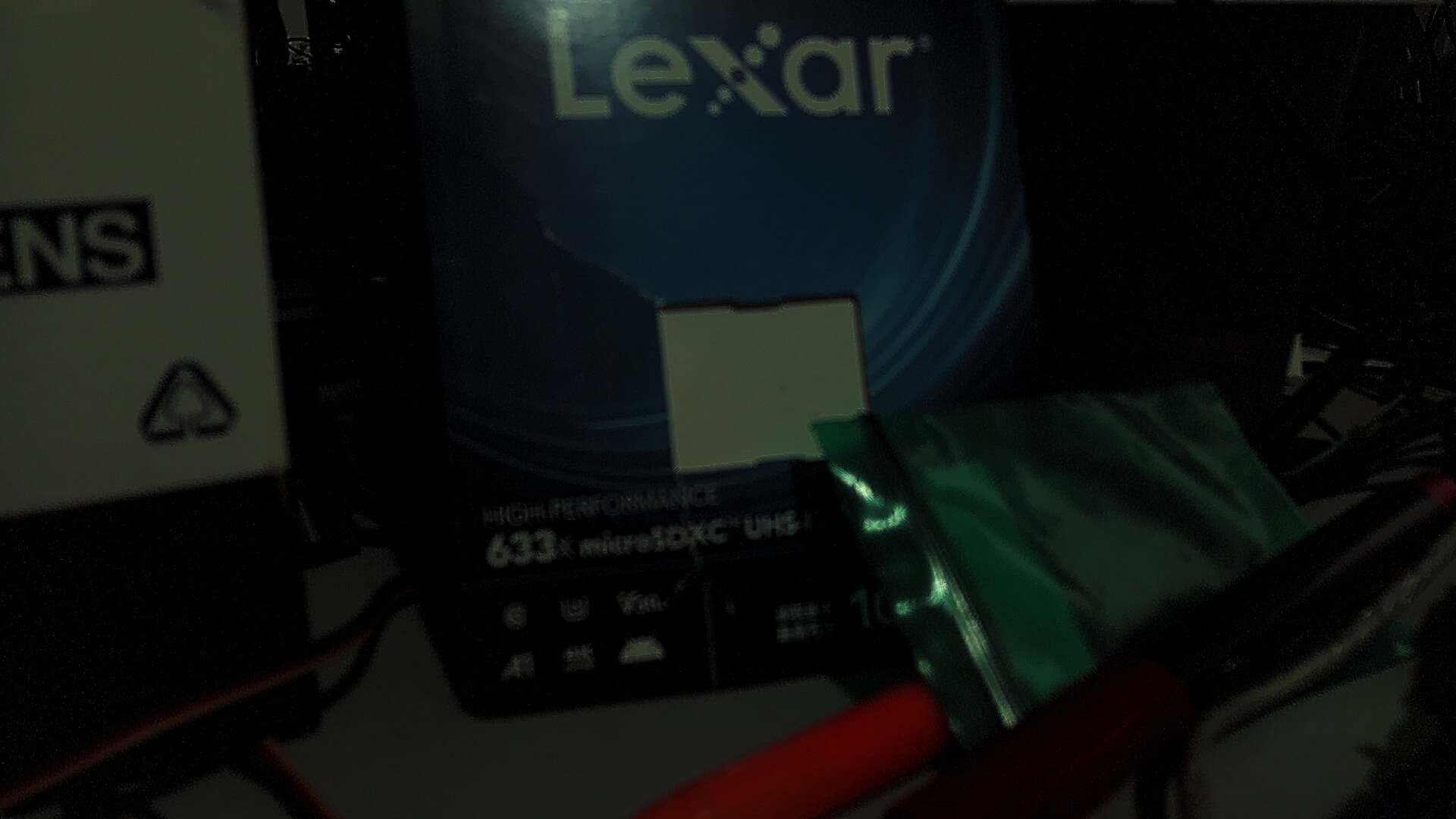
Update:
with trixie_cli_t4 , this issue is fixed.