Hi everyone. I’m struggling to get a decent boot image up and running on my Cubue A7Z.
I’m using a usb outlet with 2a output as power, mini hdmi->hdmi, and a usbc->a keyboard/mouse dongle.
All of the official images I’ve tried were the Standard image, not the UFS ones.
I’ve gotten only the radxa-a733_bullseye_kde_r1(and r2).output_512.img to boot, written with Balena Etcher.
I’ve tried all fo the official cli images(r1/r2/r3/t1/t2/t3) written with balena and none start up and the a7z led stays green, unlike the booting images which flash green when starting up successfully.
I’ve also tried the official Android image(a733_android13_radxa_a7z_20250917_uart0) written with PhoenixCard and that doesn’t boot either.
@ovin08 : As for the Debian images (I’ve tried the KDE not the CLI) I can advise you to try this: Don’t use the Balena Etcher, but use the Raspberry PI Imager instead. I had the exact same issue, whatever image I tried, it failed to boot. But when I flashed the “Radxa Cubie A7Z Debian 11 KDE R2” image using the Raspberry Pi Imager, it worked!
When you open it, you start in the “Select your Raspberry Pi Device” Screen, if you scroll to the bottom you can select “No Filtering”
The next menu is “Choose your OS” if you scroll down there as well you can select “Use Custom”, click it and select the radxa .img file
in storage select your microSD and then flash it.
When finished, transfer it to the Cubie and it should boot!
As for the Android Image using PhoenixCard: If anyone can help? I cannot get this to work, whatever I try.
The PhoenixCard flash appears successful each time, but when I transfer it to the Cubie it doesn’t work. Same solid green led mentioned by @ovin08 …
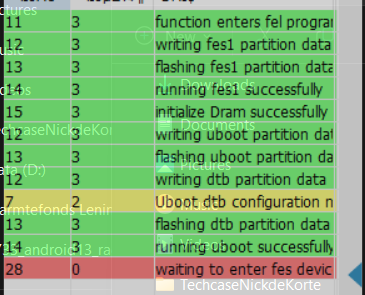
Finally I went for the PhoenixSuit Option and successfully installed the required driver.
When I press the UBoot Button and attach the device, Phoenix Suit recognizes it and asks to start the imaging process.
When I press yes it starts, but the last “success” message is always “running uboot successfully” but after that it times out on the error “waiting to enter fes device…[something]” and the PhoenixSuit goes back to showing “No device attached”
I’ve tried all I could think of in terms of pressing/releasing the Uboot button, but it doesn’t matter if I release it after the connection to my laptop, or after pressing “ yes” on starting the process, or after seeing “uboot succesful” in the log or even holding it until the error appears…. it just never works.
I should have mentioned I had much more success with RPI imager. It would have been nice if this was mentioned in the docs instead of Balena or PhoenixCard.
I guess we’re just stuck with the current distros since this is a pretty new do-dad.
I did find this armbian distro that worked for me as well: Radxa Cubie A7A/A7Z - Allwinner a733 - Allwinner sunxi - Armbian Community Forums
So far this is the only other image I found out there
Is there anyone who managed to get Android running on the Cubie A7Z and can share how he/she did this? I bought it because I have a family planner app and a touch-screen….
But the app requires dragging/dropping and I can’t get it to work properly on the debian distro as it confuses the mouse-key touches with the app touches (so I can’t drag tasks for example), but it’s tailored to android…
I am having the same issue, i tried rpi-imager too but no luck so far, this is my first sbc and i only booted it once, and it stuck during the update because of low memory, after that it doesnt boot at all, i tried several images from github but nothing is booting.