Idle power on the Orion O6: status, progress, how configure

Hi,

For the Orion O6 without considering any M.2/PCI/USB peripherals:

What is the idle power now?

Most reviews online say it’s circa 15W.

Have there been firmware, kernel, distribution or configuration file advancements that lowered the idle power?

Are there kernel etc. settings I can set so idle power becomes lower, how far can be expected?

Thanks

@RadxaNaoki Do you have any idea if idle power can be lowered on Linux or if lower idle power will be realistic in future firmware and or Linux kernel etc. versions?

As a data point, my completely non-radxa/non-cix Fedora 42 install, with firmware 0.3.0-1, is bouncing between 12W and 14W idle.

The radxa-customized image has some additional mailbox interrupts happening all the time. I was hoping this OS without any of that would idle lower, but it appears not.

1 Like

@washley Could one add some configuration in Linux to cause lower idle power consumption.

Say you look at when network traffic and CPU load from processes is super-low, could you for instance down-clock the CPU and pause most CPU cores, or other measures?

What components take those 12-14W in the first place e.g. mostly the SoC?

I don’t plan on carrying out experiments on how to lower this, as it isn’t a big factor for me.

One thing that stands out to me is that PCIe either doesn’t support, or is just not currently configured to support, ASPM. PCIe pretty much consumes full power all the time, even when nothing is being transferred. Having the PCIe links go into power saving mode would probably help here.

1 Like

@washley If you run some command to power off the PCI bus altogether, does your watt meter show significant power consumption drop?

Also is there some command to power off some CPU cores.

E.g. echo "0" > /sys/bus/pci/slots/SLOT_NUMBER/power where SLOT_NUMBER is 0 I guess.

And do echo 0 | sudo tee /sys/devices/system/cpu/cpu2/online where 2 is the CPU core number, and do it up to the highest core number e.g. for i in {2..12}; do echo 0 | sudo tee /sys/devices/system/cpu/cpu$i/online; done.

Can anyone tell me what the idle power consumption status is in the BSP kernel? I’m considering jumping on the CIX paltform.

1 Like

@avaf Did you find the answer eventually

My board is on customs for clearance, but unfortunately is not an Orion, so i won’t be able to confirm what some people say on the internet. It’s around 15W. It’s still high.

@jack @RadxaYuntian Could you ask the tech team if they know any trick to lower the idle consumption on the O6 in Linux? For example what happens if you power off CPU cores.

@hipboi Can you please comment on that? It’s really pathetic not getting any information on this for almost a year.

Maybe all of this stuff is discussed on crappy Discord but for obvious reasons people involved in open source would never join that closed place.

1 Like

Right, O6N got some improvement from 15W to 11W (according to the O6N post), but where exactly? Software improvement or hardware removal/downgrade (ethernet perhaps)?

In my experiments with CD8160 I found similar power consumption, 14W~15W, better than N150 + Halo8 by the way. Maybe the NPU is power hungry, who knows?

What i know is ~18% CPU doing something else.

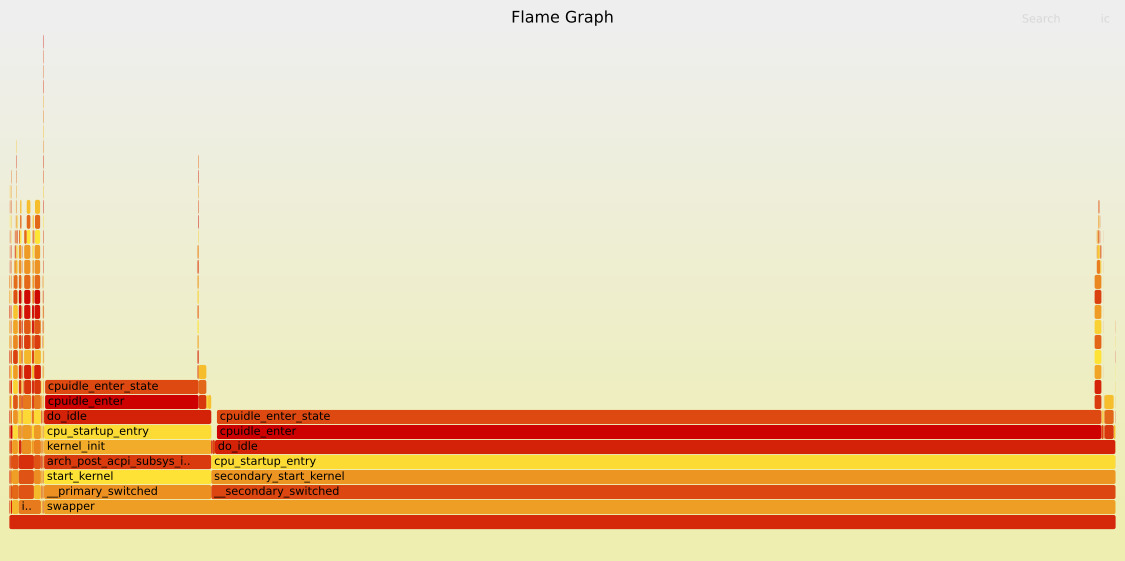
I tried do find something useful, using Flame Graph, but i can’t get any meaning from the graph:

I think a lot of the confusion around the idle power numbers comes from a mismatch between the hardware design and how power state is currently understood.

The CIX P1 isn’t just a classic “CPU + RAM + IO” SoC anymore. It’s a highly integrated set of memory masters (CPU, GPU, NPU, PCIe, Ethernet, DMA, etc.) that all share the same memory and interconnect fabric.
In that setup, the SMMU, the NoC and the DDR controller are really at the center, and they largely determine whether the system can go into deep idle or not.

From Linux’s point of view, things can look completely idle, and that’s a valid view. CPU flame graphs clearly show cores spending most of their time in cpuidle.
But that only tells us what the CPUs are doing. It doesn’t say much about what’s happening in the interconnect, the SMMU, or the DDR side.

With this kind of architecture, idle isn’t a per-device thing anymore, it’s global.
If even one piece of the system is still considered active, a DMA path that isn’t fully shut down, an SMMU context that’s still there, an interrupt source, or a NoC that can’t be sure there’s no traffic, the memory subsystem stays up.
When that happens, DDR can’t really go into deep self-refresh, and power doesn’t drop much.

In the end, the PMU is the one that makes the call. No matter what Linux reports, it’s the PMU, following firmware policies, that decides whether clocks and power rails can actually be turned off.
If it’s not confident that everything is quiet, it will stay conservative and keep things powered.

That’s also why comparing this directly with older platforms is tricky. Older SoCs generally fit Linux’s power model better: simpler interconnects, fewer global dependencies, and clearer idle paths.
With the P1, the hardware has clearly moved toward a more system-level power model, and the software stack as a whole firmware, PMU setup, kernel abstractions is still adjusting to that.

So this doesn’t really look like a single bug or a broken SoC.
It looks more like a very integrated design exposing the limits of how power management is currently handled across hardware, firmware and the OS.
1 Like

Thanks for the explanation.

Alright, I never meant or implied that, but assumed there is an improvement and that should be shared and/or explained if they (CIX) follow the Open-source policy.

At current Load average: 4.09 4.12 4.09 i don’t see this on any other platform i currently know of.

I hope this is not a Windows requirement for compatibility. :slight_smile: Just joking…

Sure, it looks like a ton of bugs and/or a broken concept. Where did you get your insights from? You know other manufacturers are doing way more complex SoCs than this one and everything ‘idle’ above 10W can be considered insane since almost a decade?

The last time I checked the Intel crap I was using as my daily driver half a century ago it idled at 6W (dimmed LCD display included). In comparison the MacBook Air M1 I tested back then consumed exactly nothing.

With Cix P1 the consumption delta between ‘CPU fully loaded’ and ‘idle’ is worse than 100:50. There’s something seriously wrong with the settings right now or since almost a year when first Orion O6 boards were shipped out. And the worst part of this is: we’re enjoying only silence about the root cause (or maybe everything relevant happens over at closed Discord channels).

1 Like

Linux ‘average load’ is different to any other kernel (OS) known: Linux Load Averages: Solving the Mystery

Check which processes are in uninterruptible state, this is a common issue with ‘boards’ in ‘bring-up’ stage, at least I’ve seen this with plenty of BSP kernels here and there (though usually loadavg not dropping below 2 or 1 and not 4 as you report – haven’t bootet ‘my’ O6 for months since interested in ‘energy efficient computing’ and anything Cix P1 currently is a joke)

Not much luck searching for uninterruptible sleep state:

PPID PID USER STAT %CPU COMMAND WCHAN
2 89 root D 0.0 bbox_main rdr_main_thread_body
2 90 root D 0.0 bbox_cleartext rdr_cleartext_body
2 126 root D 0.0 chre_kthread cix_nanohub_direct_push_work
2 127 root D 0.0 scp_power_reset cix_nanohub_power_up_loop
2 11 root I 0.0 rcu_tasks_kthre rcu_tasks_one_gp
2 12 root I 0.0 rcu_tasks_trace rcu_tasks_one_gp
2 14 root I 0.0 rcu_preempt rcu_gp_fqs_loop

Perhaps it would be better to turn off some subsystems and just monitor energy consumption, but I’m not ready for that task yet.

At least way back when the O6 first came out, the radxa-provided linux image’s had some bug that caused the load average to never go below 4. IIRC it wasn’t actually 400% CPU usage, just a reporting issue.

Yes, but I’ve noticed that all the new images have stripped down of features.

My findings show CPU is indeed processing/doing something 18%~20% , not that 400% , i will try to dig more into this, i doubt i can do something.

Huh? You show 4 processes in D state which results in ‘average load’ not being able to drop below 4.0

Again. Average load on Linux is not CPU utilization. Check the link above Idle power on the Orion O6: status, progress, how configure - #17 by tkaiser