Howdy! I’m watching a7z resellers since a week or so, I’d like to buy a 2 or 4 GB variant, however it’s permanently out of stock. When a restock can be expected?
Buy 1G version then upgrade to 4G or 8G by yourself is also another solution
This is what I did … now it’s 4G RAM , runing well and works good
2 Likes
If upgrade to 4G by replacing RAM chip via DIY, is it required to set any boot-up configuration to start up? Is there any compatibility issue for replaced RAM chip? Thanks a lot.
not requred … just replace the RAM that’s all , if your RAM chip is LPDDR4X then move the resister to next slot which neare the RAM
What RAM chip is compatible? I’m looking for 8GB or 4GB. Could you send the listing you used? Cheers!
1 Like
Are there any compatibility issues with certain ram chips or will any lpddr4/4x 200fbga 2133mhz 4-16 GB chip work? I also have purchased a 1gb A7Z since it is almost impossible to find any legitimate 8-16gb models. I searched around in the bom, but I just wanted to verify.
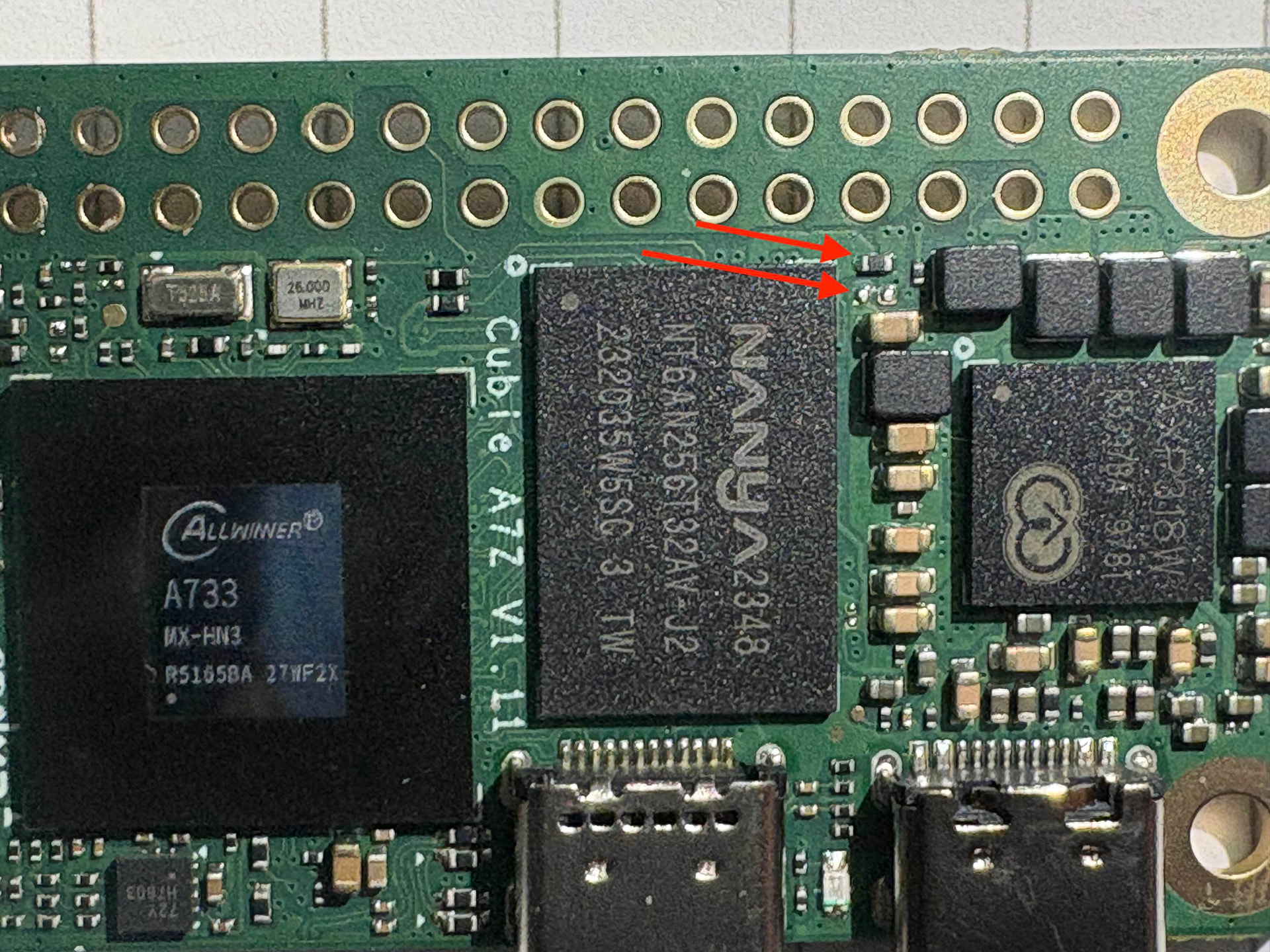
yes, move it from up to down , then it will support LPDDR4X
Mine works good
1 Like
I got the LPDDR 4X from my phone, I even didn’t verify before I install it … but good luck to me , it works fine
1 Like
yes, move it from up to down , then it will support LPDDR4X
Mine works good
Thanks! That was super helpful.
hello,@nqhdanny
I followed your instructions and replaced the memory with the Micron D9XKK (MT53E1536M32D4DT-046 AAT:A) 6GB LPDDR4X chip. I also moved the resistor to the adjacent second position as advised.
However, after testing with several different systems, the device still fails to boot. Do you have any idea where the problem is? Does 6GB not work?
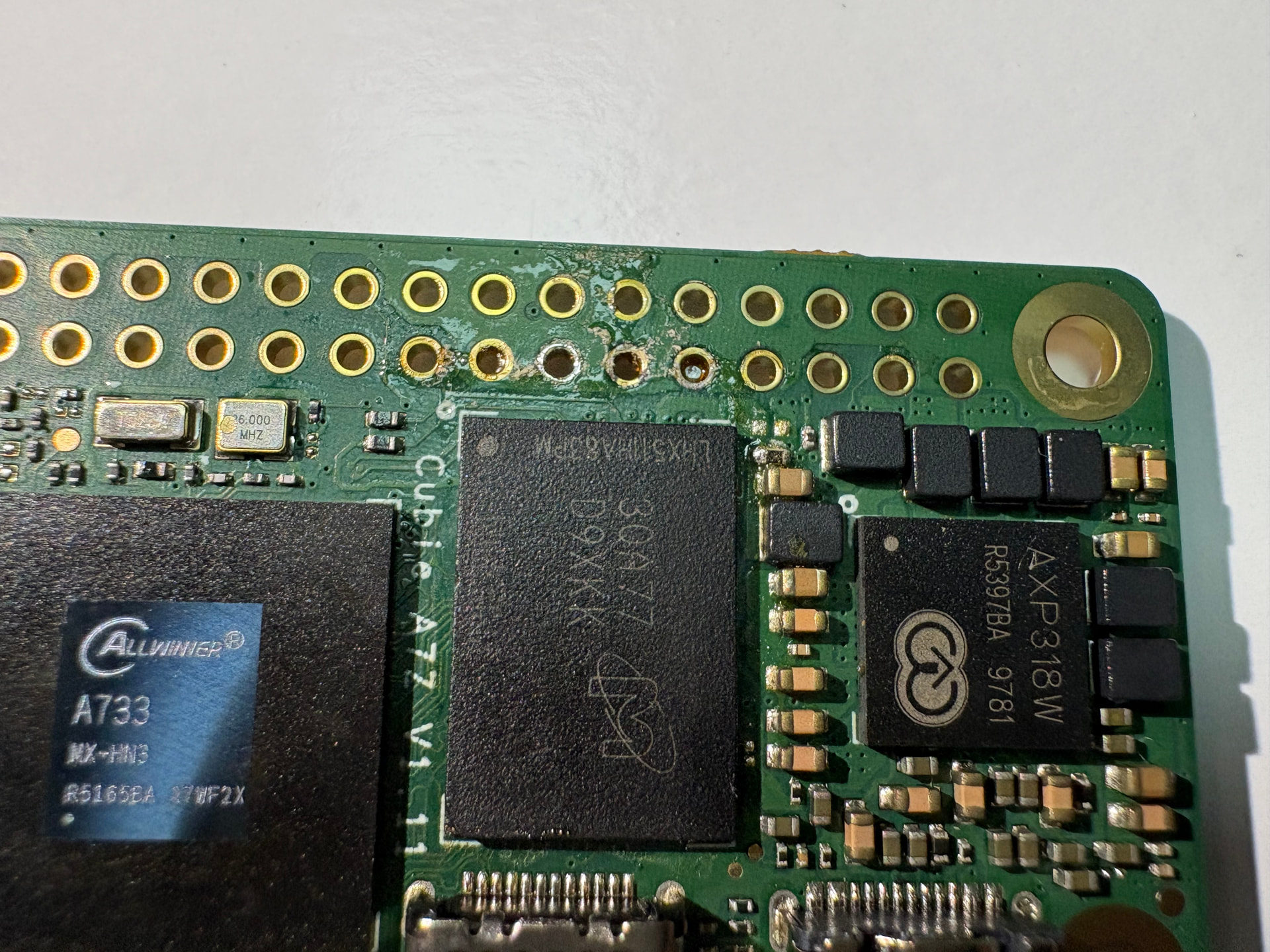
Booting with the official r6 version system, I received the following information via UART:
......


[230]HELLO! BOOT0 is starting!
[233]BOOT0 commit : {4721ad08}
[236]board gpio withstand voltage auto mode
[251]dram_para_total:0xf
[254]vaild para:6  select dram para10
[mmc]: mmc driver ver 2025-10-16 17:10
[mmc]: Wrong media type 0x0
[mmc]: ***Try SD card 0***
[mmc]: HSSDR52/SDR25 4 bit
[mmc]: 50000000 Hz
[mmc]: 15279 MB
[mmc]: ***SD/MMC 0 init OK!!!***
[291]boot param - magic error
[294]DRAM BOOT DRIVE INFO: V0.601
[298]DRAM_VCC set to 1100 mv
[3541]Training result is = 7
[3544]DRAM Pstate 0 training, frequency is 1800 Mhz
[3552][AUTO DEBUG]16 bit,2 ranks training success!
[6792]Training result is = 7
[6795]DRAM Pstate 0 training, frequency is 1800 Mhz
[10039]Training result is = 7
[10042]DRAM Pstate 0 training, frequency is 1800 Mhz
[13283]Training result is = 7
[13286]DRAM Pstate 0 training, frequency is 1800 Mhz
[13294]DRAM CLK =1800 MHZ
[13297]DRAM Type =8 (8:LPDDR4,9:LPDDR5)
[13402]Training result is = 7
[13405]DRAM Pstate 1 training, frequency is 1200 Mhz
[13519]Training result is = 7
[13521]DRAM Pstate 2 training, frequency is 800 Mhz
[13732]Training result is = 7
[13735]DRAM Pstate 3 training, frequency is 400 Mhz
[16950]Training result is = 7
[16953]DRAM Pstate 0 training, frequency is 1800 Mhz
[16961]Actual DRAM SIZE =8192 M
[16964]DRAM SIZE =8192 MBytes, para1 = 311a, para2 = 20001001, dram_tpr13 = 6067
[16979]DRAM simple test OK.
[16985]error:bad magic.
[17049]error: dtb not found for scp
[17053]mmc not para
[17055]Jump to ATF: monitor_base = 0x48000000, uboot_base = 0x4a000000, optee_base = 0x0
NOTICE:  BL31: OP-TEE 32bit detected
NOTICE:  BL31: U-BOOT 32bit detected
NOTICE:  BL31: dram size is 8589934592 bytes
NOTICE:  BL31: v2.5(debug):48e54578a
NOTICE:  BL31: Built : 14:13:06, Jul  2 2025
NOTICE:  BL31: No DTB found.
ERROR:   Error initializing runtime service opteed_fast


U-Boot 2018.07-17-boot-aw2501-g4c7078cfdf7-dirty (Apr 29 2026 - 10:03:59 +0000) Allwinner Technology

[17.111]CPU:   Allwinner Family
[17.114]Model: Radxa Cubie A7A
I2C:   ready
[17.177]DRAM:  8 GiB
[17.186]Relocation Offset is: 75d89000
[17.240]secure enable bit: 0
[17.243]PMU: AXP8191
[17.245]PMU: AXP8191 VER_A
FDT ERROR:fdt_get_regulator_name:get property handle twi-supply error:FDT_ERR_INTERNAL
[17.257]bmu_axp515_probe pmic_bus_read fail
[17.261][AXP8191] onoff status: 0x50 = 0x1, 0x51 = 0x0
[17.266][AXP8191] charge status: 0x4 = 0x0
[17.270]CPU=1014 MHz,PLL6=1200 Mhz,AHB=200 Mhz, APB1=24Mhz  MBus=600Mhz
[17.276]gic: sec monitor mode
SPI ALL:   ready
[17.320]flash init start
[17.322]workmode = 0,storage type = 1
[17.326][mmc]: mmc driver ver uboot2018:2024-10-18 9:01:00 -- uboot2018:2025-03-28 10:03:00
[17.334][mmc]: get sdc_type fail and use default host:tm1.
[17.342][mmc]: can't find node "mmc0",will add new node
[17.347][mmc]: fdt err returned <no error>
[17.350][mmc]: Using default timing para
[17.354][mmc]: SUNXI SDMMC Controller Version:0x50530
[17.372][mmc]: card_caps:0x3000000a
[17.375][mmc]: host_caps:0x3000003f
[17.379]sunxi flash init ok
get value error
[17.393]Loading Environment from SUNXI_FLASH... OK
No ethernet found.
[17.430]NOT support bridge yet
[17.433]Warn: no find panel or bridge
[17.534]drm hdmi get mode: 1920x1080@60Hz
hdmi0@5520000: use force output detailed mode clock 148500 kHz, flags[5]
    H: 1920 2008 2052 2200
    V: 1080 1084 1089 1125
bus_format: 0
partno erro : can't find partition bootloader
[17.566]bootloader is not found!
partno erro : can't find partition boot-resource
[17.575]boot-resource is not found!
[17.578]Can not load logo.bmp file!
[17.582]load logo fail
[17.591]the secure storage item0 copy0 magic is bad
[17.603]the secure storage item0 copy1 magic is bad
[17.607]usb burn from boot
delay time 0
[17.614]usb prepare ok
[17.823]usb sof ok
[17.824]usb probe ok
[17.826]usb setup ok
set address 0x8
set address 0x8 ok
[18.232]do_burn_from_boot usb : have no handshake
cann't get the boot_base from the env
[18.271]update part info
[18.276]battery temp is -1
[18.283]update bootcmd
[18.291](not enough data: expected >= 8 cells, got 4 cells)
Link up timeout
Speed change timeout
PCIe speed of Gen1
Override default fdtfile to allwinner/sun60i-a733-cubie-a7z.dtb
[20.735]libfdt fdt_check_header(): FDT_ERR_BADMAGIC
[20.741]libfdt fdt_path_offset() returned FDT_ERR_BADMAGIC
[20.747][mmc]: get sunxi-mmc0 string failed
[20.751]The storage not support sample function
[20.757]## error: update_fdt_dram_para_from_bootpara : FDT_ERR_NOTFOUND
[20.764]chip id : 0x00005100 0x00004900 0x0000c418 0x00002294
[20.770]mac addr => 08:51:49:dc:b6:2c
[20.773]chip id : 0x00005100 0x00004900 0x0000c418 0x00002294
[20.778]mac addr => 08:51:49:dc:b6:2d
[20.782]/chosen/rng-seed node not exit
[20.786]no battery, disabled battery functons
[20.790]Could not find nodeoffset for bat_supply
[20.794]update dts
curr_device:0
Device: SUNXI SD/MMC
Manufacturer ID: 1b
OEM: 534d
Name: 00000
Bus Speed: 50000000
Mode : SD High Speed (50MHz)
Rd Block Len: 512
SD version 3.0
High Capacity: Yes
Capacity: 14.9 GiB
Bus Width: 4-bit
Erase Group Size: 512 Bytes
[ufs]info:Driver version 0.0.24 2024.12.30 16:00
[ufs]info:Cal words 0x60:val 0xae400000, 0x64:val 0x4f21885d
[ufs]err:uic c 16,uic a 0,1,0
[ufs]err:e 80000010,0,0,0,0
[ufs]err:int s 0,400
[ufs]err:Device not present
[ufs]err:wait device link startup failed
[ufs]info:peer link startup timeout
[ufs]info:Cal words 0x60:val 0xae400000, 0x64:val 0x4f21885d
[ufs]err:uic c 16,uic a 0,1,0
[ufs]err:e 80000010,0,0,0,0
[ufs]err:int s 0,400
[ufs]err:Device not present
[ufs]err:wait device link startup failed
[ufs]info:peer link startup timeout
[ufs]info:Cal words 0x60:val 0xae400000, 0x64:val 0x4f21885d
[ufs]err:uic c 16,uic a 0,1,0
[ufs]err:e 80000010,0,0,0,0
[ufs]err:int s 0,400
[ufs]err:Device not present
[ufs]err:wait device link startup failed
[ufs]info:peer link startup timeout
[ufs]info:Cal words 0x60:val 0xae400000, 0x64:val 0x4f21885d
[ufs]err:uic c 16,uic a 0,1,0
[ufs]err:e 80000010,0,0,0,0
[ufs]err:int s 0,400
[ufs]err:Device not present
[ufs]err:wait device link startup failed
[ufs]info:peer link startup timeout
[ufs]err:link startup failed -6
[ufs]err:ufshcd_probe() failed -6
fail to init ufs
sunxi_flash - sunxi_flash sub-system

Usage:
sunxi_flash sunxi_flash init storage_type
sunxi_flash read mem_addr part_name [size]
sunxi_flash read_mtd mem_addr part_name [size]
sunxi_flash write <mem_addr> <part_name> [size]
sunxi_flash write <mem_addr> <part_name> [offset] [size]
sunxi_flash write_mtd <mem_addr> <part_name>
sunxi_flash boot0 force_dram_update_size <new_val>
sunxi_flash boot0 force_dram_update_flag <new_val>

Hit any key to stop autoboot:  0
starting USB...
USB0:   start sunxi  USB-DRD...
config usb clk ok
sunxi USB-DRD init ok...
USB EHCI 1.00
scanning bus 0 for devices... 1 USB Device(s) found
USB1:   start sunxi  USB1-Host...
config usb clk ok
sunxi USB1-Host init ok...
USB EHCI 1.00
scanning bus 1 for devices... 1 USB Device(s) found
       scanning usb for storage devices... 0 Storage Device(s) found

Device 0: device type unknown
... is now current device
** Bad device usb 0 **
** Bad device usb 0 **
mmc0 is current device
Scanning mmc 0:2...
Scanning mmc 0:3...
Found /boot/extlinux/extlinux.conf
Retrieving file: /boot/extlinux/extlinux.conf
1373 bytes read in 39 ms (34.2 KiB/s)
U-Boot menu
1:  Debian GNU/Linux 11 (bullseye) 5.15.147-21-a733
2:  Debian GNU/Linux 11 (bullseye) 5.15.147-21-a733 (rescue target)
Enter choice: 1:    Debian GNU/Linux 11 (bullseye) 5.15.147-21-a733
Retrieving file: /boot/initrd.img-5.15.147-21-a733
32594122 bytes read in 1384 ms (22.5 MiB/s)
Retrieving file: /boot/vmlinuz-5.15.147-21-a733
23296512 bytes read in 1003 ms (22.2 MiB/s)
append: root=UUID=2a1371bc-7ff5-43a2-a3f9-7778b6d70186 console=ttyAS0,115200n8 earlyprintk=sunxi-uart,0x2500000 rootwait clk_ignore_unused mac_addr=08:51:49:dc:b6:2c mac1_addr=08:51:49:dc:b6:2d quiet splash loglevel=4 rw earlycon consoleblank=0 console=tty1 coherent_pool=2M irqchip.gicv3_pseudo_nmi=0 cgroup_enable=cpuset cgroup_memory=1 cgroup_enable=memory swapaccount=1 kasan=off
Retrieving file: /usr/lib/linux-image-5.15.147-21-a733/allwinner/sun60i-a733-cubie-a7z.dtb
193692 bytes read in 298 ms (633.8 KiB/s)
[30.049]libfdt fdt_path_offset() returned FDT_ERR_BADMAGIC
[30.058]The storage not support sample function
[30.144]mac addr => 08:51:49:dc:b6:2c
[30.148]mac addr => 08:51:49:dc:b6:2d
[30.153]no battery, disabled battery functons
[30.160]update dts
stop sunxi USB-DRD ok...
stop sunxi USB1-Host ok...
[30.187]Starting kernel ...

[30.189]total: 30189 ms

[30.192][mmc]: MMC Device 2 not found
[30.195][mmc]: mmc 2 not find, so not exit
NOTICE:  [SCP] :wait arisc ready....
NOTICE:  [SCP] :arisc version: [d463b9da43dc50320f21ba51c6c51afe2db20d83]
NOTICE:  [SCP] :arisc startup ready
NOTICE:  [SCP] :arisc startup notify message feedback
NOTICE:  [SCP] :sunxi-arisc driver is starting
NOTICE:  BL3-1: Next image address = 0x40200000
NOTICE:  BL3-1: Next image spsr = 0x3c5
[    0.000000][    T0] Booting Linux on physical CPU 0x0000000000 [0x412fd050]
[    0.000000][    T0] Linux version 5.15.147-21-a733 (vscode@719ff648175a) (aarch64-linux-gnu-gcc (Debian 10.2.1-6) 10.2.1 20210110, GNU ld (GNU Binutils for Debian) 2.35.2) #21 SMP PREEMPT Thu Apr 30 12:14:04 UTC 2026
[    0.000000][    T0] random: crng init done
[    0.000000][    T0] Machine model: sun60iw2
[    0.000000][    T0] printk: bootconsole [earlycon0] enabled
You said you used a 6GB chip but the U-Boot reports as
DRAM: 8 GiB
As such, kernel might use invalid address, and crashed.
You can try add mem=6GB kernel command (or even smaller value) to see if you are able to boot.
Please be aware that we cannot guarantee support on modified hardware.
Thanks for the official response! I am indeed using 6GB memory chips, and I’ve already shared the model number, but the system is incorrectly identifying it as 8GB. Could you please guide me on how to use the mem=6GB kernel command?
I’m fully aware that modifying this myself will void the warranty, but as a development board, it’s really meant for the community to research and experiment with together, right?
You can edit the /boot/extlinux/extlinux.conf to add the kernel command. If that works for your system, you can add it to /etc/kernel/cmdline so it will be applied when boot configuration is rebuilt.
I set mem=6GB as you suggested, but it still stops at the exact same spot during boot. The serial output confirms my settings were applied, but the system is still crashing.
I also tried setting it to 4GB, but the result is the same.
Also, the system still incorrectly identifies the memory as 8GB at the very beginning. Could you please advise on how to further troubleshoot or resolve this?
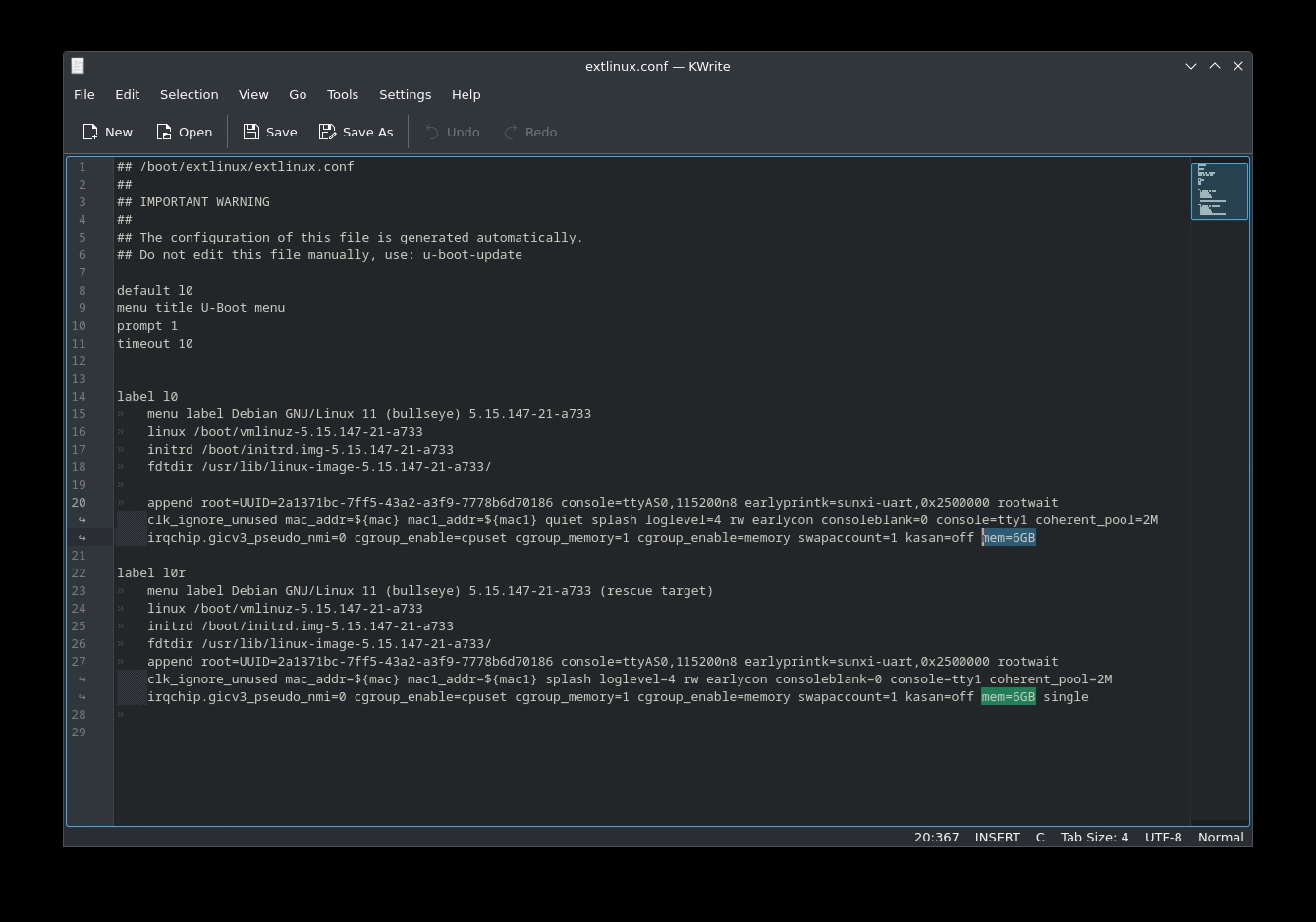
…
[237]HELLO! BOOT0 is starting!
[240]BOOT0 commit : {4721ad08}
[243]board gpio withstand voltage auto mode
[258]dram_para_total:0xf
[261]vaild para:6 select dram para10
[mmc]: mmc driver ver 2025-10-16 17:10
[mmc]: Wrong media type 0x0
[mmc]: Try SD card 0
[mmc]: HSSDR52/SDR25 4 bit
[mmc]: 50000000 Hz
[mmc]: 15279 MB
[mmc]: SD/MMC 0 init OK!!!
[299]DRAM BOOT DRIVE INFO: V0.601
[304]DRAM_VCC set to 1100 mv
[306]DRAM CLK =1800 MHZ
[309]DRAM Type =8 (8:LPDDR4,9:LPDDR5)
[414]Training result is = 7
[417]DRAM Pstate 1 training, frequency is 1200 Mhz
[530]Training result is = 7
[533]DRAM Pstate 2 training, frequency is 800 Mhz
[743]Training result is = 7
[745]DRAM Pstate 3 training, frequency is 400 Mhz
[3965]Training result is = 7
[3968]DRAM Pstate 0 training, frequency is 1800 Mhz
[3977]Actual DRAM SIZE =8192 M
[3980]DRAM SIZE =8192 MBytes, para1 = 311a, para2 = 20001001, dram_tpr13 = 6067
[3994]DRAM simple test OK.
[4000]error:bad magic.
[4065]error: dtb not found for scp
[4068]mmc not para
[4070]Jump to ATF: monitor_base = 0x48000000, uboot_base = 0x4a000000, optee_base = 0x0
NOTICE: BL31: OP-TEE 32bit detected
NOTICE: BL31: U-BOOT 32bit detected
NOTICE: BL31: dram size is 8589934592 bytes
NOTICE: BL31: v2.5(debug):48e54578a
NOTICE: BL31: Built : 14:13:06, Jul 2 2025
NOTICE: BL31: No DTB found.
ERROR: Error initializing runtime service opteed_fastU-Boot 2018.07-17-boot-aw2501-g4c7078cfdf7-dirty (Apr 29 2026 - 10:03:59 +0000) Allwinner Technology
[04.126]CPU: Allwinner Family
[04.129]Model: Radxa Cubie A7A
I2C: ready
[04.192]DRAM: 8 GiB
[04.201]Relocation Offset is: 75d89000
[04.255]secure enable bit: 0
[04.258]PMU: AXP8191
[04.260]PMU: AXP8191 VER_A
FDT ERROR:fdt_get_regulator_name:get property handle twi-supply error:FDT_ERR_INTERNAL
[04.272]bmu_axp515_probe pmic_bus_read fail
[04.276][AXP8191] onoff status: 0x50 = 0x1, 0x51 = 0x0
[04.281][AXP8191] charge status: 0x4 = 0x0
[04.285]CPU=1014 MHz,PLL6=1200 Mhz,AHB=200 Mhz, APB1=24Mhz MBus=600Mhz
[04.291]gic: sec monitor mode
SPI ALL: ready
[04.335]flash init start
[04.337]workmode = 0,storage type = 1
[04.341][mmc]: mmc driver ver uboot2018:2024-10-18 9:01:00 – uboot2018:2025-03-28 10:03:00
[04.349][mmc]: get sdc_type fail and use default host:tm1.
[04.357][mmc]: can’t find node “mmc0”,will add new node
[04.362][mmc]: fdt err returned
[04.365][mmc]: Using default timing para
[04.369][mmc]: SUNXI SDMMC Controller Version:0x50530
[04.387][mmc]: card_caps:0x3000000a
[04.390][mmc]: host_caps:0x3000003f
[04.394]sunxi flash init ok
get value error
[04.408]Loading Environment from SUNXI_FLASH… OK
No ethernet found.
[04.445]NOT support bridge yet
[04.448]Warn: no find panel or bridge
[04.549]drm hdmi get mode: 1920x1080@60Hz
hdmi0@5520000: use force output detailed mode clock 148500 kHz, flags[5]
H: 1920 2008 2052 2200
V: 1080 1084 1089 1125
bus_format: 0
partno erro : can’t find partition bootloader
[04.580]bootloader is not found!
partno erro : can’t find partition boot-resource
[04.590]boot-resource is not found!
[04.593]Can not load logo.bmp file!
[04.596]load logo fail
[04.606]the secure storage item0 copy0 magic is bad
[04.618]the secure storage item0 copy1 magic is bad
[04.622]usb burn from boot
delay time 0
[04.629]usb prepare ok
[04.932]overtime
[04.936]do_burn_from_boot usb : no usb exist
skip update boot_param
cann’t get the boot_base from the env
[04.948]update part info
[04.952]battery temp is -1
[04.960]update bootcmd
[04.968](not enough data: expected >= 8 cells, got 4 cells)
Link up timeout
Speed change timeout
PCIe speed of Gen1
Override default fdtfile to allwinner/sun60i-a733-cubie-a7z.dtb
[07.412]libfdt fdt_check_header(): FDT_ERR_BADMAGIC
[07.418]libfdt fdt_path_offset() returned FDT_ERR_BADMAGIC
[07.423][mmc]: get sunxi-mmc0 string failed
[07.428]The storage not support sample function
[07.434]## error: update_fdt_dram_para_from_bootpara : FDT_ERR_NOTFOUND
[07.441]chip id : 0x00005100 0x00004900 0x0000c418 0x00002294
[07.446]mac addr => 08:51:49:dc:b6:2c
[07.450]chip id : 0x00005100 0x00004900 0x0000c418 0x00002294
[07.455]mac addr => 08:51:49:dc:b6:2d
[07.459]/chosen/rng-seed node not exit
[07.462]no battery, disabled battery functons
[07.467]Could not find nodeoffset for bat_supply
[07.471]update dts
curr_device:0
Device: SUNXI SD/MMC
Manufacturer ID: 1b
OEM: 534d
Name: 00000
Bus Speed: 50000000
Mode : SD High Speed (50MHz)
Rd Block Len: 512
SD version 3.0
High Capacity: Yes
Capacity: 14.9 GiB
Bus Width: 4-bit
Erase Group Size: 512 Bytes
[ufs]info:Driver version 0.0.24 2024.12.30 16:00
[ufs]info:Cal words 0x60:val 0xae400000, 0x64:val 0x4f21885d
[ufs]err:uic c 16,uic a 0,1,0
[ufs]err:e 80000010,0,0,0,0
[ufs]err:int s 0,400
[ufs]err:Device not present
[ufs]err:wait device link startup failed
[ufs]info:peer link startup timeout
[ufs]info:Cal words 0x60:val 0xae400000, 0x64:val 0x4f21885d
[ufs]err:uic c 16,uic a 0,1,0
[ufs]err:e 80000010,0,0,0,0
[ufs]err:int s 0,400
[ufs]err:Device not present
[ufs]err:wait device link startup failed
[ufs]info:peer link startup timeout
[ufs]info:Cal words 0x60:val 0xae400000, 0x64:val 0x4f21885d
[ufs]err:uic c 16,uic a 0,1,0
[ufs]err:e 80000010,0,0,0,0
[ufs]err:int s 0,400
[ufs]err:Device not present
[ufs]err:wait device link startup failed
[ufs]info:peer link startup timeout
[ufs]info:Cal words 0x60:val 0xae400000, 0x64:val 0x4f21885d
[ufs]err:uic c 16,uic a 0,1,0
[ufs]err:e 80000010,0,0,0,0
[ufs]err:int s 0,400
[ufs]err:Device not present
[ufs]err:wait device link startup failed
[ufs]info:peer link startup timeout
[ufs]err:link startup failed -6
[ufs]err:ufshcd_probe() failed -6
fail to init ufs
sunxi_flash - sunxi_flash sub-systemUsage:
sunxi_flash sunxi_flash init storage_type
sunxi_flash read mem_addr part_name [size]
sunxi_flash read_mtd mem_addr part_name [size]
sunxi_flash write <mem_addr> <part_name> [size]
sunxi_flash write <mem_addr> <part_name> [offset] [size]
sunxi_flash write_mtd <mem_addr> <part_name>
sunxi_flash boot0 force_dram_update_size <new_val>
sunxi_flash boot0 force_dram_update_flag <new_val>Hit any key to stop autoboot: 0
starting USB…
USB0: start sunxi USB-DRD…
config usb clk ok
sunxi USB-DRD init ok…
USB EHCI 1.00
scanning bus 0 for devices… 1 USB Device(s) found
USB1: start sunxi USB1-Host…
config usb clk ok
sunxi USB1-Host init ok…
USB EHCI 1.00
scanning bus 1 for devices… 1 USB Device(s) found
scanning usb for storage devices… 0 Storage Device(s) foundDevice 0: device type unknown
… is now current device
** Bad device usb 0 **
** Bad device usb 0 **
mmc0 is current device
Scanning mmc 0:2…
Scanning mmc 0:3…
Found /boot/extlinux/extlinux.conf
Retrieving file: /boot/extlinux/extlinux.conf
1389 bytes read in 41 ms (32.2 KiB/s)
U-Boot menu
1: Debian GNU/Linux 11 (bullseye) 5.15.147-21-a733
2: Debian GNU/Linux 11 (bullseye) 5.15.147-21-a733 (rescue target)
Enter choice: 1: Debian GNU/Linux 11 (bullseye) 5.15.147-21-a733
Retrieving file: /boot/initrd.img-5.15.147-21-a733
32594122 bytes read in 1386 ms (22.4 MiB/s)
Retrieving file: /boot/vmlinuz-5.15.147-21-a733
23296512 bytes read in 1005 ms (22.1 MiB/s)
append: root=UUID=2a1371bc-7ff5-43a2-a3f9-7778b6d70186 console=ttyAS0,115200n8 earlyprintk=sunxi-uart,0x2500000 rootwait clk_ignore_unused mac_addr=08:51:49:dc:b6:2c mac1_addr=08:51:49:dc:b6:2d quiet splash loglevel=4 rw earlycon consoleblank=0 console=tty1 coherent_pool=2M irqchip.gicv3_pseudo_nmi=0 cgroup_enable=cpuset cgroup_memory=1 cgroup_enable=memory swapaccount=1 kasan=off mem=6GB
Retrieving file: /usr/lib/linux-image-5.15.147-21-a733/allwinner/sun60i-a733-cubie-a7z.dtb
193692 bytes read in 308 ms (613.3 KiB/s)
[16.738]libfdt fdt_path_offset() returned FDT_ERR_BADMAGIC
[16.747]The storage not support sample function
[16.833]mac addr => 08:51:49:dc:b6:2c
[16.837]mac addr => 08:51:49:dc:b6:2d
[16.842]no battery, disabled battery functons
[16.849]update dts
stop sunxi USB-DRD ok…
stop sunxi USB1-Host ok…
[16.876]Starting kernel …[16.878]total: 16878 ms
[16.881][mmc]: MMC Device 2 not found
[16.884][mmc]: mmc 2 not find, so not exit
NOTICE: [SCP] :wait arisc ready…
NOTICE: [SCP] :arisc version: [d463b9da43dc50320f21ba51c6c51afe2db20d83]
NOTICE: [SCP] :arisc startup ready
NOTICE: [SCP] :arisc startup notify message feedback
NOTICE: [SCP] :sunxi-arisc driver is starting
NOTICE: BL3-1: Next image address = 0x40200000
NOTICE: BL3-1: Next image spsr = 0x3c5
[ 0.000000][ T0] Booting Linux on physical CPU 0x0000000000 [0x412fd050]
[ 0.000000][ T0] Linux version 5.15.147-21-a733 (vscode@719ff648175a) (aarch64-linux-gnu-gcc (Debian 10.2.1-6) 10.2.1 20210110, GNU ld (GNU Binutils for Debian) 2.35.2) #21 SMP PREEMPT Thu Apr 30 12:14:04 UTC 2026
[ 0.000000][ T0] random: crng init done
[ 0.000000][ T0] Machine model: sun60iw2
[ 0.000000][ T0] printk: bootconsole [earlycon0] enabled
This is what we do when we need to update memory support: Add SID command, MAC fallback, EHCI fix, pinctrl fix and USB support by vamrs-feng · Pull Request #24 · radxa-pkg/u-boot-dlan17 · GitHub
Yeah we have no source or control on this. Those binaries are coming from Allwinner directly. If your memory is not supported by existing code, then there is not much we can do.
OK, thanks! I’ll look into it myself.